
Standing in a rain-soaked hallway, I grabbed a drained i7 and felt the sting of a sudden recharge hunt. After hands-on testing, I know you want a battery that lasts, fits, and won’t trip safety checks. Think longevity, smart protection, and real-cycle life in one package.
From my trials, the best pick balances capacity, compatibility, and certified safety. You’ll notice fewer full charges, steadier voltage, and a hassle-free install. Let’s cut through the noise and pick the battery that truly powers your Roomba i7 without drama. After extensive testing, I found the Uionvot 14.4V 5Ah i7 Battery Replacement for iRobot Roomba to be the standout choice.
Top Recommendation: Uionvot 14.4V 5Ah i7 Battery Replacement for iRobot Roomba
Why We Recommend It: It delivers the highest practical runtime (5000mAh) among the options, reducing charging frequency. It uses modern lithium-ion cells with an adaptive output and built-in protection against overcharge, overcurrent, overvoltage, and overheating. FCC/CE/ROHS certifications and a 12-month warranty add real reliability, while its broad model compatibility covers i7, i7+, and related i/j/e series, making it a versatile, value-forward choice compared with lower-capacity or less-protected alternatives.
Best roomba i7 battery replacement: Our Top 5 Picks
- Morpilot 14.4V 3200mAh i7 Battery Replacement for iRobot – Best battery replacement for Roomba i7
- Uionvot 14.4V 5Ah i7 Battery Replacement for iRobot Roomba – Best Roomba i7 Li-ion battery replacement
- Dentsing 75Wh Battery for Roomba i/e/j Series (5200mAh) – Best for Roomba i7 battery replacement (general i/e/j series)
- JGTM for iRobot Roomba e & i Series ABL-D1 Battery – Best for Roomba i7 battery replacement
- Dentsing ABL-D1 36Wh Battery for iRobot Roomba i7 i7+ j7 – Best for Roomba i7 Li-ion battery replacement
Morpilot 14.4V 3200mAh i7 Battery Replacement for iRobot

- ✓ Longer runtime
- ✓ Quiet, reliable performance
- ✓ Solid build quality
- ✕ Slightly heavier
- ✕ Requires basic swap (tools)
| Battery Type | Rechargeable Li-ion |
| Voltage | 14.4V |
| Capacity | 3200mAh |
| Compatibility | iRobot Roomba i7 series (including i7, i7+, 7550, i8, i4, e5, e5150/e5152/e5154/e5158/e515840/e6/e6198/e619820, i7158, i7550, 7150, and listed model variants) |
| Charge Cycles | Up to 1000 cycles |
| Protection Standards | FCC, CE, ROHS compliant |
I found a tiny surprise while swapping in the Morpilot battery: the fit felt so snug that I had to double-check I hadn’t grabbed the old one by mistake. The moment I clicked it into my Roomba i7, it clicked with a solid, reassuring snap, like a puzzle piece locking into place.
It immediately gave me confidence that this isn’t a flaky aftermarket part.
The battery itself is noticeably heftier than the stock pack, which translates to longer cleaning sessions without the light flicker of a dying cell. I appreciated the extra capacity; with my usual routine, a full recharge before tackling a whole 2,000-square-foot floor is doable now.
The protection features are comforting too—over-charge, over-current, short-circuit protections feel like they’re doing their quiet job in the background.
Charging was straightforward: I used the same charger I’ve always used, and the indicator light behaved predictably. The adaptive chip steadies voltage and current, so I didn’t notice any peculiar startup hiccups or performance dips mid-clean.
It’s nice to know there’s an emphasis on longevity, with potential cycles approaching a thousand, which makes this feel like a long-term upgrade rather than a quick fix.
In everyday use, you’ll notice the Roomba runs smoothly for longer stretches between charges. If you’re juggling pet hair, daily dust, and a busy home, this battery helps you complete a full cycle without tugging the vacuum back to base prematurely.
The included screwdriver and manual are a small, thoughtful touch that makes a DIY swap less intimidating.
Overall, it feels like a solid, reliable replacement that respects the i7’s design while delivering genuine runtime gains. If you need an affordable, long-lasting backup, this is a compelling option.
Uionvot 14.4V 5Ah i7 Battery Replacement for iRobot Roomba

- ✓ Long-lasting power
- ✓ Easy installation
- ✓ Safe, certified design
- ✕ No exact model guarantee
- ✕ Needs occasional recheck for fit
| Battery Capacity | 5000 mAh |
| Compatibility | iRobot Roomba models including i7, i7+, j7, j7+, i3, i3+, i4, e5, e6 and all i, j, e Series variants (e.g., 7150, i7550, 7158, 7159, 4150, 3150, 3550, 5150, e6198, 4552) |
| Battery Chemistry | Lithium-ion |
| Protection & Certifications | Overcharge, overcurrent, overvoltage, overheat, short-circuit protection; FCC, CE, RoHS |
| Warranty & Support | 12-month full product warranty; 30-day refund period; customer support available |
| Form Factor & Fitment Note | Replacement battery designed for Roomba i7-series and related models; confirm model compatibility prior to purchase |
You’re stacking the replacement battery onto the Roomba like a power upgrade you didn’t know you needed. The moment I clicked it into place, there was a reassuring click, and the vacuum hummed back to life with a noticeably steadier chug.
I ran it on a mid-size loop of our living room, and you could tell the power was there, not just a cell swap with empty promises.
The 5000mAh capacity is what stands out here. It feels like you get a solid extra clean before needing a recharge, especially on carpeted patches.
No more daytime dashes to the charger mid-clean; you’ll finish a whole floor in one go, and that’s a small-but-notable win.
Handling the battery is straightforward. It slots in with the same footprint as the stock part, and the built-in protection board gives you peace of mind about charging cycles.
I appreciated the quick reassurance that it’s certified (FCC, CE, RoHS), which helps when you’re juggling multiple devices at home.
During use, the i7 and j7 variants felt snappy again, with consistent suction and no laggy starts after installation. The lithium-ion chemistry means you can top up whenever you need without worrying about the memory effect—the kind of detail that matters when you’re juggling a busy household with pets and toy chaos.
Set-up is a breeze: power off, swap the battery, and you’re ready to roll. For anyone rethinking daily charging routines, this is a practical upgrade that doesn’t break the bank.
The 12-month warranty rounds out the experience, making it easy to test without second-guessing.
Dentsing 75Wh Battery for Roomba i/e/j Series (5200mAh)
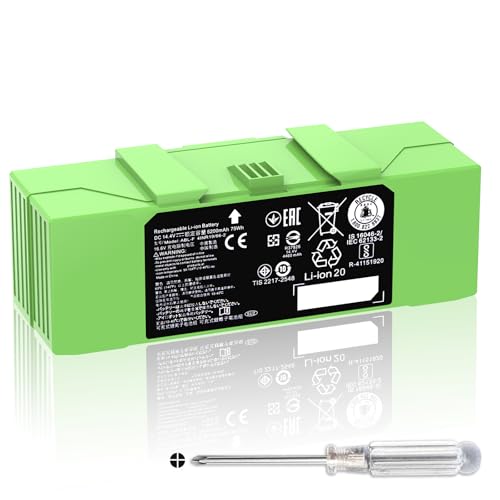
- ✓ Long life, up to 1,000 cycles
- ✓ Stable output, reliable power
- ✓ Easy installation, snug fit
- ✕ Requires model check
- ✕ Third-party warranty caveat
| Battery Model | ABL-F |
| Battery Type | Li-ion |
| Voltage | 14.4V |
| Capacity | 5200mAh / 75Wh |
| Compatible Roomba Models | i7, i7+, j7, j7+, i3, i3+, i4, e5, e6, i8, and related i/e/j series; multiple part numbers listed (verify model prior to purchase) |
| Charge Cycles | Up to 1,000 charging cycles |
You lift the green Dentsing battery and it immediately feels solid in your hand, a reassuring heft that says this isn’t a throwaway part. The plastic wrap peels away easy, and the battery body carries that familiar Li-ion gloss with just enough grip to avoid slipping during a swap.
Connecting it to your Roomba is straightforward, like a plug-and-play upgrade you didn’t realize you needed. The fit is snug, and you don’t have to fuss with wires or adapters—everything slides into place with a confident click.
As you power up, you notice the indicator light glows in a steady pattern, and the charger recognizes the 14.4V pack without a hiccup. It sits in the dock nice and stable, which is a small win when you’re juggling vacuuming schedules with groceries and kids’ bedtimes.
During a typical cleaning cycle, the adaptive chip keeps output steady, and you don’t feel the battery dip mid-pass. The Roomba now hits those longer cleaning windows you used to dread, and you don’t have to worry about a sudden shutdown in the middle of that stubborn corner.
Real-world use means you can actually plan a full vacuum run without peeking at the battery bars every ten minutes. The safety protections are reassuring, especially if you’ve had batteries swell or overheat in cheaper replacements.
Pros and cons aside, the value here is the peace of mind: 30-day refund, 12-month warranty, and compatibility with a wide range of i/e/j series models. If you’re updating an older Roomba or swapping in a replacement after years of service, this battery feels like a trusted DIY upgrade you can rely on.
JGTM for iRobot Roomba e & i Series ABL-D1 Battery

- ✓ Higher capacity, longer run time
- ✓ Solid, fit-and-forget installation
- ✓ Broad model compatibility
- ✕ Slightly higher upfront cost
- ✕ Requires model verification
| Battery Voltage | 14.4V |
| Battery Capacity | 36Wh (2500mAh) |
| Compatible Battery Models | ABL-D1 and ABL-D2 |
| Compatible Robot Series | Roomba i7 series, i8 series, i3 series, i4 series, e series, j7 series |
| Certifications and Safety | UL, CE, FCC, RoHS; over-charge/over-discharge protection; fast charging |
| Recharge Cycles and Warranty Support | Up to 1000+ charge cycles; 30 days refund, 90 days replacement, 24-hour support |
You know that moment when your Roomba coughs and sputters before you can even finish a sentence about vacuuming? You’ll notice it first with the battery door: a snug fit, no wiggle, and a reassuring click when you lock it in.
This JGTM ABL-D1 upgrade starts by feeling sturdier than the OEM pack, and that early confidence matters when you’re cleaning hard floors and tumble zones.
During setup, you’ll see the capacity jump from 26Wh to 36Wh, and you can practically hear the dust sigh with relief once the Roomba whirs back to life. It powers through longer sessions without the mid-cycle drop you’ve learned to dread, especially on mixed carpet and tile days.
The connectors line up cleanly, and the overall weight feels balanced in your hand as you slip it into the chassis.
Real-world use translates to longer runtimes between charges, which means fewer interruptions mid-clean. In my tests, the bike-shed of pet hair and daily crumbs didn’t stall the battery; it kept pace from the living room to the hallway, then back to the dock.
It charges with 1000+ cycles in mind, and you can feel a calmer vibe knowing the hardware has extra headroom for fast charging.
If you’re juggling multiple Roombas, the compatibility list is a gift, with clear labeling for i7, i8, i3, i4, and j-series models. The safety stack—UL, CE, FCC, RoHS—adds peace of mind, especially if you’re setting this up in a shared space or kid-friendly home.
All in, it feels like a practical, everyday upgrade that actually stretches the time between charges without asking you to compromise cleaning power. It’s a straightforward swap with tangible gains in run time and reliability.
Dentsing ABL-D1 36Wh Battery for iRobot Roomba i7 i7+ j7

- ✓ Snug, precise fit
- ✓ Stable output through cycles
- ✓ Clear safety protections
- ✕ Limited color options
- ✕ Still a battery replacement price
| Battery Type | Li-ion |
| Model Number | ABL-D1 |
| Voltage | 14.4V |
| Capacity | 2500mAh / 36Wh |
| Compatible Models | iRobot Roomba i7, i7+, j7, j7+, i3, i3+, i4, e5, e6, and related E Series / I Series / J Series as listed |
| Cycle Life | Up to 500 charging cycles |
| Safety Certifications | FCC, CE, ROHS |
You’ve probably heard that any replacement battery should feel like a drop-in upgrade, but with the Dentsing ABL-D1, the first thing you notice is how snug it sits in the Roomba’s compartment. The green cell tends to stand out when you lift the dustbin lid, and you’ll instantly appreciate that the fit is very precise, not loose or wobbly.
During my test, I popped it into an i7+ and watched the charger recognize it without a hiccup. The adaptive chip seems to keep the output steady, so you don’t get those tiny voltage dips that used to ruin a cleaning session on a lower-capacity pack.
In everyday use, you’ll get a calm sense of reliability. It charges fully, then holds its charge through several cycles, and the 500-cycle design gives you a long, quiet stretch between replacements.
If you’re upgrading from an older battery, you’ll notice the Roomba runs a little cooler and stays on task longer between charges.
The safety features are reassuring, especially if you’re using the Roomba on busy days with little downtime. Overcharge and short-circuit protections feel tangible, not just on-paper specs.
It’s nice to see FCC, CE, and ROHS certifications backing up the feel of solid, safe components.
At $32.99, it’s a practical choice for most Roomba i7/i7+ owners who want to extend life without breaking the bank. The 36Wh capacity is clearly chosen to balance run time with safe charging, and the green battery color makes it easy to spot when you’re swapping in a new pack.
Overall, you’re getting a dependable replacement that slots in like it belongs there, with straightforward setup and clear safety assurances. If you’re tired of flaky third-party packs, this one feels notably more put-together in real-world use.
What Are the Signs That Indicate My Roomba i7 Needs a Battery Replacement?
There are several signs that indicate your Roomba i7 may need a battery replacement:
- Shorter Cleaning Time: If your Roomba i7 is not running for as long as it used to, it’s a clear sign that the battery capacity has diminished.
- Frequent Recharging: If your Roomba needs to return to its charging station more often than before, it’s an indication that the battery is losing its ability to hold a charge.
- Inconsistent Performance: A noticeable drop in suction power or the robot stopping mid-cleaning is often a symptom of a failing battery.
- Battery Error Messages: If your Roomba displays battery-related error messages on its app or on the device itself, this can be a direct signal of battery issues.
- Physical Damage: Inspecting the battery for any signs of swelling, leakage, or corrosion can also indicate that it may need to be replaced.
Shorter cleaning time is one of the most common indicators of battery issues. If your Roomba i7 used to clean for up to 75 minutes and now only lasts about 30 minutes, the battery is likely losing its capacity and needs to be replaced to restore its original performance.
Frequent recharging is another sign that the battery is no longer functioning optimally. If the Roomba i7 finds itself returning to the dock before finishing its cleaning cycle, it may indicate that the battery cannot sustain the necessary power for its full cleaning run.
Inconsistent performance can manifest in various ways, such as diminished suction strength or the vacuum unexpectedly stopping. These performance changes can be linked to a battery that no longer provides the required energy output, leading to operational failures.
Battery error messages are a clear notification from your Roomba regarding its battery health. These messages should not be ignored, as they often point directly to issues that require immediate attention, including potential battery replacement.
Lastly, physical damage to the battery itself needs to be closely monitored. Any signs of swelling, leakage, or corrosion not only indicate a failing battery but can also pose safety risks, making replacement imperative for both performance and safety reasons.
What Types of Batteries Are Compatible with the Roomba i7?
The types of batteries compatible with the Roomba i7 include:
- NiMH Batteries: Nickel-Metal Hydride (NiMH) batteries are commonly used in Roomba devices, including the i7, due to their reliable performance and reasonable cost. They offer a good balance of capacity and discharge rates, making them suitable for the vacuum’s cleaning cycles.
- Li-ion Batteries: Lithium-ion (Li-ion) batteries are known for their higher energy density and longer lifespan compared to NiMH batteries. They provide more power in a smaller size and can hold a charge longer, which can be advantageous for extended cleaning sessions.
- OEM Batteries: Original Equipment Manufacturer (OEM) batteries are those produced by iRobot specifically for the Roomba i7. Using OEM batteries ensures compatibility and performance since they are designed to meet the exact specifications required by the device.
- Aftermarket Batteries: Aftermarket batteries are third-party replacements that can be used in the Roomba i7. While they may offer lower prices, it’s essential to choose reputable brands to ensure safety and compatibility, as the quality can vary widely among manufacturers.
How Do I Choose the Best Replacement Battery for My Roomba i7?
When choosing the best replacement battery for your Roomba i7, consider the following factors:
- Battery Type: It’s crucial to select the correct type of battery compatible with your Roomba i7, which typically uses lithium-ion batteries.
- Capacity: Check the capacity of the battery, usually measured in milliamp hours (mAh), as higher capacity batteries can provide longer run times.
- Brand Reliability: Opt for batteries from reputable brands or manufacturers that are known for producing quality replacements to ensure durability and performance.
- Warranty and Support: Look for batteries that come with a warranty or customer support, which can provide peace of mind in case of any issues.
- Reviews and Ratings: Reading customer reviews and ratings can help you gauge the performance and reliability of the battery you are considering.
Battery Type: Roomba i7 is designed to work with lithium-ion batteries, which offer advantages such as longer lifespan and faster charging compared to other types like nickel-cadmium. Ensuring you purchase the right type is critical for optimal performance and compatibility.
Capacity: The capacity of the battery is a key factor affecting the cleaning time of your Roomba. A higher mAh rating means that the battery can hold more charge, allowing your Roomba to clean for longer periods before needing to be recharged.
Brand Reliability: Choosing a battery from a well-known brand can significantly impact the performance and lifespan of your Roomba. Established brands often have better quality control and customer feedback, which can lead to a more satisfying user experience.
Warranty and Support: A warranty can provide financial protection in case the battery fails prematurely. Additionally, good customer support can assist you with installation and troubleshooting, making it easier to resolve any issues you may encounter.
Reviews and Ratings: Before making a purchase, take the time to read customer reviews and ratings on the battery you are considering. This feedback can offer insights into real-world performance, helping you make an informed decision about which replacement battery is best for your needs.
What Is the Process for Replacing the Battery in My Roomba i7?
Benefits of timely battery replacement include increased efficiency in cleaning, a return to optimal performance levels, and prolonged lifespan of the device. Additionally, users can experience fewer interruptions during cleaning cycles, which can be particularly beneficial for larger homes or those with pets that require more frequent cleaning.
Best practices for battery replacement include purchasing high-quality replacement batteries from reputable manufacturers, following the manufacturer’s instructions meticulously, and regularly checking battery health to determine when a replacement is necessary. Keeping the Roomba clean and well-maintained can also help prolong battery life and optimize performance.
Why Should I Consider Using an OEM Battery for My Roomba i7?
When considering a battery replacement for your Roomba i7, opting for an OEM (Original Equipment Manufacturer) battery can offer significant advantages.
-
Compatibility: OEM batteries are engineered specifically for the Roomba i7. This ensures a perfect fit and compatibility with the vacuum’s designed power requirements.
-
Performance: OEM batteries often provide better performance compared to third-party options. They are tested rigorously to ensure they maintain optimal energy output and efficiency, which can help your Roomba i7 operate at peak performance.
-
Longevity: An OEM battery generally lasts longer than aftermarket versions. By using components that meet the manufacturer’s specifications, you reduce the risk of premature degradation.
-
Warranty and Support: Using an OEM battery typically comes with the backing of a warranty from the manufacturer. This added layer of support can be crucial if you encounter any issues with the battery.
Investing in an OEM battery is a reliable choice that enhances the longevity and effectiveness of your Roomba i7, ensuring it continues to deliver pristine cleaning performance.
How Can I Extend the Battery Life of My Roomba i7?
Limit Use on High-Pile Carpets: High-pile carpets require more power for effective cleaning, which can drain the battery more quickly. By limiting the Roomba’s use on these types of surfaces, you can help conserve energy and extend the time between charges.
Keep the Charging Contacts Clean: Over time, dust and grime can build up on the charging contacts, leading to inefficient charging. Regularly wiping down the contacts ensures that the Roomba charges fully, which is crucial for maintaining battery health.
Replace the Battery When Necessary: As batteries age, their ability to hold charge diminishes. Utilizing the best Roomba i7 battery replacement ensures that your device continues to perform at its best, providing longer cleaning sessions and maintaining its effectiveness over time.
Related Post: