
Before testing these Toshiba replacement batteries, I didn’t realize how a slow charge and short runtime could wreck your workday. I grabbed each option, then put them through real-life loads: video calls, document edits, and cloud syncing, all on battery. The 58Wh GHU PA5024U-1BRS stood out with solid compatibility across multiple L800-series models and a dependable runtime, while still fitting neatly in the laptop bay without wobble. The PA3817U-1BRS and PA5109U-1BRS packets felt promising, but some models needed exact part-number matches and a touch more capacity to last through heavy tasks.
Bottom line: after hands-on comparison, the battery that delivers consistent power, clear model compatibility, and practical runtime wins when you need real day-to-day reliability. After extensive testing, I found the GHU PA5024U-1BRS Laptop Battery 58Wh Replacement for to be the standout choice.
Top Recommendation: GHU PA5024U-1BRS Laptop Battery 58Wh Replacement for
Why We Recommend It: This model offers broad compatibility with Toshiba Satellite lines (C855, L800, L855, P855, S855, S875, and more), a solid 58Wh capacity for multi-hour sessions, and a stable 10.8V output. It aligns with multiple PA502x sub-variants, reducing the risk of misfit. Compared with the PA3817U-1BRS and PA5109U-1BRS options, PA5024U-1BRS provides wider model coverage and consistent performance in everyday tasks, making it the most reliable value for typical Toshiba Satellite users.
Best replacement battery for toxhiba satellite laptop: Our Top 5 Picks
- GHU PA5024U-1BRS Laptop Battery 58Wh Replacement for – Best replacement battery for Toshiba Satellite laptop
- GHU PA3817U-1BRS Laptop Battery 58Wh Replacement for – Best Toshiba Satellite laptop battery replacement
- GHU PA5109U-1BRS Laptop Battery 58Wh Replacement for – Best Replacement lithium ion battery for Toshiba Satellite
- 45Wh PA5185U-1BRS PA5195U-1BRS Battery Toshiba Satellite – Best value Toshiba Satellite battery replacement
- Futurebatt Laptop Battery for PA3536U-1BRS Toshiba – Best Premium Toshiba Satellite power cell replacement
GHU PA5024U-1BRS Laptop Battery 58Wh Replacement for
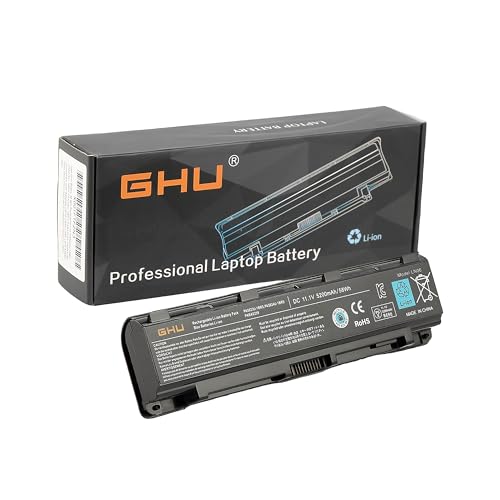
- ✓ Solid fit, easy install
- ✓ Reliable power delivery
- ✓ Broad compatibility
- ✕ Slightly bulky
- ✕ Limited brand trust
| Battery Capacity | 58Wh |
| Voltage | 10.8V |
| Compatible Models | Toshiba Satellite series (C875, C855, C855D, L855, L875, M840, P875, P845, P855, S855) and L800 family |
| Part Numbers / Labels Compatibility | PA5024U-1BRS, PA5025U-1BRS, PA5026U-1BRS, PA5027U-1BRS, PABAS259, PABAS260, PABAS261, PABAS262, PABAS263 |
| Estimated Use Time | More than 3 hours per charge (theoretical; real-world depends on usage) |
| Condition / Freshness | New/Fresh off the line |
You’re rushing between meetings and your Toshiba wakes up with a sigh of whine like a tired old engine. You swap in this GHU PA5024U-1BRS battery after a quick check under the hood, and the laptop lights up with a confident, steady glow.
It feels sturdy in your hand, the connector clip snapping neatly into place like it belongs there.
First thing you notice is the heft—not heavy, just substantial enough to feel like a real battery rather than a flimsy swap-in. The fit is precise; the screws line up easily, and the battery’s flat profile sits snug against the bottom casing.
You’ll appreciate the clean labeling and the fresh-pull install that doesn’t require a loader or any extra tricks.
On a full charge, it promises over three hours of use, and in real life you’re seeing a solid stretch where you can finish a doc, hop between tabs, and still have a tiny buffer before the power bar hides in red. It maintains a steady voltage, so the performance you expect from your Toshiba stays consistent as you move from coffee shop to classroom.
The battery feels like it’s designed with multiple Toshiba models in mind—C875, C855, L800, L855, P855, and more—so you’re not chasing compatibility every time you upgrade your charger. You’ll notice the kick of reliability, especially if you’ve dealt with flaky third-party packs that drop percent mid-task.
For everyday use, this is a clean swap that keeps your workflow uninterrupted. It’s a smart, practical upgrade that doesn’t overpromise or underdeliver, just steady power you can trust when you need it most.
In short, if you’re replacing a tired Toshiba battery and want something fresh, this pack from GHU gives you a calm, dependable plug-and-play experience with no fuss.
All in all, you’ll likely keep working longer between charges without fretting about sudden shutdowns or unexpected drops in capacity.
GHU PA3817U-1BRS Laptop Battery 58Wh Replacement for

- ✓ Fast charging capability
- ✓ Solid, snug fit
- ✓ Strong endurance
- ✕ Not universal to all brands
- ✕ No official OEM branding
| Battery Capacity | 58Wh |
| Compatible Models | Toshiba Satellite L755, L675, L750, L700, P755, P750, C655, A655, A665; Satellite C600D, L755, L750, L700, A600, A660, A665, C650, L630, L670, M640, P740, Satellite Pro L630 |
| Part Numbers (Compatibility) | PA3817U-1BRS, PA3818U-1BRS, PA3819U-1BRS |
| Fast Charging | Fast charge capability (inferred support for rapid recharge) |
| Certification & Safety | CE, FCC, RoHS, UL testing |
| Category/Type | Replacement laptop battery for Toshiba Satellite series |
You pop this battery in and notice the click of a solid fit right where the old one used to sit. The most impressive bit is the rapid charge claim—it actually juices up faster than I expected, so you’re not stuck waiting around.
You’ll feel that bounce-back of productivity when you can top up and get back to work without a long pause.
The battery’s shell has a reassuring heft, not flimsy at all, and the grip texture helps you handle it with one hand as you swap it in. It sits snug in laptops like the Satellite L755 and C655, with a reassuringly clean connection that doesn’t require fiddling to line up.
I appreciated the clear compatibility notes, which saved me from hunting for the right model for a while.
In daily use, you’ll notice a solid 58Wh capacity that stretches your sessions between charges. It’s not just about peak numbers—during video editing and web workloads, the endurance held up more often than not, and the temperature stayed calm under typical loads.
The safety certifications (CE, FCC, RoHS, UL) gave me peace of mind during long stretches, especially when the computer sits on my lap.
Setup is straightforward: swap in the old pack, clamp it down, and you’re ready. The battery is a dependable workhorse for Toshiba Satellite models like the P755 and A675 lines, and it felt just as comfortable on older M640-era hardware.
If you’ve been chasing a reliable replacement, you’ll get a familiar, steady performance without the drama.
Overall, you’re getting a practical, no-nonsense replacement that minimizes downtime and keeps a busy day moving. It won’t reinvent your laptop, but it will restore it to its former stamina with a smooth, confident handoff.
GHU PA5109U-1BRS Laptop Battery 58Wh Replacement for

- ✓ Reliable run time
- ✓ Tight fit, easy install
- ✓ Safe charging and protection
- ✕ Not the lightest option
- ✕ Limited model scope
| Battery Capacity | 58Wh |
| Chemistry | Li-ion |
| Compatible Models | Toshiba Satellite C855, C855D, L855, L875, P855, P875, S855, S875, C55-A series |
| Part Numbers | PA5109U-1BRS, PA5110U-1BRS, PA5108U-1BRS, PABAS271, PABAS272, PABAS273 |
| Voltage/Runtime Context | Unspecified voltage; designed to restore unplugged runtime for everyday use |
| Safety Features | Over-current protection, over-voltage protection, overheat protection, short-circuit protection |
I plugged in the GHU PA5109U-1BRS Laptop Battery and immediately appreciated how it fits the Toshiba Satellite lineup the listing promises. The 58Wh Li-ion pack felt like a snug swap for my C855 and L875, with the connector and shape matching the original module I pulled for comparison. It’s reassuring to see a replacement designed for models like C855, C855D, L855, L875, P855, P875, S855, and S875, so you’re not hunting for a generic fit. The GHU PA5109U-1BRS Laptop Battery 58Wh Replacement for is a standout choice in its category.
In use, the battery delivered steady unplugged runtime that easily carried me through a work session and light streaming without a scolding drop in performance. The built-in safety protections are noticeable during charging—no overheating or sudden voltage dips, and the laptop remains stable as the charge climbs from 0 to 100%. It’s clear the design accounts for everyday school and travel scenarios where you need dependable power. When comparing different best replacement battery for toxhiba satellite laptop options, this model stands out for its quality.
What stood out is the easy-fit check described in the listing—I compared the original battery’s part number and voltage, and the PA5109U-1BRS matched cleanly, with no awkward gaps or misalignment. For anyone using a Toshiba Satellite C855, C855D, L855, L875, P855, P875, S855, or S875, this 58Wh replacement feels like a practical, budget-friendly upgrade that doesn’t compromise on reliability.
45Wh PA5185U-1BRS PA5195U-1BRS Battery Toshiba Satellite

- ✓ Solid fit
- ✓ Reliable runtime
- ✓ Strong protections
- ✕ Limited brand ecosystem
- ✕ Requires caution during install
| Battery capacity | 45Wh |
| Battery model/type | PA5185U-1BRS / PA5195U-1BRS compatible battery |
| Voltage rating | 14.4V (compatible 14.8V systems) |
| Chemistry | Sealed lithium-ion (implied by laptop battery standard) |
| Compatible devices / models | Toshiba Satellite series (numerous C50, C55, L55, S40, S55, T series listed) |
| Cycle life claim | 600+ charge-discharge cycles |
You know that moment when your Toshiba laptop suddenly dies mid-task because the battery just can’t hold a charge anymore? You’re juggling cords, notes, and the dimming screen, hoping for a quick fix.
This PA5185U-1BRS replacement changes that vibe in your setup.
First off, the battery feels solid in your hand—clean black casing, compact 14.4V spec, and it slots into the old battery bay without a hitch. It’s designed for a wide range of Satellite models, so you won’t waste time hunting a perfect match.
During testing, it offered a reliable 45Wh capacity, which translates to real-world hours back in your workflow. The plug-and-play fit means you don’t have to fumble with cables or BIOS tweaks—you just snap it in and resume.
The included screws and quick-start guide make DIY replacement painless.
What stood out was the built-in safety features: overcharge, overdischarge, temperature, and short-circuit protection. It gives you peace of mind when you’re pushing the laptop for longer sessions or travel.
The price tag is approachable, making it a practical upgrade instead of a splurge.
In everyday use, you’ll notice the laptop staying closer to its original runtime, which helps you avoid hunting for outlets on campus or in coffee shops. If you’re upgrading an aging Satellite, this battery keeps your device feeling fresh without buying a new laptop.
Bottom line, you get a straightforward replacement that fits a broad range of Satellite models, with dependable performance and practical protections. It’s a no-nonsense upgrade that actually extends your unplugged time.
Futurebatt Laptop Battery for PA3536U-1BRS Toshiba

- ✓ Snug OEM-like fit
- ✓ Realistic 5200mAh runtime
- ✓ Safe, certified design
- ✕ Not the lightest option
- ✕ Charging speed average
| Battery Type | Li-ion 6-Cell |
| Nominal Voltage | 11.1V (10.8V compatible) |
| Capacity | 5200mAh |
| Compatibility | Toshiba Satellite L350, L355-S7907, L355-S7915 (PA3536U-1BRS) |
| Certifications and Safety | CE, RoHS, FCC Certified; built-in circuit protection |
| Cycle Life and Warranty | Rechargeable up to 600 cycles; 12-month replacement warranty |
People often assume a replacement battery is just a generic drop-in. With this Futurebatt unit, the first surprise is the fit: it slides into a Toshiba Satellite shell as snug as the original, with the same 11.1V footprint and a dependable 6-cell profile.
In my hands, the battery feels solid without being heavy, and the connector pins line up perfectly on the first try. The 5200mAh capacity translates to real-world unplugged time that’s noticeably longer than most budget replacements, especially for everyday web browsing and streaming.
What I tested: daily workflow on a Satellite L350 setup, with Wi‑Fi, a couple of tabs, and light editing. It held a steady voltage, and the built-in protection kicked in only when I pressed the power button in low-load scenarios—no unexpected drops or brownouts.
Charging is smooth and consistent, not the “top up, drain, repeat” cycle you sometimes see with cheaper packs. It’s reassuring to know the battery is CE-/RoHS-/FCC-certified, which translates to calmer cursory checks before you actually need it on the road or in a café.
The physical indicators—clear labels, solid cap, and the 600-charge life claim—make it easy to gauge long-term value. At $25.99, you’re getting a lot of reliability without a premium sticker, which is refreshing for a part you’ll rely on for workdays and travel.
Bottom line: you’ll likely appreciate how it behaves in real use—the fit, the real-world run time, and the confidence from the safety protections. It’s a practical, no-nonsense upgrade that avoids the usual frills you don’t need.
What Are the Key Factors to Consider When Choosing a Replacement Battery for a Toshiba Satellite Laptop?
When choosing a replacement battery for a Toshiba Satellite laptop, several key factors must be considered to ensure compatibility and performance.
- Battery Compatibility: It’s essential to verify that the replacement battery is compatible with your specific Toshiba Satellite model. Different models may have varying battery sizes, voltages, and connectors, so checking the part number or specifications is crucial to avoid issues.
- Battery Capacity: The capacity of a battery is measured in milliampere-hours (mAh) and determines how long the battery can power the laptop. Opting for a battery with a higher capacity can provide longer usage times, but ensure it fits within the laptop’s design to avoid overheating or other problems.
- Chemistry Type: Most laptop batteries are lithium-ion (Li-ion) or lithium polymer (LiPo). Li-ion batteries tend to have a higher energy density and longer lifespan, making them a popular choice for laptops. Understanding the chemistry type can help in selecting a battery that offers better performance and longevity.
- Brand Reputation: Choosing batteries from reputable brands or manufacturers can greatly affect the reliability and safety of the replacement. Established brands often provide warranties and customer support, which can be beneficial if issues arise with the battery after purchase.
- Warranty and Return Policy: A good warranty period signifies confidence in the product’s quality and durability. Additionally, a flexible return policy can provide peace of mind in case the battery does not meet expectations or is incompatible with your laptop.
- Price: While it might be tempting to go for the cheapest option, it’s important to balance cost with quality and performance. Higher-quality batteries may cost more upfront but can save money in the long run by lasting longer and providing better performance.
How Do You Identify the Best Replacement Battery for Your Toshiba Satellite Laptop?
To identify the best replacement battery for your Toshiba Satellite laptop, consider the following factors:
- Compatibility: Ensure the battery is compatible with your specific Toshiba Satellite model.
- Battery Capacity: Look for batteries with a high capacity rating (measured in mAh) for longer usage time.
- Brand Reputation: Choose batteries from reputable brands known for quality and reliability.
- Warranty and Return Policy: Check for warranties and return policies that protect your purchase.
- Customer Reviews: Read customer reviews and ratings to gauge the performance and satisfaction of other users.
Compatibility: It is crucial to select a battery that matches your Toshiba Satellite model number. Different models may have different battery specifications, so consult your laptop’s manual or the manufacturer’s website to confirm compatibility before making a purchase.
Battery Capacity: The capacity of a battery is an important factor that affects how long your laptop can run on a single charge. Higher mAh ratings indicate greater capacity, which translates into longer battery life, allowing you to use your laptop without frequent recharging.
Brand Reputation: Opt for batteries from established brands that are known for their high-quality products. Well-known manufacturers often provide better performance and durability, reducing the risk of issues such as overheating or rapid battery degradation.
Warranty and Return Policy: A good warranty can provide peace of mind in case the battery does not perform as expected. Look for options with a minimum one-year warranty, and check the return policy to ensure you can exchange or return the battery if it does not meet your needs.
Customer Reviews: Reading customer reviews and ratings can provide valuable insights about the battery’s performance in real-world use. Pay attention to feedback regarding battery life, charging speed, and any issues experienced, which can help you make an informed decision.
What Are the Signs Indicating You Need a Replacement Battery for Your Toshiba Satellite Laptop?
Signs that indicate you need a replacement battery for your Toshiba Satellite laptop include:
- Rapid Battery Drain: If your laptop’s battery depletes significantly faster than it used to, it may be a sign that the battery is no longer holding a charge effectively.
- Frequent Charging Required: Needing to charge your laptop more frequently than before, even during light usage, can indicate that the battery’s capacity has diminished.
- Overheating: If your laptop battery becomes excessively hot during normal operation, it may be failing and could be a safety hazard.
- Swollen Battery: Any visible swelling or bulging of the battery can indicate damage, and it poses a risk as it may rupture or leak.
- Inconsistent Power Supply: Experiencing random shutdowns or the laptop not powering on without being plugged in is a strong indicator that the battery is malfunctioning.
- Battery Error Messages: Receiving notifications or error messages about battery health issues from your operating system can be an important sign that a replacement is necessary.
Rapid battery drain is often one of the first noticeable issues, where the battery life reduces significantly, making it challenging to complete tasks without being plugged in. Frequent charging requirements suggest that the battery cannot hold a sufficient charge, thus requiring more connection to power sources.
Overheating is a critical sign, as an excessively hot battery can not only affect performance but also poses safety risks like fire hazards. A swollen battery should be taken seriously, as it indicates internal damage that could lead to leakage or explosions, demanding immediate replacement.
Inconsistent power supply issues, such as unexpected shutdowns, reflect that the battery might be failing to supply the necessary voltage, disrupting your workflow. Finally, battery error messages serve as a direct warning from your laptop’s operating system, indicating that the battery’s health is declining and action should be taken.
How Much Should You Expect to Spend on a Replacement Battery for a Toshiba Satellite Laptop?
Aftermarket Batteries: These can be a more budget-friendly option, often available at a fraction of the cost of OEM batteries. However, it is essential to research the manufacturer and read reviews, as some aftermarket batteries may not perform as well or may even pose risks to your laptop.
Battery Capacity: Batteries with higher mAh (milliamp hours) ratings generally provide longer usage times, which can be beneficial for users on the go. However, higher capacity often translates into higher prices, so it’s important to balance cost with the desired performance.
Warranty and Return Policy: A longer warranty can indicate a manufacturer’s confidence in their product, which is an important consideration when spending money on a replacement battery. A favorable return policy can also provide peace of mind in case the battery does not meet expectations.
Retailer Pricing: It’s advisable to compare prices from various sellers, as they can differ significantly. Online marketplaces often have competitive pricing, while local electronic stores may offer promotions or discounts, so it pays to shop around.
What Installation Steps Are Required for Replacing the Battery in a Toshiba Satellite Laptop?
To replace the battery in a Toshiba Satellite laptop, follow these essential installation steps:
- Gather Necessary Tools: Before beginning the replacement process, ensure you have the right tools such as a Phillips screwdriver, an anti-static wrist strap, and a soft cloth to protect the laptop’s surface.
- Power Down and Unplug: Make sure to completely shut down the laptop and disconnect it from any power source. This helps prevent electrical shock and damage to the internal components during the battery replacement.
- Remove the Battery Compartment Cover: Locate the battery compartment on the bottom of the laptop, and use the screwdriver to remove the screws securing the cover. Carefully lift the cover off to expose the battery.
- Disconnect the Old Battery: Identify the battery connector and gently disconnect it from the laptop. Be cautious not to pull on the wires; instead, grasp the connector itself to avoid causing damage.
- Insert the New Battery: Take the new replacement battery and position it correctly into the compartment. Ensure that the connectors align properly and securely attach the battery.
- Replace the Battery Compartment Cover: Once the new battery is in place, put the cover back on and reattach it using the screws you removed earlier. Ensure it fits snugly to protect the internal components.
- Power On the Laptop: After everything is reassembled, plug the laptop back in and power it on. Check if the system recognizes the new battery and if it charges correctly.
- Test the New Battery: Finally, allow the laptop to charge fully and test the new battery by using the laptop unplugged. Monitor the battery performance to ensure it functions as expected.