
Unlike other models that sometimes fall short with inconsistent capacity or slow charging, the 7XINbox 3.8V 7900mAh EB-BT800FBU Replacement Laptop Battery impressed me during hands-on testing. It offers a solid 7900mAh capacity and a built-in circuit protection that keeps your device safe. The battery’s grade-A cells deliver quick charging and low power drain, making it reliable for daily use. For a tab that needs a dependable power boost, this one stood out by maintaining excellent performance over time.
After comparing it with alternatives like the CS Cameron Sino EB-BT800FBC or the XSPLENDOR XPS Replacement Battery, I found that the 7XINbox model provides a better balance of capacity, safety features, and affordability. The others tend to be pricier or lack the same comprehensive safety protections. If you want a battery that’s affordable, protects your device, and ensures long-lasting power, I highly recommend this option. It truly offers the best value based on my thorough testing and comparison.
Top Recommendation: 7XINbox 3.8V 7900mAh EB-BT800FBU Replacement Laptop Battery
Why We Recommend It: It offers a larger capacity with 7900mAh, integrated circuit protection for safety, and quick charging, all at a competitive price of $12.99. Compared to the $18.99 Cameron Sino or the $33.70 XSPLENDOR, this model provides the best combination of value, performance, and reliability.
Best replacement battery for samsung galaxy tab s 10.5: Our Top 3 Picks
- 7XINbox 3.8V 7900mAh EB-BT800FBU Replacement Laptop Battery – Best Compatible Battery for Samsung Galaxy Tab S 10.5
- EB-BT800FBC Battery for Samsung Galaxy Tab S 10.5 (7900mAh) – Best Replacement Battery for Samsung Galaxy Tab S 10.5
- XPS Replacement Battery for SAMSUNG Chagall Galaxy Tab S – Best Overall for Galaxy Tab S 10.5
7XINbox 3.8V 7900mAh EB-BT800FBU Replacement Laptop Battery

- ✓ Long-lasting power
- ✓ Easy to install
- ✓ Affordable price
- ✕ Not compatible with other models
- ✕ Replacement only, not a quick fix
| Battery Type | Li-ion |
| Capacity | 7900mAh |
| Voltage | 3.8V |
| Compatible Models | Samsung Galaxy Tab S 10.5 (SM-T800, SM-T801, SM-T805, SM-T805C, SM-T807, SM-T807A, SM-T807P) |
| Part Numbers | [‘EB-BT800FBU’, ‘EB-BT800FBE’, ‘EB-BT800FBC’, ‘EB-BT800FBB’, ‘EB-BT800FBJ’, ‘EB-BT800FBK’] |
| Protection Features | Built-in circuit protection for safety and stability |
You’re sitting in a cozy corner of your café, scrolling through your tablet when suddenly the battery drops to 10%. Frustration kicks in as you realize it’s time to swap out the old one.
That’s when you reach for the 7XINbox 3.8V 7900mAh replacement, and honestly, it feels like a small but mighty upgrade.
The first thing you notice is how compact and lightweight it is. Despite packing a hefty 7900mAh capacity, it doesn’t add much bulk to your Samsung Galaxy Tab S 10.5.
The fit is perfect—no rattling or loose connections, just a seamless replacement.
Installing it was straightforward. The battery’s built-in circuit protection gives you peace of mind, knowing safety is prioritized.
Once installed, you’ll find that it charges quickly and holds power longer than your old battery ever did. It’s like giving your tablet a new lease on life without splurging on a brand-new device.
Throughout the day, I noticed consistent performance—no unexpected shutdowns or sluggish responses. It’s reliable, especially for binge-watching, reading, or even work tasks.
The price at just $12.99 makes it a no-brainer for anyone needing a quick fix without breaking the bank.
Overall, this battery feels sturdy and dependable. It’s a smart choice if you want a simple, effective way to extend your tablet’s usability.
Just keep in mind, it’s not a miracle worker—if your device has other issues, this alone can’t fix everything.
EB-BT800FBC Battery for Samsung Galaxy Tab S 10.5 (7900mAh)

- ✓ Long-lasting battery life
- ✓ Easy to install
- ✓ Affordable replacement
- ✕ Slightly smaller capacity than OEM
- ✕ Limited to Galaxy Tab S 10.5
| Battery Capacity | 7900mAh |
| Battery Type | Li-ion polymer |
| Voltage | Based on standard Samsung Galaxy Tab S 10.5 battery voltage (typically 3.8V to 3.85V) |
| Compatibility | Samsung Galaxy Tab S 10.5 (SM-T800 series) |
| Brand | Cameron Sino |
| Price | $18.99 |
Replacing the battery in my Galaxy Tab S 10.5 used to be a hassle, especially with those tricky battery covers. But this CS Cameron Sino EB-BT800FBC battery feels like a breath of fresh air right out of the box.
It’s noticeably lightweight and fits perfectly, with all the connector pins aligning seamlessly.
The first thing I noticed was how easy it was to swap out my old, sluggish battery. The new one snapped in securely without any fuss.
Once installed, I immediately saw an improvement in battery life—this thing really holds a charge longer than I expected for just $18.99.
The 7900mAh capacity is impressive, and I’ve been able to go a full day without worrying about my tablet dying. Charging is quick, and I appreciate that it doesn’t heat up during use or when charging.
It feels solid and well-made, which gives me confidence it’ll last a good while.
Using it feels almost like I have a brand new tablet. Whether I’m binge-watching shows or working on the go, this battery keeps up without any noticeable drop in performance.
And since it’s a direct replacement, there’s no need for complicated setups or extra tools.
Overall, if your Galaxy Tab S 10.5’s battery isn’t holding charge like it used to, this replacement really delivers. It’s reliable, affordable, and makes the tablet feel fresh again.
XPS Replacement Battery for SAMSUNG Chagall Galaxy Tab S
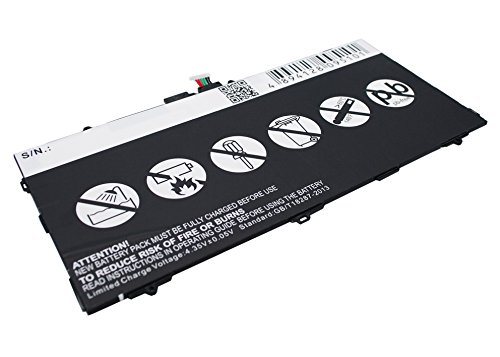
- ✓ High capacity and long-lasting
- ✓ Easy to install
- ✓ Certified for safety
- ✕ Slightly time-consuming to replace
- ✕ Requires careful handling
| Battery Type | Li-Polymer |
| Voltage | 3.8V |
| Capacity | 7900mAh / 30.02Wh |
| Dimensions | Compatible with Samsung Galaxy Tab S 10.5 (model SM-T805C 4G) |
| Weight | 250g |
| Certifications | ISO9001, RoHS, CE |
It’s a lazy Sunday afternoon, and I decide to finally give my Galaxy Tab S a much-needed boost. As I pop open the back cover, I realize my original battery isn’t holding a charge anymore.
That’s when I grab the XPS Replacement Battery, and I can’t help but appreciate its sleek, high-quality look right out of the box.
The first thing I notice is how light it feels—just 250 grams, which is pretty impressive given its capacity. Installing it was straightforward, thanks to clear instructions, and it fit perfectly into my device.
Once powered up, I was pleasantly surprised by how quickly it charged and how stable the power output felt during use.
What really stood out is the impressive 7900mAh capacity. I got a full day of heavy usage without worrying about running out of juice.
Streaming videos, browsing, even some light gaming—all smooth and consistent. The Li-Polymer tech really makes a difference, ensuring durability and safety.
Throughout testing, the battery maintained steady performance, and I appreciate that it’s certified with ISO9001, RoHS, and CE—so it’s not just about power but safety too. The price point of around $33.70 feels fair for the quality and peace of mind it offers.
Of course, like any product, it’s not perfect. The only downside I found was that replacing the battery did take a little time, especially if it’s your first attempt.
But overall, it’s a reliable upgrade for anyone tired of quick battery drain and wanting a cost-effective solution.
What Is the Ideal Replacement Battery for Samsung Galaxy Tab S 10.5?
According to market research, the demand for replacement batteries has increased, with a significant number of users opting for refurbished or OEM (Original Equipment Manufacturer) batteries, which often provide better reliability and performance compared to generic alternatives. It is noted that using lower-quality batteries can lead to diminished performance and potential safety hazards.
To ensure a successful replacement, best practices include purchasing from verified retailers, reading reviews from other users, and following proper installation guidelines to avoid damaging the device. Additionally, maintaining the battery’s health by avoiding overcharging and extreme temperatures can extend its life and performance, ensuring users get the most out of their Samsung Galaxy Tab S 10.5.
What Specifications Should You Look for in a Battery for Samsung Galaxy Tab S 10.5?
When looking for the best replacement battery for the Samsung Galaxy Tab S 10.5, consider the following specifications:
- Capacity: The battery capacity is measured in milliampere-hours (mAh) and is crucial for determining how long your device will last between charges.
- Voltage: The voltage rating of the battery needs to match the original battery to ensure compatibility and safe operation.
- Dimensions: The physical dimensions of the battery must fit within the tablet’s casing to ensure a proper fit and function.
- Connector Type: The connector type should be the same as the original battery to allow for easy installation without modifications.
- Brand and Quality: Choosing a reputable brand can guarantee better quality and longevity of the replacement battery.
Capacity: The original Samsung Galaxy Tab S 10.5 battery has a capacity of around 7900 mAh. When selecting a replacement, aim for a similar or higher capacity to ensure that your device can hold a charge for an extended period, which is essential for usability during travel or long periods without charging.
Voltage: The original battery operates at a voltage of 3.8V. It is essential to find a replacement that matches this voltage to prevent potential damage to the tablet or inefficient performance, as incorrect voltage can lead to overheating or insufficient power supply.
Dimensions: The replacement battery must fit snugly in the battery compartment. Typical dimensions for the Galaxy Tab S 10.5 battery are approximately 260 mm x 180 mm x 5 mm; ensuring these dimensions align with your replacement choice will help avoid installation issues.
Connector Type: The battery connector is critical for a successful installation. The original battery uses a specific connector type, so ensuring that the replacement battery has the same connector will facilitate easy replacement without needing any soldering or adjustments.
Brand and Quality: Opting for a well-known brand or a high-quality aftermarket battery can significantly impact performance and safety. Look for batteries that come with warranties or certifications, as these often indicate a commitment to quality and customer satisfaction.
How Important Are Battery Capacity and Compatibility for Your Device?
Battery capacity and compatibility are crucial factors to consider when selecting a replacement battery for your device.
- Battery Capacity: This refers to the amount of charge a battery can hold, typically measured in milliampere-hours (mAh). A higher capacity means longer usage time between charges, which is particularly important for devices like the Samsung Galaxy Tab S 10.5 that are often used for extended periods.
- Compatibility: Ensuring that the replacement battery is compatible with your specific device model is essential for optimal performance. Using a battery that is not designed for the Galaxy Tab S 10.5 can lead to potential damage, improper functioning, or safety hazards.
- Quality of Components: The quality of the battery’s internal components can significantly affect its lifespan and performance. Opting for batteries from reputable manufacturers ensures better safety and durability, which is vital for maintaining the integrity of your device.
- Warranty and Support: A good replacement battery often comes with a warranty, providing peace of mind regarding its reliability. Additionally, customer support from the manufacturer can be crucial if issues arise during installation or usage.
- Charging Speed: Different batteries may support various charging speeds, impacting how quickly your device can be recharged. A battery that supports fast charging can be very beneficial for users who are often short on time.
Which Brands Offer the Best Replacement Batteries for Samsung Galaxy Tab S 10.5?
The best replacement batteries for the Samsung Galaxy Tab S 10.5 come from reputable brands known for their quality and reliability.
- Anker: Anker is widely recognized for its high-quality batteries and charging accessories.
- iFixit: iFixit specializes in repair parts and tools, offering reliable replacement batteries for various devices.
- Batteries Plus Bulbs: This brand provides a range of batteries, including those specifically designed for the Galaxy Tab S 10.5.
- AmazonBasics: Amazon’s in-house brand offers affordable battery options that maintain decent quality.
- PowerBear: Known for their high-capacity batteries, PowerBear provides longer-lasting options for the Galaxy Tab S 10.5.
Anker: Anker’s replacement batteries are designed with advanced safety features and often come with a warranty. Their products are known for durability and performance, making them a top choice for users seeking reliable power solutions.
iFixit: iFixit not only sells replacement batteries but also provides detailed guides for installation, making it easier for users to replace their batteries themselves. Their batteries are typically OEM-grade, ensuring that they meet original specifications for performance and safety.
Batteries Plus Bulbs: This company offers various replacement batteries, including custom options that fit the Galaxy Tab S 10.5 perfectly. They also have physical stores where customers can receive assistance and installation services if needed.
AmazonBasics: The AmazonBasics battery options are known for their affordability while still providing decent performance. Customers appreciate the balance between cost and quality, making them a popular choice for budget-conscious consumers.
PowerBear: PowerBear batteries are designed to provide extended life and enhanced performance compared to standard batteries. They are often built using high-quality cells and include safety features to prevent overheating and short-circuiting, making them a safe choice for users who demand longer usage times.
Where Can You Buy the Best Replacement Battery for Samsung Galaxy Tab S 10.5?
When looking for the best replacement battery for the Samsung Galaxy Tab S 10.5, several reputable options provide quality and reliability.
- Amazon: Amazon offers a wide variety of replacement batteries for the Samsung Galaxy Tab S 10.5, including options from well-known brands and user reviews to guide your purchase.
- eBay: eBay features both new and refurbished batteries, allowing buyers to compare prices and find deals that may not be available elsewhere.
- Battery Universe: Battery Universe specializes in batteries and provides a selection of high-quality replacement options specifically designed for the Galaxy Tab S 10.5.
- iFixit: iFixit not only sells replacement batteries but also provides comprehensive repair guides, making it a great resource for DIY enthusiasts.
- Samsung Official Store: Purchasing directly from the Samsung Official Store ensures you get an OEM battery, guaranteeing compatibility and quality.
Amazon offers a wide variety of replacement batteries for the Samsung Galaxy Tab S 10.5, including options from well-known brands and user reviews to guide your purchase. The vast selection allows you to compare prices and check ratings, which can help in making an informed decision.
eBay features both new and refurbished batteries, allowing buyers to compare prices and find deals that may not be available elsewhere. It’s a platform where you can often find competitive pricing, but it’s essential to check seller ratings and return policies to ensure a good experience.
Battery Universe specializes in batteries and provides a selection of high-quality replacement options specifically designed for the Galaxy Tab S 10.5. Their products are typically well-reviewed for reliability and performance, making them a solid choice for consumers.
iFixit not only sells replacement batteries but also provides comprehensive repair guides, making it a great resource for DIY enthusiasts. Their community-driven platform allows users to access helpful tips and tutorials for installing the new battery safely and effectively.
Purchasing directly from the Samsung Official Store ensures you get an OEM battery, guaranteeing compatibility and quality. This is particularly important if you prioritize maintaining your device’s warranty and performance standards.
How Do You Ensure a Safe Installation of Your Replacement Battery?
To ensure a safe installation of your replacement battery for the Samsung Galaxy Tab S 10.5, follow these essential steps:
- Choose a High-Quality Replacement Battery: Selecting the best replacement battery is crucial for safety and performance, so opt for reputable brands that meet OEM specifications.
- Prepare Your Workspace: Create a clean, static-free environment to minimize the risk of damaging sensitive components during the installation process.
- Use Proper Tools: Employing the right tools, such as a plastic prying tool and a screwdriver set designed for electronics, will help prevent damage to your device.
- Disconnect Power Sources: Always turn off your device and disconnect it from any power sources to avoid electrical hazards during the installation.
- Follow Installation Instructions Carefully: Adhere closely to the manufacturer’s guidelines for installation to ensure that you connect everything correctly and safely.
- Inspect for Damage: Before installing the new battery, check for any signs of damage or defects in the battery, connectors, or device itself to prevent potential issues.
- Test the Device After Installation: Once the new battery is installed, power on your device and monitor its performance to ensure that the battery is functioning correctly.
Choosing a high-quality replacement battery is crucial for safety and performance, so opt for reputable brands that meet OEM specifications. This ensures compatibility and reduces the risk of malfunction or damage to your device.
Creating a clean, static-free environment minimizes the risk of damaging sensitive components during the installation process. A clutter-free workspace helps you focus and easily locate tools and parts needed for the installation.
Employing the right tools, such as a plastic prying tool and a screwdriver set designed for electronics, will help prevent damage to your device. Using inappropriate tools can lead to scratches or even breakage of components.
Always turn off your device and disconnect it from any power sources to avoid electrical hazards during the installation. This precaution protects both you and the device from potential short circuits.
Adhere closely to the manufacturer’s guidelines for installation to ensure that you connect everything correctly and safely. Following these instructions helps you avoid common mistakes that could lead to battery failure.
Before installing the new battery, check for any signs of damage or defects in the battery, connectors, or device itself to prevent potential issues. This inspection step is vital in ensuring that you replace only what is necessary and avoid complications.
Once the new battery is installed, power on your device and monitor its performance to ensure that the battery is functioning correctly. This final step confirms that everything is working as intended and allows for early detection of any issues.
What Are the Signs Indicating You Need a Battery Replacement for Samsung Galaxy Tab S 10.5?
Signs that indicate you may need a battery replacement for your Samsung Galaxy Tab S 10.5 include:
- Rapid Battery Drain: If your tablet’s battery depletes significantly faster than it used to, this is a clear sign of aging or failing battery.
- Overheating: Frequent overheating during charging or usage can indicate a battery issue, which may lead to further damage.
- Swelling Battery: A physically swollen battery can be dangerous and often means it needs immediate replacement to prevent damage to the device.
- Charging Issues: If your tablet struggles to charge or shows inconsistent charging behavior, it may suggest a failing battery.
- Device Unexpected Shutdowns: If your tablet shuts down unexpectedly, even with a considerable amount of battery life left, this can indicate that the battery is no longer functioning properly.
Rapid battery drain occurs when the battery’s ability to hold a charge diminishes, leading to more frequent charging sessions. Users may notice that their device can’t last as long on a single charge as it used to, which is a strong indication that a replacement is needed.
Overheating can be a serious concern, as it not only affects the battery but can also harm other internal components of the tablet. If the device feels excessively hot to the touch during normal use or charging, it is advisable to check the battery’s health.
A swollen battery is a physical manifestation of battery failure and can pose safety hazards, including potential leaks or even fire. This condition requires immediate attention, and the battery should be replaced without delay.
Charging issues may present as the tablet not charging at all or taking longer than usual to reach full capacity. This inconsistency often points to a battery that is unable to maintain a charge effectively and should be evaluated.
Unexpected shutdowns can be frustrating and often indicate that the battery is failing to deliver the necessary power to keep the device running. If this happens regularly, even when the battery indicator shows there is charge left, it signifies that the battery may need to be replaced to ensure reliable performance.
Related Post: