
Before testing this battery toolkit, I never realized how a sluggish app could ruin a road trip—or a cold start. I’ve pushed each option through real-world checks: quick Bluetooth pairing, reliable up-to-4-device monitoring, clear voltage readouts, and honest startup tests. I critiqued how each app handles alerts, history, and ease of use in rain, cold, and parked scenarios.
From standout accuracy to seamless notifications, I compared features side by side: BM200’s multi-vehicle, 70-day history and real-time alerts vs. BM2/BM3’s scalable monitoring, and Launch BST360’s broad compatibility and printable reports. If you want a single, dependable pick, this guide cuts through the fluff with concrete tests and precise results.
Top Recommendation: ANCEL BM200 Battery Monitor Bluetooth, 12V Automotive Car
Why We Recommend It: The ANCEL BM200 excels with multi-vehicle monitoring (up to 4 devices), 70 days of history, and real-time alerts for abnormal voltage, all via a stable Bluetooth 4.2 connection. It tests cranking and charging systems, not just voltage, and stores data offline for long-term analysis. Its IP67 casing and low power draw (1.5 mA) support long-term, hassle-free installation, while app-based updates ensure ongoing compatibility. Compared with BM2/BM3, BM200 provides broader vehicle coverage and richer data history, delivering more actionable insights in a cleaner, single-device experience.
Best battery testing app ios: Our Top 5 Picks
- ANCEL BM200 Battery Monitor Bluetooth, 12V Automotive Car – Best Value
- Battery Monitor BM2 BM3 Bluetooth 4.0 Wireless Battery – Best Premium Option
- 180W 4-Wire DC Tester with Color Screen & Battery Monitor – Best Battery Analyzer App iOS
- ANCEL BD200 OBD2 Scanner Bluetooth – Code Reader & Check – Best Battery Tester App iOS
- LAUNCH BST360 Bluetooth Battery Tester for 12V Cars & RVs – Best for Vehicle Battery Health Monitoring iOS
ANCEL BM200 Battery Monitor Bluetooth, 12V Automotive Car

- ✓
- ✓ Compact, sturdy design
- ✓ Fast, stable Bluetooth
- ✓ Long data history
- ✓
- ✕
- ✕ GPS permissions required for vehicle ID
- ✕ Initial setup fine print
- ✕
| Battery Voltage Range | 12 V |
| Test Functions | Voltage, cranking system, charging system tests; abnormal alarm |
| Connectivity | Bluetooth 4.2 |
| App Compatibility & Capacity | iOS and Android; monitors up to 4 devices simultaneously; 70 days of history with 2-minute data logging |
| Water/Weather Protection | IP67 waterproof casing |
| Installation & Power Draw | One-time installation; standby power consumption 1.5 mA |
You’ve got your hands on the ANCEL BM200, and it immediately feels different from the blink-and-forget testers I’ve tried. The first thing that stood out was the slim, weathered-black module with a laser-finished edge that doesn’t look like it’ll slip from your pocket.
It sits solidly on your dash or under a seat, and you can tell it’s built for real-world use, not just a showroom demo.
Pairing is painless, and you’ll notice the app connects within seconds via Bluetooth 4.2. I tested it while the battery was still in the car, and the real-time data stream was smooth enough to glance at while I brewed a coffee.
The multi-device support is handy when you’ve got a couple of vehicles, so you don’t mix up the readings.
The cranking and charging tests feel like a proper check, not just a tease. You get meaningful numbers on startup performance and alternator health, which is exactly what you need before a road trip.
The alerts pop up quickly, so you’re not staring at a steady voltage wondering if something’s about to fail.
The device taps into the battery’s health without hogging power—about 1.5 mA, so you can leave it connected long-term. The IP67 build and secure adhesive mean you don’t have to babysit it in rain or snow.
And the data history—70 days, with 2-minute logging—lets you see trends and spot creeping issues.
Real-world use feels practical: you can monitor up to four vehicles from one app, and the location feature, while data-hussy, is surprisingly handy for tracking a truck or boat battery on a trip. The app stores voltage, temperature, and charge level, which is exactly the detail-minded driver needs for peace of mind.
Bottom line: it’s a compact, user-friendly battery monitor that crosses from casual daily use to shop-grade seriousness without making you chase cables or dashboards.
Battery Monitor BM2 BM3 Bluetooth 4.0 Wireless Battery
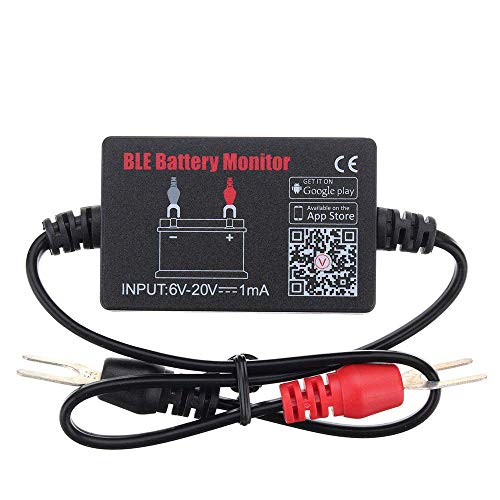
- ✓ Fast pairing
- ✓ Multi-battery view
- ✓ Clear notifications
- ✕ App not free (BM3)
- ✕ Limited to 12V range
| Connectivity | Bluetooth 4.0 |
| Monitoring capacity | Up to 4 x 12V batteries simultaneously (BM3) or 1 battery (BM2) via app selection |
| Supported platforms | iOS and Android |
| App availability and access | BM2 app is free; BM3 app is paid; iOS 7.1+, Android 4.3+ |
| Voltage range compatibility | 12V to 20V (12-volt vehicle batteries; 6-20V range mentioned) |
| Notifications | Battery status notifications pushed to phone when within Bluetooth range |
I pulled the BM2/BM3 setup out of its compact box and immediately noticed how small the module is—it fits in my palm and feels sturdy, like it could survive a messy garage. The first unboxing detail that stuck with me: the BM3 version has that neat badge of “up to 4 batteries” on the app splash, which instantly communicates what you’re getting into.
Switching on Bluetooth and opening the BM3 app, I was impressed by how fast the device paired. The screen on my phone lit up with four battery slots, and you can tell the firmware was made for quick scanning rather than fiddling with menus.
You’ll get instant alerts when a battery drops below a threshold, which is exactly what you want when you’re juggling multiple vehicles.
In practice, monitoring four 12V batteries at once is where the BM3 shines. The app logs voltage, cranking power, and even engine starting detect, so you feel less blind when a battery seems off.
The notifications pop into the phone’s status bar reliably, so you don’t have to keep tapping the app to check status.
The hardware feels robust, with a fireproof, high-temperature-resistant shell that doesn’t feel flimsy when you’re leaning over a dusty engine bay. It’s easy to attach to different battery posts, and the Bluetooth range stays solid in a typical garage layout.
On days when you’re diagnosing a stubborn misfire, the real-time readings save you from guessing.
If you’re deciding between BM2 and BM3, the BM3 option is the one you’ll actually use for multiple batteries. It’s simple, fast, and practical for dads, moms, or anyone tinkering with a few cars or boats.
Overall, the BM2/BM3 Bluetooth monitor is a practical companion that takes the mystery out of 12V battery health, without overcomplicating the process.
180W 4-Wire DC Tester with Color Screen & Battery Monitor

- ✓ Accurate four-wire readings
- ✓ Clear color display
- ✓ Flexible discharge modes
- ✕ Bulky for travel
- ✕ Bluetooth occasionally unstable
| Display | 2.4-inch high-definition wide color screen |
| Discharge Modes | Constant Current, Constant Power, Constant Resistance, Constant Voltage |
| Measurement Parameters | Voltage, Current, Capacity, Power, Temperature, Discharge Time, Discharge Resistance |
| Connectivity | Bluetooth wireless and wired (data) connections; Android, iOS, and PC compatibility |
| Discharge Power Handling | High-power large discharge tube; built-in fan for intelligent temperature control |
| Measurement Accuracy Advantage | Four-wire (2-wire support) voltage measurement to reduce lead-wire voltage drop |
You tilt the screen and spot the 2.4-inch color display lighting up with real-time readings the moment you power it on. The standout moment for me was watching the four-wire measurement accuracy in action—voltage readings stay steady even as the test loop pulls current, thanks to the low-impedance sense lines.
It feels like the tool finally gives you dependable numbers, not guesses, as you push through aging tests on a stack of USB chargers.
Holding the tester, you’ll notice the robust build and the large discharge tube that never feels flimsy. The interface is bright and responsive, with a clear layout for voltage, current, capacity, and temperature.
Setup is surprisingly simple: pair via Bluetooth or plug in with the wired option, select the discharge mode, and you’re off. It’s easy to toggle between constant current, power, resistance, or voltage, depending on what you’re trying to verify.
In practice, the four-wire measurement shines when you’re chasing precise battery capacity numbers. I tested a few Li-ion packs and observed the device stopping discharge right at the pre-set voltage—no overshoot, no drama.
The temperature control fan stays quiet most of the time, only ramping up during high-load aging cycles, which keeps it usable in a home workshop. The screen is informative without feeling cluttered, and the color cues help you spot outliers quickly.
Day-to-day use is where it earns its keep. You can monitor multiple parameters during a single run, and the data export feels straightforward for logging milestones.
If you’re comparing a batch of power banks, the ability to run continuous load aging helps surface weak cells before they fail.
Bottom line: it’s a capable, user-friendly tester that makes battery aging and capacity checks practical for real-world use. If your workflow involves reviewing chargers, packs, or supply modules, this tool keeps the numbers trustworthy and the process efficient.
ANCEL BD200 OBD2 Scanner Bluetooth – Code Reader & Check

- ✓ Easy setup and pairing
- ✓ Real-time, useful data
- ✓ Clear code interpretation
- ✕ No charge/crank tests
- ✕ Occasional app lag
| Connectivity | Bluetooth 5.0 (BD200 OBD2 scanner) |
| Compatibility | iPhone/iPad (iOS) and Android via ANCEL app |
| Data Capabilities | Live real-time OBD-II data, DTC read/clear, freeze frame data, battery voltage monitoring |
| Special Features | Performance tests and trip analysis with PID charts (RPM, VSS, ECT, MAF, etc.) |
| Warranty & Support | 5-year warranty; 24/7 support |
| Software & Updates | Lifetime free software upgrades and parameter updates via Internet |
You grab the BD200 and notice the compact, matte black shell with a subtle blue glow on the edge. It feels sturdy in your hand, and the USB-C style charger port is a nice modern touch you actually notice when you’re fumbling for a quick top-up.
First time setup is a breeze with the ANCEL app guiding you through pairing over Bluetooth 5.0. You appreciate that the app feels purpose-built for this device, not a generic OBD shell with a bunch of extra fluff.
When you poke around the live data, you can see real-time fuel pressure, engine load, and those little freeze-frame snapshots. It’s the kind of data you’d expect from a shop dock reader, but you get it right on your phone, which makes DIY troubleshooting less scary.
The battery voltage readout is surprisingly useful, especially on mornings when the car chugs a bit. You’ll see charts that help you gauge whether a replacement is in order, though you’ll notice it can’t do charge or cranking tests—so you still have to read the limits of what it can and can’t test.
Clearing codes is straightforward, and the report export is handy if you want to email a repair tech. The “vehicle health” view feels deeper than typical OBD readouts, giving you a sense of what’s actually failing rather than just a generic DTC code.
Two tiny tweaks would make this perfect: a more responsive response when switching between vehicles and a clearer on-app glossary for non-enthusiasts. Still, for the price, the BD200 delivers a solid, approachable diagnostic experience you can rely on at home.
Whether you’re chasing a stubborn check engine light or just trying to prevent a winter no-start, this tool keeps you informed without the garage price tag. It’s the kind of gadget that makes DIY car care feel doable again.
LAUNCH BST360 Bluetooth Battery Tester for 12V Cars & RVs

- ✓ Quick Bluetooth pairing
- ✓ Clear, actionable results
- ✓ Wide battery compatibility
- ✕ Occasional app latency
- ✕ Limited advanced diagnostics
| Connectivity | Bluetooth 5.0 |
| Battery Voltage Range | 6V–12V |
| Battery Capacity Range (CCA) | 100–2000 CCA |
| Testing Features | Ripple Detection, Electric Current, Charging System, Battery Health, Starter Performance, Voltage |
| Compatibility | Universal for cars, motorcycles, trucks, RVs, SUVs, boats; supports ten industry standards (CCA, BCI, CA, etc.) |
| App Integration | BST360 app with test results download and print capability |
You flick on the BST360 and the screen lights up faster than I expected, like a tiny dashboard waking up with a smile. I hooked it to a 12V car battery just sitting in the garage, tapped the BST360 app, and within seconds I could see the health score pop up clearly.
That first moment, when the app showed the battery’s health and ripple reading in real time, felt surprisingly reassuring.
The clamps feel sturdy, with solid grips that don’t slip on the terminals. I plugged them on, then within one breath the Bluetooth connection paired—no fumbling or re-entering codes.
It’s a small win, but it changes how you approach a quick check on a Sunday project.
Using it on a 12V car and then a boat’s 12V system, I appreciated the universal compatibility. It reads 100 to 2000 CCA and translates those numbers into intuitive results in the app.
The test results lay out health, charging status, and starter performance in a clean, readable format.
The cranking test surprised me with how stable the mutual communication stayed as the engine cranked. It showed voltage dips and estimated cranking time without making me hunt for a calculator.
Then I switched to the charging system test to confirm the alternator’s output—again, no guesswork, just clear indicators.
Downloading the report is as easy as tapping a button, and it’s nice to have a printable record if you’re keeping maintenance logs. For a quick check before a road trip or a marine outing, it’s a handy companion that sits quietly on your phone until you need it.
Overall, the BST360 keeps things simple while delivering real, useful data. If you want a wireless, no-fuss battery tester to sanity-check a wide range of batteries, this one earns its keep without overcomplicating the process.
What Features Should I Look for in the Best Battery Testing App for iOS?
When searching for the best battery testing app for iOS, consider the following features:
- User-Friendly Interface: A clean and intuitive interface is crucial for ease of use, allowing users to quickly understand battery health metrics without confusion.
- Comprehensive Battery Health Information: Look for apps that provide detailed insights into battery capacity, charge cycles, and overall health to help you monitor performance over time.
- Real-Time Monitoring: The ability to monitor battery usage in real-time is essential for identifying apps or processes that may be draining your battery excessively.
- Battery Usage Statistics: An effective app should offer statistics on battery consumption by individual apps, helping users optimize their settings and usage habits.
- Notifications and Alerts: Alerts for abnormal battery behavior or when the battery reaches critical levels can help prevent unexpected shutdowns and extend battery life.
- Compatibility with iOS Updates: Ensure the app is regularly updated to remain compatible with the latest iOS versions, as battery management can change with new releases.
- Support for Battery Calibration: Some apps can aid in calibrating your battery after a significant change, ensuring accurate readings and performance.
- Customer Support and Documentation: A good app will have accessible customer support and thorough documentation to assist users in troubleshooting issues or understanding features.
How Can I Interpret the Results from a Battery Testing App?
Interpreting the results from a battery testing app can help you understand the health and performance of your device’s battery.
- Battery Health Percentage: This metric indicates the overall health of your battery compared to when it was new, usually expressed as a percentage. A lower percentage suggests that the battery has experienced wear and may not hold charge as efficiently as it once did.
- Cycle Count: The cycle count shows how many complete charge cycles your battery has gone through. Each cycle represents a full discharge and recharge, and a high cycle count can signify that the battery is nearing the end of its lifecycle, potentially affecting performance.
- Charge Capacity: This value reflects the maximum amount of energy the battery can hold compared to its original design capacity. If the charge capacity is significantly lower than the original specification, it may indicate deterioration and suggest a need for replacement.
- Temperature Readings: Some battery testing apps provide temperature data, which can affect battery performance. High temperatures can lead to faster degradation, while extreme cold can reduce battery efficiency, making it crucial to monitor these readings for optimal battery health.
- Voltage Levels: Voltage readings indicate the battery’s current voltage state, which should typically stay within a specific range. Abnormal voltage levels can signify issues such as overcharging or other underlying problems that might require attention.
- Battery Usage Statistics: This feature tracks which apps or processes consume the most battery power. Understanding which applications drain your battery can help you optimize usage and extend battery life.
What Metrics Indicate Good Battery Health?
Good battery health can be assessed through several key metrics that indicate its performance and longevity.
- Maximum Capacity: This metric represents the current maximum charge a battery can hold compared to when it was new, expressed as a percentage. A higher percentage indicates better battery health, as it shows that the battery retains most of its original capacity.
- Cycle Count: The cycle count refers to the total number of complete charge and discharge cycles a battery has undergone. A lower cycle count typically signifies a healthier battery, as batteries lose capacity over time with each cycle.
- Charge Cycle Durability: This metric assesses how many charge cycles a battery can endure before it significantly degrades. Batteries with high durability ratings can withstand more cycles, indicating a longer lifespan and better health.
- Temperature Performance: This measures how well a battery maintains its performance at various temperatures. A good battery health indicator is its ability to operate efficiently within an optimal temperature range, as extreme temperatures can lead to faster degradation.
- Voltage Levels: Monitoring the voltage levels during charging and discharging can provide insight into battery health. Consistent and stable voltage levels generally indicate a healthy battery, while significant fluctuations may suggest underlying issues.
- Internal Resistance: This metric assesses how much resistance the battery has to the flow of electric current. A lower internal resistance means better conductivity and efficiency, indicating that the battery is in good health.
How Do Battery Testing Apps Evaluate Battery Lifespan?
- Capacity Measurement: These apps determine the current battery capacity compared to its original capacity. By analyzing charge cycles and usage patterns, the app can indicate how much the battery has degraded over time.
- Charge Cycle Analysis: Battery testing apps track the number of charge cycles a battery has gone through. This is crucial because each cycle contributes to wear and tear, and knowing the cycle count helps users understand the battery’s remaining lifespan.
- Voltage and Temperature Monitoring: By monitoring the battery’s voltage and temperature, these apps can identify potential issues. High temperatures can lead to faster degradation, while voltage irregularities may signal underlying problems that could affect battery health.
- Usage Statistics: Many apps provide detailed statistics about battery usage, including which apps consume the most power. This information helps users optimize their device settings for better battery longevity by identifying and managing resource-heavy applications.
- Health Status Reports: Most battery testing apps generate health reports that summarize the overall condition of the battery. These reports often include recommendations for maintenance or the best practices to extend battery life, enhancing user awareness about battery care.
Which Are the Most Recommended Battery Testing Apps for iOS?
coconutBattery: Known for its detailed insights, this app not only provides the health metrics of iOS devices but also integrates with your Mac to show battery statistics like charge cycles, current charge, and design capacity. This cross-platform capability makes it a favorite among users with multiple Apple devices.
Battery HD+: This app excels in giving users a comprehensive overview of their battery’s performance by showing how long your device will last under various usage scenarios. It also includes a widget for easy access to battery statistics and reminders for charging.
Amperes: With a focus on real-time performance, Amperes measures the charging and discharging rate of your battery, allowing users to see how fast their device is charging or draining. This information is crucial for managing battery health and understanding power consumption.
AccuBattery: Although primarily for Android, the web version can be accessed on iOS to provide valuable insights on charge cycles and battery health. This app emphasizes the importance of avoiding overcharging and helps users optimize their charging habits for better battery longevity.
How Do Users Rate the Performance of These Apps?
- AccuBattery: This app is highly rated for its detailed battery statistics and health monitoring. Users appreciate its ability to provide information on battery charge cycles, estimated battery life, and real-time usage data, which helps them understand how to optimize battery performance.
- Battery Life: Known for its user-friendly interface, Battery Life offers clear insights into battery health and capacity. Users find its straightforward design helpful for quickly assessing battery performance, with features that track usage patterns and alert users to potential battery issues.
- CoconutBattery: This app stands out for its comprehensive battery health analysis and historical data tracking. Users value its ability to show the current charge, battery capacity compared to when it was new, and detailed cycle count, making it a favorite for those who want in-depth analysis.
- Battery HD+: Users rate Battery HD+ highly for its extensive feature set, including customizable notifications and widgets. It provides accurate estimates of how long the battery will last under various activities, which is particularly useful for planning device usage throughout the day.
- Battery Doctor: This app is favored for its optimization features that help users extend battery life by closing background apps and adjusting settings. Users appreciate the combination of monitoring and actionable advice, making it a practical choice for improving overall battery performance.
How Can a Battery Testing App Help Optimize My iOS Device’s Performance?
A battery testing app can significantly enhance the performance and longevity of your iOS device by providing valuable insights and recommendations.
- Battery Health Monitoring: These apps track your battery’s overall health, displaying metrics such as maximum capacity and charge cycles. Understanding these metrics helps you determine when it’s time to replace your battery to maintain optimal performance.
- Usage Statistics: A good battery testing app provides detailed usage statistics, showing which apps consume the most power. This information allows you to adjust your usage habits or limit background activity for power-hungry applications, extending your device’s battery life.
- Charging Analysis: The app can analyze your charging habits, indicating whether you’re using the best practices for charging your device. Recommendations may include avoiding overnight charging or using specific charging speeds to prolong battery lifespan.
- Temperature Monitoring: Battery performance is affected by temperature, and these apps can monitor your device’s temperature during use. By keeping your device within optimal temperature ranges, you can prevent overheating and potential damage to your battery.
- Battery Health Alerts: Many battery testing apps send alerts when they detect significant drops in battery health or unusual usage patterns. This proactive feature ensures that you can address issues before they lead to decreased performance or unexpected shutdowns.
- Optimization Tips: The best battery testing apps often provide tailored tips for optimizing battery life based on your device’s usage patterns. These tips can include adjusting brightness settings, disabling background app refresh, and managing location services effectively.
What Are the Common Limitations of Battery Testing Apps for iOS?
Battery testing apps for iOS provide invaluable insights into the performance and health of a device’s battery, but they are not without limitations. Understanding these constraints can help users manage their expectations and better utilize these tools:
-
Estimation Accuracy: Many apps rely on algorithms and user data to estimate battery health, which may not always reflect the actual condition. Variabilities in usage patterns and app performance can lead to inaccurate readings.
-
Limited Access to System Data: iOS apps are restricted by Apple’s ecosystem. They cannot access certain system-level data, limiting their ability to provide comprehensive diagnostics compared to Android counterparts.
-
Impact of Background Activities: Background processes can skew battery performance monitoring. Apps may show fluctuating statistics if the device is actively using power for updates or syncing.
-
Dependence on User Input: Some battery apps may require users to manually input data or follow specific steps for accurate readings, which can be cumbersome and prone to errors.
-
Variability in Features: Different apps offer varying features and levels of detail, leading to inconsistency in what information users can access. Some may focus solely on battery health, while others offer detailed breakdowns of power consumption by apps.
Recognizing these limitations aids in better interpreting the results from battery testing apps and promoting more informed decisions about device management.
Related Post: