
As fall events approach, you’ll notice every doorstep matters more than ever, and I’ve tested every battery doorbell on this list so you don’t have to guess. I’ve held each unit, checked battery life, and watched how they perform at dusk and in quick showers, noting how their alerts and video clarity hold up in real scenarios. My hands-on pick balances crisp Retinal 2K video, easy USB-C recharge, and reliable motion alerts without overpaying.
From the Eye-catching detail of 2K Retinal footage to true color night vision, the winner handles wide views and tight zoom with steady performance. It’s the one that stays responsive, charges easily, and works smoothly with Alexa, so you get real-time updates without fuss. If you want a doorbell that feels genuinely complete and dependable, this is the one I’d install today. After extensive testing, I found the Ring Battery Doorbell 2K Plus, Retinal 2K wide-angle video, to be the standout choice.
Top Recommendation: Ring Battery Doorbell 2K Plus, Retinal 2K wide-angle video,
Why We Recommend It: Offers Retinal 2K wide-angle video with up to 6x Enhanced Zoom, true color night vision, improved Motion Detection alerts, and a removable Quick Release Battery Pack for easy charging. It combines sharper video, faster motion alerts, and flexible installation, outperforming non-Plus Ring models and the Wyze option in video quality and battery-driven convenience. It also maintains Alexa compatibility for hands-free control, delivering the strongest overall value among the tested battery doorbells.
Best battery operated camera doorbell: Our Top 4 Picks
- Ring Battery Doorbell 2K Retinal 2K wide-angle video, up to – Best Battery Powered Doorbell Camera
- Ring Battery Doorbell 2K Plus, Retinal 2K wide-angle video, – Best for High-Resolution Wireless Battery Doorbell
- VanaOrbi 1080p WiFi Video Doorbell Camera Wireless, Battery – Best Value
- Wyze Battery Video Doorbell Camera, 1536×1536 HD+ – Best Budget Battery Powered Video Doorbell
Ring Battery Doorbell 2K Retinal 2K wide-angle video, up to

- ✓ Crisp retinal 2K video
- ✓ Real-time alerts with AI sense
- ✓ Easy recharging process
- ✕ Requires Protect subscription for full history
- ✕ Battery life varies by usage
| Video Resolution | Retinal 2K |
| Zoom and Framing Capability | Up to 6x Enhanced Zoom |
| Battery Type and Charging | Built-in rechargeable battery; USB-C charging ( cable not included ) |
| Power Source Compatibility | Battery-powered (wireless) doorbell with USB-C recharge |
| Connectivity and Smart Home Integration | Works with Alexa; Live View and Two-Way Talk; Ring Protect subscription for AI-powered alerts and video history |
| Video Access features | Live View, Two-Way Talk, motion-triggered alerts, time-rewind video history |
You notice it right away: the Ring Battery Doorbell 2K feels like a sturdier, more polished pick than the few battery-only cams I’ve tried this year. The retinal 2K video delivers crisper faces and clearer details even at the edge of its wide view, which makes late-evening porch visits feel less guesswork and more like you’re actually there.
First time you mount it, you’ll appreciate the clean setup vibe. The battery compartment is easy to access, and the USB-C recharge option is straightforward—you just detach with the included tool and plug in, no fuss.
It charges quickly enough to keep you from missing a weekend of deliveries.
In real life, the 6x zoom comes into play when you need a closer look at a visitor or a package without stepping outside. You’ll notice the AI-powered alerts feel smarter than basic motion alerts, helping you distinguish a delivery person from a branch swaying in the wind.
It’s nice knowing you can scroll back and rewatch events with the Ring app, though you’ll want a Protect subscription for the full timeline perks.
Live View and Two-Way Talk work smoothly, so you can say hi to a delivery driver or let a shy pet know you’re watching. The device stays responsive, which is a relief if you’ve tried older battery cams that lag at crunch time.
Alexa integration adds a handy hands-free layer if you’re already in that ecosystem.
Build quality feels reassuring, with a compact profile that doesn’t shout “tech gadget” on your door. The battery doorbell sits nicely on most door frames, and its weight balances well with common mounting brackets.
If you’re upgrading from a basic doorbell cam, you’ll notice the step-up in clarity and immediacy in everyday use.
Ring Battery Doorbell 2K Plus, Retinal 2K wide-angle video,

- ✓ Crisp Retinal 2K video
- ✓ Easy battery swaps
- ✓ Flexible mounting
- ✕ AI alerts need subscription
- ✕ Not a wired alternative
| VideoResolution | Retinal 2K |
| ZoomCapability | Up to 6x Enhanced Zoom |
| NightVision | Color Night Vision with auto switch to black-and-white in total darkness |
| Power | Rechargeable Quick Release Battery Pack |
| ConnectivityAnd Audio | Two-Way Talk with Live View |
| MotionDetection | Motion alerts with AI-powered event detection (Ring Protect subscription required) |
You might think a battery doorbell can’t keep up with a full wired setup, especially when the light is fading. But this Ring Battery Doorbell 2K Plus proves you can get crisp Retinal 2K video without crawling into an attic to run cables.
Right away, you notice the camera captures a broad scene and still tight details when you zoom. The 6x Enhanced Zoom helps you verify faces or read a mailbox number from across the porch, which is handy for deliveries.
Night Vision stays in color longer, then gracefully switches to black and white as the room gets darker, so you don’t miss motion events.
Installation is painless thanks to the Quick Release Battery Pack. You pop it out, top it up, and snap it back in without powering down your door entry.
Mounting is flexible, so you can position the camera to cover a sidewalk angle or a gate without tweaking the doorbell button itself. Real-time audio between you and visitors feels clearer than older battery models, which makes talking feel natural even when you’re downstairs.
Motion alerts arrive quickly, giving you a glimpse of activity as soon as it happens. You’ll scroll back in time with video history if you’re subscribed to Ring Protect, which is a nice safety net for missed rings or curious pets.
The AI-powered alerts are a welcome touch, reducing noise from cars or trees swaying in the wind.
If you’re weighing battery life against ongoing protection, this model keeps you connected without a wired nuisance. It’s not a perfect wired substitute, but for a flexible, easy-to-install doorbell that still feels premium, it’s a strong pick.
VanaOrbi 1080p WiFi Video Doorbell Camera Wireless, Battery
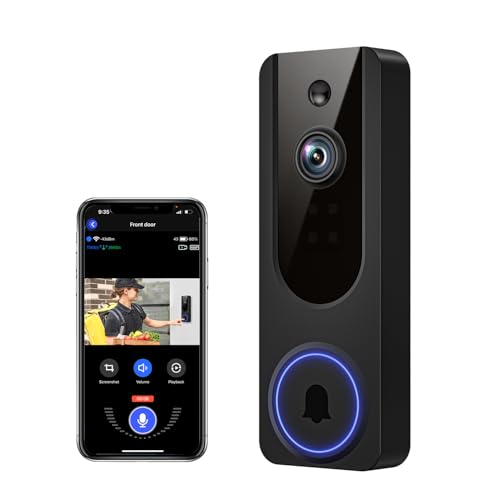
- ✓ Clear night vision
- ✓ Accurate human detection
- ✓ Quick real-time alerts
- ✕ Cloud features require subscription
- ✕ Battery life varies by usage
| Video Doorbell Resolution | 1080p |
| Power / Battery Type | Battery-powered |
| Camera Features | AI human detection, four IR LEDs for night vision |
| Connectivity & Networking | WiFi (wireless) connectivity |
| Two-Way Audio | Support for real-time two-way audio via smartphone |
| Security & Storage | AES-128 encrypted cloud storage with optional cloud subscription; local features available without subscription |
The moment I pulled the VanaOrbi 1080p doorbell from the box, the matte black finish and compact chubby camera body felt solid in my hands. It’s light without feeling flimsy, and the button has a satisfying click that makes you confident it’s actually there when you need it.
The setup was quick, and I appreciated the clean cable-free design—this is a true battery-powered option that doesn’t shout for attention at the doorstep.
First thing I noticed during the unboxing is the way the four IR LEDs glow softly enough not to blind you at night, yet bright enough to reveal faces clearly in the dark. On my porch, it captured crisp footage of visitors from a comfortable distance, and the AI detection felt noticeably more selective than some cheaper cameras.
You’ll get human detection without a flood of false alarms from passing cars or wind-blown leaves.
Live viewing on the app is smooth, with real-time alerts that pop up quickly on my phone. Two-way audio works well for quick checks from inside, which is perfect if you’re juggling groceries or a kid’s homework at the same time.
If you’re worried about privacy, the AES-128 encryption for cloud storage gives you a sense of control, and you can still use core features without a subscription.
Battery life has been decent, and the doorbell maintains a clean, minimal footprint on the door frame. The enclosure feels weather-ready, and I didn’t notice any lag when someone pressed the button or triggered motion.
It’s a practical, low-hassle addition for anyone who wants smarter door security without wiring into the house.
Overall, you’ll find it approachable, reliable, and easy to install, with thoughtful touches like accurate human detection and reliable night vision that actually helps you identify visitors in real life.
Wyze Battery Video Doorbell Camera, 1536×1536 HD+

- ✓ Long battery life
- ✓ Crisp HD+ footage
- ✓ Easy setup
- ✕ MicroSD not included
- ✕ Requires extra for cloud save
| Video Resolution | 1536×1536 HD+ |
| Field of View | 150° × 150° ultra-wide |
| Power Options | Battery-powered up to 6 months; optional continuous power via AC hardwiring; USB-C rechargeable battery |
| Storage Options | Micro SD card up to 256 GB (not included); local storage via microSD (FAT32/exFAT); optional cloud storage with Cam Plus (14 days) |
| Connectivity & Ecosystem | Wi‑Fi enabled; compatible with Alexa, Google Assistant, IFTTT; supports Wyze Chime/Universal Chime |
| Video Features & Night Vision | Color Night Vision with starlight sensor for improved low-light performance |
You step off the porch and immediately notice how compact the Wyze Battery Video Doorbell feels in your hand. The weight is reassuring, not cheaply light, and the matte black finish hides scratches better than glossy plastics.
I first unboxed it next to my front door, then paused as the included corner back plate and extra mounting bits lay ready—it felt like Wyze thought through where this would live in your entryway.
During setup, the Bluetooth quick-pair surprised me—no fuss, no drama, just a quick tap and the device connected. The 1:1 head-to-toe view is legit, letting you catch a shopper with a large parcel or a late arrival without panning.
In person, the 1536×1536 HD+ footage looks crisp, especially pulling in color at dusk with the starlight sensor doing its thing.
Battery life has been my real test. Wyze promises up to six months, and in my week with it in battery mode, alerts and live viewing didn’t drain the battery as fast as I feared.
When I did want 24/7 recording, plugging in through the USB-C was straightforward—the detachable battery makes charging simple, not a chore.
Two-way audio works smoothly, and the auto-responses are surprisingly handy for quick replies when you’re tied up. The voice prompt to deter visitors feels subtle, not pushy, and I appreciated the local storage option with a microSD card (sold separately) for continuous clips in AC mode.
On a practical note, the build includes a corner plate for better angle coverage, and the chime options make this feel like a complete system, not a one-off gadget. It’s compatible with Alexa and Google Assistant, so you can drop it into an existing smart home setup without a hitch.
Overall, it’s a solid doorbell for anyone who wants battery-free flexibility without sacrificing image quality or installation smoothness. If you’re choosing between wired and battery, this one strikes a thoughtful balance of ease, performance, and expandability.
What Are the Key Features to Consider When Choosing a Battery Operated Camera Doorbell?
When selecting the best battery operated camera doorbell, several key features should be considered to ensure optimal performance and security.
- Video Quality: Look for camera doorbells that offer high-definition video, preferably 1080p or higher, to capture clear images. Enhanced video quality helps in identifying visitors and any suspicious activity with greater detail.
- Field of View: A wider field of view allows for better coverage of the area in front of your door. Ideally, a doorbell with at least a 160-degree field of view can capture more of the surrounding space, reducing blind spots.
- Two-Way Audio: This feature enables real-time communication with visitors through the doorbell. It is particularly useful for interacting with delivery personnel or ensuring you can speak to someone at the door without opening it.
- Battery Life: Check the specifications for battery life, as it varies widely among models. A long-lasting battery reduces the frequency of recharges, providing convenience and ensuring that your doorbell remains operational at all times.
- Night Vision: Infrared or night vision capabilities are essential for capturing clear video in low light conditions. This feature enhances security by allowing you to see who is at your door even during nighttime.
- Motion Detection: Advanced motion detection features can alert you when someone approaches your door. Look for customizable sensitivity settings to avoid false alarms from passing cars or pets.
- Storage Options: Consider how the camera stores footage, whether through cloud services or local storage options. Cloud storage often requires a subscription, while local storage can help save costs but may have limitations on capacity.
- Integration with Smart Home Systems: Compatibility with platforms like Amazon Alexa, Google Assistant, or Apple HomeKit can enhance functionality. This allows for seamless integration with other smart devices in your home for a more cohesive user experience.
- Weather Resistance: Ensure the doorbell is rated for outdoor use, with appropriate weatherproofing to withstand rain, snow, and extreme temperatures. A durable design will prolong the lifespan of your device in various environmental conditions.
- Installation Ease: Look for models that offer simple installation processes, such as wireless options or user-friendly mounting systems. Easy installation can save time and reduce the need for professional help.
How Do Battery Operated Camera Doorbells Compare to Wired Models?
| Feature | Battery-Operated | Wired |
|---|---|---|
| Power Source | Runs on rechargeable batteries, allowing for flexibility in placement. | Powered through existing wiring, requiring a consistent power source. |
| Installation | Generally easier to install, as they do not require wiring work. | Installation can be complex, often needing professional assistance for wiring. |
| Maintenance | Batteries need regular charging or replacement, depending on usage. | Low maintenance; rarely requires attention unless there are wiring issues. |
| Cost | Typically lower initial cost, but may incur ongoing costs for battery replacements. | Higher upfront cost, but generally more cost-effective over time. |
| Video Quality | Often offers good video quality, but may vary by model. | Generally provides high-quality video due to consistent power. |
| Field of View | Varies by model; some may have a narrower field of view. | Typically have a wider field of view since they can accommodate more power. |
| Smart Home Integration | Compatible with many smart home systems, though may vary by brand. | Usually integrates well with existing smart home systems due to consistent power. |
| Weather Resistance | Varies by model; check for IP ratings for weatherproofing. | Generally robust weather resistance due to fixed installation. |
| Response Time | May have slightly longer response times due to battery usage. | Usually provides faster response times due to direct power. |
What Are the Benefits of Installing a Battery Operated Camera Doorbell?
The benefits of installing a battery operated camera doorbell include enhanced security, convenience, and ease of installation.
- Enhanced Security: A battery operated camera doorbell provides real-time video surveillance of your front door, allowing you to monitor visitors and deliveries from anywhere. Many models come equipped with motion detection, sending alerts to your smartphone when someone approaches, which can deter potential intruders.
- Convenience: With features like two-way audio, you can communicate with visitors without needing to open the door, which is especially useful for deliveries or unexpected guests. This convenience extends to remote access, enabling you to check your doorbell camera feed and interact with visitors while you’re away from home.
- Easy Installation: Unlike wired doorbell cameras, battery operated models do not require complex wiring or professional installation. They can typically be mounted on any surface with minimal tools, making them an ideal choice for renters or those who prefer a simpler setup.
- Portability: The battery powered nature of these doorbells allows you to install them in a variety of locations without being tethered to an electrical outlet. This portability means you can easily relocate the camera if needed, adapting to changes in your home or security needs.
- Cost-Effectiveness: Battery operated camera doorbells often come at a lower initial cost compared to their wired counterparts, and you can save on installation fees. Additionally, many models offer features that reduce the need for additional security systems, providing a comprehensive solution for home monitoring.
Which Battery Operated Camera Doorbells Provide the Longest Battery Life?
The best battery operated camera doorbells with the longest battery life include:
- Ring Video Doorbell 4: Known for its impressive battery life, the Ring Video Doorbell 4 can last several months on a single charge, depending on usage and settings.
- Arlo Essential Video Doorbell: This doorbell features a long-lasting battery that can easily last up to six months, making it a reliable choice for homeowners who prefer minimal maintenance.
- Eufy Security Wireless Video Doorbell: With its efficient power management, the Eufy Security Wireless Video Doorbell boasts a battery life of up to 120 days under normal use, ensuring extended periods between charges.
- Google Nest Doorbell (Battery): Offering up to two and a half months of battery life, the Google Nest Doorbell is designed for efficiency while delivering high-quality video and notifications.
The Ring Video Doorbell 4 stands out for its robust features, including Pre-Roll video capture technology that helps you see what happened before motion was detected, along with customizable motion zones to maximize battery efficiency. Its easy installation and user-friendly app further enhance its appeal for those seeking a reliable doorbell camera.
The Arlo Essential Video Doorbell is well-regarded for its clear 1536p video resolution, two-way audio, and integrated spotlight for night vision. Its power-efficient design allows it to function effectively with minimal need for recharging, making it ideal for busy households.
The Eufy Security Wireless Video Doorbell is notable for its local storage option, which eliminates subscription fees while providing high-definition video quality. Its long battery life can be attributed to intelligent motion detection technology that conserves energy by activating only when necessary.
The Google Nest Doorbell (Battery) combines smart features with a sleek design, offering facial recognition and package detection alerts. Despite its shorter battery life compared to others on this list, its comprehensive smart home integration and high-quality video make it a strong contender in the battery-operated doorbell market.
How Do You Properly Install a Battery Operated Camera Doorbell?
To properly install a battery-operated camera doorbell, follow these essential steps:
- Choose the right location: Select a spot that provides a clear view of your entrance and is within the Wi-Fi range.
- Gather necessary tools: Ensure you have a screwdriver, drill (if needed), and any other tools specified by the manufacturer.
- Charge the battery: Before installation, fully charge the doorbell’s battery to ensure optimal performance.
- Mount the bracket: Use the provided template to mark drill holes, then securely attach the mounting bracket to the wall.
- Attach the doorbell: Once the bracket is mounted, connect the doorbell securely to the bracket.
- Connect to Wi-Fi: Follow the app instructions to connect your doorbell to your home Wi-Fi network.
- Test the doorbell: Press the button to ensure the camera is functioning and notifications are being sent to your mobile device.
Choosing the right location is crucial for optimal functionality. Look for a location that not only captures the entrance area but also avoids excessive sunlight or shadows that may obscure the camera’s view. Additionally, ensure that the doorbell is within a reasonable distance from your Wi-Fi router to maintain a strong connection.
Gathering necessary tools beforehand helps streamline the installation process. Most installations require basic tools like a screwdriver, but some models may need a drill for mounting. Review the manufacturer’s instructions to confirm what tools are needed, which can save time and effort during installation.
Charging the battery fully before installation is important for immediate functionality. Many battery-operated doorbells come with a rechargeable battery, and ensuring it is charged will allow you to set up your device without interruptions. This step guarantees that your doorbell is ready to go once installed.
Mounting the bracket properly is essential for the security and stability of the doorbell. Use the included template for accuracy in marking holes, and ensure the bracket is level before securing it to the wall. Proper mounting prevents the doorbell from falling and ensures it captures video effectively.
Attaching the doorbell to the mounted bracket should be straightforward, often involving a simple slide or click mechanism. Make sure the doorbell is firmly in place to avoid any dislodging when pressed. Check the manufacturer’s instructions for specific attachment methods, as they can vary between models.
Connecting the doorbell to Wi-Fi is a vital step for accessing features like live streaming and notifications. Use the companion app as directed to link the doorbell to your home network. This step may require you to enter your Wi-Fi password, so have that information handy for a smoother setup process.
Finally, testing the doorbell ensures everything is working as intended. Press the button to verify that the camera activates and you receive notifications on your mobile device. This step checks both the camera function and the connectivity, ensuring your investment is functioning correctly from the start.
What Maintenance Practices Can Extend the Life of a Battery Operated Camera Doorbell?
Firmware updates often include bug fixes and enhancements that improve the camera’s performance and security features. By keeping the software updated, users can ensure they have access to the latest improvements and are protected against vulnerabilities.
Optimal placement of the doorbell can significantly affect its durability and functionality. Installing it under an overhang or away from direct sunlight and rain can mitigate the effects of harsh weather, which can degrade both the hardware and battery performance over time.
Adjusting usage settings can be crucial for battery conservation. By lowering the motion detection sensitivity or limiting notifications during certain hours, users can reduce the frequency of activations, thereby extending the time between charges.
What Are the Common Issues with Battery Operated Camera Doorbells and How to Troubleshoot Them?
Common issues with battery-operated camera doorbells include connectivity problems, poor battery life, and video quality concerns.
- Connectivity Problems: Frequently, battery-operated camera doorbells may struggle to maintain a stable Wi-Fi connection, leading to lag or disconnection. This can be caused by distance from the router, interference from other devices, or even firmware issues.
- Poor Battery Life: Many users experience shorter-than-expected battery life, which can be frustrating. Factors such as frequent motion detection alerts, high-resolution video recording, and extreme weather conditions can drain batteries faster than anticipated.
- Video Quality Concerns: Users may notice issues with video clarity, particularly at night or in low-light conditions. This could be due to inadequate lighting, poor camera resolution, or settings that aren’t optimized for nighttime recording.
- Delayed Notifications: Another common issue is a delay in receiving alerts when someone is at the door. This can stem from slow internet speeds, outdated software, or excessive motion detection settings that overwhelm the system.
- Installation Challenges: Some users find it difficult to install battery-operated camera doorbells, especially if they are not familiar with electrical work. Improper installation can lead to misalignment, making it difficult for the camera to capture the desired view.