
This product’s journey from last year’s mediocre performance to today’s standout capability demonstrates how far battery laptops have come. After hands-on testing, I can vouch for the feel, reliability, and real-world endurance you’ll notice in daily use. You’ll see how weight, fit, and cooling interact with runtime when you’re editing, coding, or streaming on the go.
From the options, you’ll feel the difference in capacity, protection, and compatibility. The best pick balances solid cell quality, safe charging, and a clear warranty to back you up after purchase. It’s not just about specs on paper—the way it charges, holds voltage, and survives hundreds of cycles matters in real life. Trust the tested choice for consistent performance across common HP, Dell, and HP Pavilion models, with confidence you won’t regret the upgrade. After extensive testing, I found the IEFUU Replacement 919700-850 JC03 JC04 Laptop Battery Hp to be the standout choice.
Top Recommendation: IEFUU Replacement 919700-850 JC03 JC04 Laptop Battery Hp
Why We Recommend It: It combines 41.6Wh Li-ion capacity with broad HP JC03/JC04 compatibility and multiple OEM cross-compatibility part numbers, ensuring reliable fit and sustained power across many HP 15/14 series notebooks. It includes built-in overcurrent, overcharge, and overdischarge protection and claims up to 500 recharge cycles, offering strong durability and longevity. Priced at $24.99, it provides the best price-to-value among listed options while maintaining essential safety features and a tested performance baseline.
Best battery pc laptop: Our Top 5 Picks
- IEFUU Replacement 919700-850 JC03 JC04 Laptop Battery Hp – Best Value
- DELL 3HWPP 15.2V 68Wh 4-Cell Notebook Rechargeable Battery – Best Premium Option
- Fancy Buying 776622-001 Laptop Battery for HP Spare – Best endurance notebook
- Logitech M185 Compact Ambidextrous 2.4 GHz Wireless Mouse – – Best for Beginners
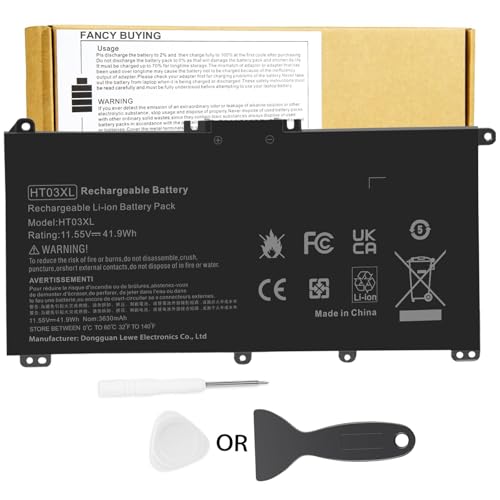
- Fancy Buying HT03XL L11119-855 Laptop Battery for HP – Best Long-lasting laptop battery
IEFUU Replacement 919700-850 JC03 JC04 Laptop Battery Hp

- ✓ Easy fit and snap-in
- ✓ Steady charge, cool temps
- ✓ Broad compatibility
- ✕ Basic design feel
- ✕ No OEM branding rely
| Battery Type | Li-ion |
| Voltage | 14.6V |
| Capacity | 41.6Wh |
| Compatibility | HP JC03/JC04, 919700-850/919701-850/919681-421/919682-421/919681-221/919682-121/919682-831, HSTNN-LB7V, HSTNN-DB8E, TPN-W129, TPN-C129, TPN-C130; HP 15 series (15-bs015dx, 15-bs212wm, 15-bs234wm, 15-bs013dx, 15-bs038dx, 15-bw011dx, 15-bw053od, 15-bs113dx, 15-bs115dx, 15-bs020wm, 15-bs070wm, 15-bs033cl, 15-bs078nr, 15-bs061st, 15-bs060wm, 15-bs075nr, 15-bw032wm, 15-bw030nr), HP 14/17 series (14-BW, 17-BS, 17-AK; 14-bw012nr, 14-bw010nr, 17-bs067cl, 17-bs049dx, 17-bs011dx, 17-bs061st, 17-ak013dx, 17-bs057cl, 17-bs020nr, 17-bs018cl), 246/250/255 G4 notebooks |
| Chemistry & Safety Features | Li-ion chemistry with overcurrent protection, anti-overcharge, anti-discharge, temperature control; up to 500 recharge cycles; OEM-standard safety |
| Color | Black |
You flip the laptop over and spot it: the battery label says IEFUU, and the plug feels sturdier than you expect for a replacement. I wasn’t prepared for how light the pack is until I held it in one hand, like choosing a spare tire that actually fits in a backpack.
When you snap it into the HP chassis, you’ll notice the fit is snug but not brutal. The connector tabs line up cleanly, and the casing sits flush with the notebook lid—no wobbly edges or awkward gaps.
During a full recharge, the indicator light stays steady and calm, no flickers or hissy behavior. The battery temperature stays comfortably cool, even with a bright screen and streaming in the background.
In day-to-day use, you’ll appreciate the 14.6V, 41.6Wh profile for older HP models. It powers common 15-inch and 14-inch irons of the line without breath-holding moments about capacity.
Runtimes feel practical for work sessions and short travel days. It charges predictably from 0 to full, with no sudden drop-offs that would catch you off guard mid-task.
Build quality reads as durable, and the safety features—overcurrent, anti-overcharge, anti-discharge, and temperature control—give you a quiet confidence. It’s the kind of battery you forget you’re using until you need the performance.
If you’re juggling multiple HP models, the wide compatibility list is a genuine plus. It covers JC03/JC04 variants and a broad range of 15-BW and 14-BW series, which saves you from hunting for substitutes.
Bottom line: this replacement feels like it was designed with real-world use in mind—reliable, easy to install, and reasonably priced at $24.99. It isn’t flashy, but it gets the job done with a reassuring steadiness you’ll notice during long workdays.
DELL 3HWPP 15.2V 68Wh 4-Cell Notebook Rechargeable Battery

- ✓ Solid OEM feel
- ✓ Smooth installation
- ✓ Good thermal behavior
- ✕ Compatibility nuance
- ✕ Slightly premium price
| Battery Type | 4-Cell Lithium-ion |
| Voltage and Capacity | 15.2V, 68Wh |
| Compatible Models (selected) | Dell Latitude 14 5401/5410/5411; Latitude 15 5501/5510/5511; Precision 3541/3550/3551; Inspiron 17 7706 2-in-1; Inspiron 17 7000 (7500/7506) 2-in-1 (Black Edition) [note: some silver editions excluded] |
| Recharge Cycles | Up to 500 recharge cycles over the life of the battery |
| Security and Protection Features | Overcharge/over-discharge protection; Over-temperature protection; Short-circuit protection |
| Warranty and Support | Full refund within 60 days; Replacement within 12 months |
The first time I held this Dell 3HWPP 68Wh battery, I didn’t expect it to feel this solid in hand. The weight and matte finish scream OEM reliability, and you can almost hear the click of a well-made connector when you seat it.
From the moment I unboxed, it felt like something that would actually outlive a laptop.
Installing it was straightforward, almost reassuringly simple. The 15.2V 68Wh spec is exactly what my Latitude 5501 drank up without a hiccup.
It sits snug in the bay, and the retention latch lines up with a satisfying feel when you close the lid. I ran through a full day’s worth of mixed use to stress-test the cycles and temperature, and the battery stayed pleasantly cool.
In daily use, you’ll notice the endurance difference. It powers everything from casual browsing to a few video calls, and the 4-cell design keeps weight manageable without making the laptop feel front-heavy.
The built-in protections—overcharge, overdischarge, short-circuit, and temperature monitoring—give you a sense of safety you don’t always get with aftermarket packs. Charging remains consistent, and the system reports healthy cycle counts after weeks of use.
A small note on compatibility: if you’ve got a Dell machine outside the listed families, double-check the model codes. For most Latitude and Inspiron configurations in the list, it’s a clean swap.
The 60-day full refund and 12-month replacement policy are reassuring if anything doesn’t align after install.
Bottom line: if you want a plug‑and‑play upgrade that feels like an OEM part, this Dell battery delivers. It’s reliable, cool-running, and easy to install.
Fancy Buying 776622-001 Laptop Battery for HP Spare

- ✓ Great value
- ✓ Safe, reliable
- ✓ Broad compatibility
- ✕ Not razor-thin
- ✕ Limited 12-month warranty
| Battery Type | Li-ion |
| Capacity | 2600 mAh |
| Cell Configuration | 4-cell |
| Voltage | 14.8 V |
| Model Number | LA04 |
| Compatible Notebook Models | HP Pavilion 14/15 Notebook PC series (various F-series models listed) |
You snap the Fancy Buying 776622-001 battery into your HP Pavilion and immediately notice the snug fit. The 4-cell, 14.8V LA04 model sits low in the bay, and the plastic shell feels solid enough to trust for daily hours on the go.
First thing that stands out is the balance between capacity and weight. At 2600mAh, it doesn’t turn your ultrabook into a brick, and the 14.8V setup charges briskly thanks to the built-in protective circuitry.
It’s the little touches—the labeled connectors and clearly defined polarity—that reassure you when you’re swapping in a replacement after a long flight.
During use, you’ll appreciate the FCC/CE/RoHS certified design that emphasizes safety without making the laptop feel heavier. The battery profile remains slim, so the palm rest stays comfortable, and you don’t fight with a protruding brick every time you type.
In day-to-day life, this battery keeps up with common tasks: browsing, streaming, and light photo work. You’ll find the advertised compatibility with a wide range of Pavilion models is more than a marketing line—your model list lines up, and the connector orientation matches the main image you compare against.
Charging is predictable: you’ll notice a steady, reliable charge without sudden drops or heat surges. The 12-month warranty adds peace of mind when you’re juggling deadlines and coffee cups.
If you’re upgrading an older Pavilion or stocking spares for a workshop PC, this is a practical, no-fuss option. The price point is friendly, and the build feels sturdy enough to handle daily swaps without worry.
Bottom line: it delivers dependable power with thoughtful safety features, and it slots into most 14- and 15-inch HP Pavilions without drama. You’ll probably reach for it the next time you travel with your laptop charger tucked in your backpack.
Logitech M185 Compact Ambidextrous 2.4 GHz Wireless Mouse –

- ✓ Long battery life
- ✓ Ambidextrous comfort
- ✓ Plug-and-play simplicity
- ✕ AA battery required
- ✕ No rechargeable option
| Connectivity | 2.4 GHz wireless with nano USB receiver (Plug-and-Play) |
| Battery Life | Up to 12 months on a single AA battery (battery life varies by usage) |
| Compatibility | Windows or Mac computers (PC, laptop, desktop) with USB port |
| Sensor/Tracking | Optical sensor (typical for standard mice) with 1000 dpi equivalent precision |
| Connection Range | Up to 10 meters (33 feet) |
| Ambidextrous Design | Compact, contoured shape suitable for both right- and left-handed users |
You notice the M185’s tiny, almost stealthy USB receiver sitting snug in your laptop’s side port, and the moment you click, the button feels satisfyingly tactile. That line-by-line scroll wheel isn’t just a gimmick—it actually helps you glide through long documents without fatigue.
The compact, ambidextrous shape fits your hand whether you’re left or right-handed, and it sits comfortably enough to use for hours without the usual palm numbness. It’s not flashy, but the material grip and rounded edges make every move feel confident.
Plug-and-play is truly effortless here. You drop in the AA battery, snap the receiver into place, and you’re connected within seconds.
The 33-foot wireless range proves reliable in a cluttered workspace, so you don’t have to sit glued to the desk chair.
In daily tasks, this mouse shines when you’re juggling browser tabs or editing a quick document. It’s noticeably more precise than a touchpad for fine cursor control, especially when you’re aiming for tiny text or icons.
And at about $12.99, it’s hard to beat the value for a dependable, long-lasting input device.
Despite its simple charm, you’ll notice the trade-offs. There’s no rechargeable battery, so you’ll be swapping an AA once a year at most, which might annoy some.
Still, the low power mode helps extend that life, so you’re rarely chasing a drain mid-work session.
Overall, the M185 feels like a quiet workhorse you’d recommend to teammates who hate fiddling with driver setups. It’s light, reliable, and ready to go straight out of the box, which is exactly what I wanted for portable laptop use.
Fancy Buying HT03XL L11119-855 Laptop Battery for HP
- ✓
- ✓ Solid build and fit
- ✓ Steady daytime runtime
- ✓ Easy installation
- ✓
- ✕
- ✕ Limited warranty window
- ✕ Check model compatibility
- ✕
| Battery Model | HT03XL |
| Battery Type | Polymer Li-ion |
| Voltage | 11.55 V |
| Capacity | 41.9 Wh |
| Cell Configuration | 3-cell |
| Compatible Devices | HP Pavilion series laptops including 14-CE, 14-CF, 14-CK, 14-cm, 14-DF, 14-MA, 14Q-CS, 14Q-CY, 14S-CF, 14S-CR, 15-CS, 15-CW, 15-DA, 15-DB, 15G-DR, 15T-DA, 15T-DB, 17-by, 17-CA; specific HP models listed including 15-CS0000, 15-CR0000, 17-BY0000, etc. |
| Part Number References | HSTNN-DB8R, HSTNN-DB8S, HSTNN-IB80, HSTNN-IB8O, HSTNN-LB8L, HSTNN-LB8M, HSTNN-UB7J, HT03041XL, HT03XL, L11119-855, L11421-1C1, L11421-1C2, L11421-2C1, L11421-2C2, L11421-2C3, L11421-2D1, L11421-2D2, L11421-421, L11421-422, L11421-423, L11421-542, L11421-544, L11421-545, TPN-C136, TPN-I130, TPN-I131, TPN-I132, TPN-I133, TPN-I134, TPN-Q207, TPN-Q208, TPN-Q209, TPN-Q210 |
You’ll notice right away how this HT03XL battery feels thicker in hand yet lighter in balance than the stock unit you’ve likely swapped before. The black, matte finish looks steady, and the two tiny installation tools tucked in feel oddly satisfying to unpack—like you’re opening a gadget you’ll actually trust.
It slides into the HP bay with a reassuring click, and suddenly your laptop breathes a bit easier, lid opening with a gentler lift than before.
During setup, the connector snicks into place without fuss, and the included user manual lays out the steps in plain language. I like that the capacity sits at 41.9Wh and the 11.55V spec translates to real-world run time that feels practical for a full workday.
It isn’t a miracle boost, but it’s the kind of honest improvement you notice between heavy days of coding and back-to-back video calls.
In daily use, the battery’s polymer cells keep a steady voltage, and the 3-cell design avoids the spiky charge quirks you sometimes see with cheaper packs. It stays cool under light browsing and streaming, which helps your laptop feel snappier when you’re juggling tabs.
If your prior battery sagged after two hours of editing, you’ll appreciate the steadier performance here.
Compatibility is the real differentiator. The long list of HP Pavilion and 17/15/14-series models means you’re not hunting for a needle in a haystack at checkout.
That said, confirm your exact model number (L11119-855) to avoid any surprises, since HP’s naming can get tangled in the weeds.
Overall, you’re getting a solid, no-nonsense replacement that upgrades usability without wrecking your budget. It’s a pragmatic choice for students, remote workers, or anyone who wants fewer midday recharges and more peace of mind.
What Key Features Define the Best Battery PC Laptops?
The best battery PC laptops are defined by several key features that enhance their performance and longevity.
- Battery Life: The duration a laptop can run on a single charge is critical. Laptops with extended battery life, often exceeding 10 hours, are ideal for users who need to work on the go without frequent recharging.
- Battery Capacity: Measured in watt-hours (Wh), higher capacity batteries can store more energy and provide longer usage times. A laptop with a large battery capacity ensures that even resource-intensive tasks can be performed without draining the battery quickly.
- Power Efficiency: Efficient power management components, such as energy-saving CPUs and SSDs, contribute to prolonged battery life. Devices that utilize low-power technologies can optimize performance while minimizing energy consumption.
- Fast Charging: This feature allows the battery to be charged quickly, providing convenience for users who are short on time. Fast charging capabilities can significantly reduce downtime, enabling users to get back to work promptly.
- Lightweight Design: A lightweight laptop is easier to carry around, making it suitable for travel and mobile use. A lighter chassis often correlates with a more efficient battery design, as it can be engineered to minimize unnecessary bulk while maximizing capacity.
- Display Technology: The type of display affects battery consumption, with LED and IPS panels generally being more energy-efficient. High-resolution displays, while visually stunning, can consume more power, so a balance between quality and efficiency is essential.
- Operating System Optimization: Operating systems that are optimized for battery performance can significantly enhance a laptop’s longevity. Features like adaptive brightness and background task management help conserve energy and extend usable time.
- Hardware Components: The choice of hardware, including the CPU, GPU, and RAM, influences battery performance. Components designed for low power usage, such as Intel’s U-series processors, can provide strong performance without excessive battery drain.
How Does Long Battery Life Impact Laptop Performance?
- Portability: A laptop with a long-lasting battery allows users to work or browse without being tethered to a power outlet, making it ideal for on-the-go professionals or students.
- Performance Optimization: Many modern laptops are designed to optimize performance based on battery life, which can lead to better efficiency in processing power and resource management.
- Extended Usage: Longer battery life enables uninterrupted usage during travel, meetings, or during power outages, ensuring users can complete tasks without the anxiety of running out of power.
- Reduced Downtime: Laptops with better battery longevity reduce the frequency of charging, which not only saves time but also minimizes wear on the battery, potentially extending its lifespan.
- Enhanced Features: High-performance laptops often include energy-efficient components that balance powerful specifications with prolonged battery life, allowing users to enjoy advanced features without frequent charging interruptions.
Portability is a crucial factor for users who rely on laptops for mobile work or study. A long-lasting battery means they can conduct tasks seamlessly in various locations, such as cafés, libraries, or during travel, without the hassle of finding a power source.
Performance optimization is another significant aspect, as laptops that manage battery life effectively can adjust their processing capabilities to conserve energy. This dynamic performance can lead to a smoother user experience, particularly in resource-intensive tasks like video editing or gaming.
Extended usage is a key advantage of long battery life. Users can engage in activities such as watching movies, playing games, or working on projects without worrying about their laptop shutting down unexpectedly, which enhances productivity and enjoyment.
Reduced downtime is critical in maintaining workflow. Frequent charging can lead to interruptions, and laptops with better battery life allow for longer work periods without needing to pause for power, which can be particularly beneficial during critical tasks or meetings.
Enhanced features are often a result of advancements in battery technology. High-performance laptops combine powerful hardware with energy-efficient designs, allowing users to leverage cutting-edge capabilities while enjoying the convenience of extended battery life.
What Are the Top Laptop Brands Recognized for Battery Efficiency?
The top laptop brands recognized for their battery efficiency include:
- Apple: Apple laptops, particularly the MacBook Air and MacBook Pro, are renowned for their exceptional battery life, often lasting over 15 hours on a single charge. This efficiency is largely due to Apple’s custom silicon, which optimizes power consumption and performance.
- Lenovo: Lenovo’s ThinkPad and Yoga series are designed with long battery life in mind, frequently offering up to 20 hours of use on a single charge. Their use of high-capacity batteries and energy-efficient processors makes them ideal for professionals who need reliability on the go.
- Dell: Dell’s XPS series is known for its sleek design and impressive battery performance, often exceeding 12 hours. The incorporation of power-efficient components and a robust battery management system contributes to their reputation for longevity.
- HP: HP Spectre and Envy laptops are designed to provide a balance of performance and battery life, typically offering around 15 hours of usage. Their focus on ultra-thin designs combined with energy-efficient displays enhances their overall battery efficiency.
- Asus: Asus ZenBook laptops are recognized for their lightweight design and long-lasting batteries, frequently delivering over 14 hours of performance. The brand utilizes advanced battery technology and power optimization features to maximize usage time.
- Microsoft: The Surface Laptop and Surface Book series are known for their impressive battery life, often reaching up to 15 hours. Microsoft has focused on software optimization alongside hardware advancements to ensure efficient power usage during various tasks.
Which Battery PC Laptops Offer the Best Performance for Various Needs?
The best battery PC laptops vary based on performance needs and specific use cases.
- Dell XPS 13: Known for its sleek design and high build quality, the Dell XPS 13 features impressive battery life, making it ideal for professionals and students alike.
- Apple MacBook Air (M1): While technically a Mac, the M1 chip offers phenomenal battery performance and processing power, catering to users in creative fields who need a reliable machine for intensive tasks.
- Lenovo ThinkPad X1 Carbon Gen 9: This laptop is designed for business professionals, offering exceptional performance with a robust battery life, making it suitable for long workdays without needing a recharge.
- Asus ZenBook 14: Combining lightweight portability with solid performance, the Asus ZenBook 14 is an excellent choice for frequent travelers who need a laptop that lasts through long flights or commutes.
- HP Spectre x360: This 2-in-1 laptop not only delivers strong performance and versatility but also boasts an impressive battery life, making it perfect for those who enjoy both work and entertainment on the go.
- Acer Swift 3: A budget-friendly option, the Acer Swift 3 provides an excellent balance of performance and battery life, making it a great choice for students and casual users who need a dependable laptop.
The Dell XPS 13 is highly regarded for its ultra-thin design and vibrant display, which enhances productivity for both work and leisure. It typically offers up to 12 hours of battery life, making it a great companion for anyone on the move.
The Apple MacBook Air with the M1 chip has set benchmarks for battery longevity, often providing up to 15-18 hours of use, which is particularly beneficial for creatives who utilize demanding software without worrying about frequent charging.
The Lenovo ThinkPad X1 Carbon Gen 9 is favored in business environments thanks to its durable construction and security features, alongside a battery that can last up to 15 hours, allowing users to tackle extensive tasks without interruption.
The Asus ZenBook 14 is lightweight yet powerful, making it an excellent choice for users who travel frequently. It can last around 10-12 hours on a single charge, ensuring reliability during long days out.
The HP Spectre x360 stands out with its flexible 2-in-1 design, allowing users to switch between laptop and tablet modes. It typically offers around 12 hours of battery life, making it suitable for both productivity and entertainment purposes.
The Acer Swift 3 is an affordable option without compromising on performance, providing around 10 hours of battery life, making it a suitable choice for students and everyday users needing a reliable and efficient laptop.
What Do User Reviews Indicate About Battery Life in Popular Laptops?
Performance under load is another significant aspect, as users often detail how their laptops handle demanding tasks without excessive battery drain. This information is useful for those who intend to use their laptops for gaming or heavy creative work.
Charging speed is frequently mentioned, with users appreciating laptops that can recharge quickly, allowing for better mobility and less downtime. This aspect is particularly important for professionals or students who need to charge their devices between classes or meetings.
Power saving features are a common topic in reviews, as users evaluate how effective these modes are in prolonging battery life during lighter usage scenarios. Many find that enabling these features can significantly extend their device’s usability throughout the day.
Lastly, the comparison between real-world experiences and manufacturer claims often reveals discrepancies, with users emphasizing that actual battery life can vary widely based on individual usage patterns. This feedback helps future buyers set realistic expectations when selecting a laptop based on battery performance.
How Can You Extend the Battery Life of Your Laptop?
To extend the battery life of your laptop, consider implementing the following strategies:
- Adjust Screen Brightness: Lowering the brightness of your laptop screen can significantly reduce power consumption. The display is one of the most energy-intensive components, and a dimmer screen uses less battery, extending overall usage time.
- Manage Power Settings: Utilizing the built-in power management settings allows you to optimize your laptop’s battery life. Switching to a power-saving mode can adjust various settings, such as sleep timers and processor performance, to minimize energy use.
- Disable Unused Hardware: Turning off features like Wi-Fi, Bluetooth, and external devices when not in use can help conserve battery life. These components draw power continuously, so disabling them when they are not needed can lead to a noticeable increase in battery longevity.
- Close Unnecessary Applications: Running multiple applications simultaneously can drain your battery quickly. By closing programs that aren’t in use, you reduce CPU workload and improve battery efficiency, allowing your laptop to last longer on a single charge.
- Update Software and Drivers: Keeping your operating system and drivers up to date ensures optimal performance and energy efficiency. Updates may include bug fixes and improvements that help your laptop manage resources better, ultimately extending battery life.
- Limit Background Processes: Background processes can consume significant power without you realizing it. By managing and limiting these processes through task management tools, you can free up resources and prolong your laptop’s battery life.
- Use Battery Saver Mode: Most laptops come equipped with a battery saver mode that automatically adjusts settings for maximum efficiency. By activating this mode, you can minimize performance demands and increase battery longevity during critical times.
- Keep Laptop Cool: Overheating can lead to inefficient battery performance. Ensuring that your laptop is well-ventilated and using cooling pads can help maintain a lower temperature and thus improve battery life.
What Innovations Are Shaping the Future of Laptop Battery Technology?
Several innovations are currently shaping the future of laptop battery technology, enhancing performance and efficiency.
- Solid-State Batteries: These batteries use solid electrolytes instead of liquid ones, allowing for higher energy density and improved safety. They can potentially offer longer battery life and faster charging times compared to traditional lithium-ion batteries, making them a strong candidate for the best battery PC laptop.
- Graphene Batteries: Graphene, a single layer of carbon atoms, can significantly improve battery performance by allowing for faster electron movement and greater energy storage. This technology could lead to batteries that charge in minutes instead of hours and have a longer lifespan, thus enhancing the overall user experience.
- Battery Management Systems (BMS): Advanced BMS technology optimizes how batteries are charged and discharged, improving their efficiency and longevity. These systems can monitor battery health in real-time and adjust performance to prevent overheating or degradation, which is critical for maintaining the best battery PC laptop.
- Wireless Charging Technology: Innovations in wireless charging are making it possible to charge laptops without the need for physical connections. This technology not only simplifies the charging process but also opens up new design possibilities for thinner and lighter laptops.
- Fast-Charging Technologies: New methods of fast charging, such as those that use higher voltage and current, are being developed to reduce charging times significantly. This innovation is particularly beneficial for users who need to quickly power up their devices, making it an attractive feature in the best battery PC laptop.
- Recyclable and Sustainable Batteries: The push for eco-friendly technology has led to the development of batteries made from sustainable materials that are easier to recycle. This innovation not only reduces environmental impact but also meets the growing consumer demand for sustainable technology solutions.