
For years, laptop batteries in the HP Pavilion Sleekbook line have fallen short on runtime and reliability, which is why this new round of replacements deserves your attention. I’ve tested each option side by side, noting how they fit, charge, and hold up under daily use—work, streaming, and long browsing sessions.
From compact 37Wh VK04 substitutes to 41.9Wh HT03XL and HW03XL variants, the key is consistency: voltage stays steady, cells deliver real hours, and protection features keep your system safe. The standout is the one that balances capacity, compatibility, and build quality without breaking the bank. If you want seamless pairing with HP Pavilion Sleekbook 15 and similar models, this guide points you to the best mix of performance and value. After extensive testing, I found the HT03XL Laptop Battery for HP Pavilion Series (L11119-855) to be the standout choice.
Top Recommendation: HT03XL Laptop Battery for HP Pavilion Series (L11119-855)
Why We Recommend It: It combines robust 41.9Wh capacity and 11.55V with proven 3-cell design for reliable daily runtime. It lists broad compatibility across Pavilion 15 and 14-series models, includes screws/tools, and advertises up to 500 recharge cycles with CE/FCC/ROHS certs. Compared to VK04’s 37Wh and HW03XL’s 3610mAh ratings, HT03XL delivers more runtime per charge and clear safety protections, making it the strongest value for the Sleekbook 15 lineage.
Best replacement laptop battery hp pavilion ts sleekbook 15: Our Top 5 Picks
- GHU VK04 Laptop Battery 37Wh Replacement for HP Pavilion – Best for HP Pavilion 15 Sleekbook replacement
- HT03XL L11119-855 Laptop Battery for HP Pavilion 15-CS – Best for Pavilion TS Sleekbook 15 replacement
- HW03XL L97300-005 Laptop Battery for HP Pavilion 15-EG – Best for HP Pavilion Sleekbook 15 laptop battery
- 41.04Wh HW03XL Battery for HP L97300-005, Replacement for – Best Value
- HT03XL Laptop Battery for HP Pavilion Series (L11119-855) – Best for HP Pavilion TS Sleekbook 15 battery replacement
GHU VK04 Laptop Battery 37Wh Replacement for HP Pavilion

- ✓ Solid door-click fit
- ✓ Reliable daily runtime
- ✓ Easy compatibility check
- ✕ Not the absolute longest life
- ✕ Non-removable internals may vary
| Battery Capacity | 37Wh |
| Voltage | 14.4V |
| Compatibility | HP Pavilion Sleekbook 14-b000, 15-b000; Pavilion Ultrabook 14-b000 |
| Battery Family / Model | VK04 family (VK04, HSTNN-YB4D, HSTNN-YB4M, 694864-851, 695192-001, H4Q45AA, TPN-Q113, TPN-Q114, TPN-Q115) |
| Chemistry | Lithium-ion |
| Label Verification Guidance | Verify original VK04 label before ordering |
You snap the VK04 replacement into your HP Pavilion Sleekbook 15 like a puzzle piece finally finding its home. The first moment you press the power button, you notice the lid lifts with a familiar, confident sturdiness—and you realize this isn’t a cheap retry, it’s a thoughtful upgrade.
The battery itself feels solid in hand, a compact 37Wh pack that doesn’t bloat the chassis. It sits snugly in the bay, with connectors that click into place without any wiggle.
Boot times stay the same, but you’ll appreciate how quickly the system recognizes the new power cell on the first plug-in.
In daily use, you’ll notice more predictable runtime for classes, browsing, and streaming. It’s a practical, straightforward replacement that doesn’t pretend to be something it’s not.
You’ll get a solid day of light work without hunting for outlets at every coffee shop stop.
Temperature stays comfortable, and the fan behavior remains quiet enough not to distract during a quiet class or library session. Since it’s a VK04-compatible pack, you won’t run into firmware hiccups or compatibility alarms if your label matches VK04 variants.
It’s easy to check by the label family before ordering, which saves you a return headache.
If you’re upgrading from a spec-tired battery, this one delivers a noticeable bump in reliability and duration. It’s a clean swap, with minimal fuss and a reasonable price point that makes sense for a mid-cycle refresh.
Overall, it feels like a thoughtful, no-nonsense upgrade for HP Pavilion Sleekbook 15 owners. You’ll get dependable daily performance without drama, at a budget-friendly price.
HT03XL L11119-855 Laptop Battery for HP Pavilion 15-CS

- ✓ Solid build feel
- ✓ Easy installation fit
- ✓ Included tools
- ✕ No rapid-charge claim
- ✕ Limited model parity notes
| Voltage | 11.55 V |
| Capacity | 41.7 Wh |
| Cell Configuration | 3-cell |
| Compatibility | HP Pavilion 15-CS, 14-CE/CF/CM/CR/DA/DB/DR/DA/DQ series and HP 240/245/250/255 G7, 340/348 G5; HT03XL/HT03041XL variants |
| Part Number / Model References | L11119-855; L11421-1C1/1C2; HSTNN-DB8R/DB8S/IB80/IB8O/LB8L/LB8M/UB7J; HT03XL/HTO3XL |
| Compatibility Note | HT03XL not compatible with HW03XL |
The moment I peeled back the packaging, the HT03XL battery tucked in with a neat, matte-black finish that feels solid in hand. It’s noticeably lighter than I expected, yet the heft sits just right—balanced enough to reassure you it’s a reliable replacement rather than a cheap swap.
When I pulled it out, the two included screwdrivers were a welcome touch, plus a compact user manual that actually makes sense. The battery itself shows its 11.55V, 41.7Wh capacity clearly on the label, and the three-cell layout feels compact without feeling skimpy for daily use.
Placing it into the HP Pavilion 15-CS series wasn’t the chore I feared. The connectors aligned with a satisfying click, and the snug fit meant you don’t need to wrestle it into place.
It sits flush with the laptop chassis, which is exactly what you want from a replacement.
In use, you’ll notice the balance between performance and endurance. It powers typical day-to-day tasks smoothly, and the 41.7Wh capacity is enough to pull a full workday without a constant trip to the charger.
The battery’s temperature stayed comfortable during longer sessions, no abrupt warmth leaks or odd hotspots.
What stands out is the perceived durability. The external shell handles the occasional nudge on a crowded desk, and the inclusion of spare tools means you don’t need to hunt for the right screwdriver mid-install.
It feels like a product designed for real-life, not just a spec sheet promise.
Overall, you get a practical, straightforward replacement that fits a wide range of HP Pavilion 15-CS and related models. If you’ve been hunting for a budget-friendly upgrade with solid reliability, this one checks those boxes without fanfare.
HW03XL L97300-005 Laptop Battery for HP Pavilion 15-EG

- ✓ Solid fit and finish
- ✓ Long-cycle life promise
- ✓ Easy install kit
- ✕ Compatibility caveat risk
- ✕ Non-included battery cable
| Model Name | HW03XL |
| Battery Type | Rechargeable Li-ion / Li-polymer |
| Voltage | 11.55V |
| Capacity | 3610mAh |
| Cells | 3-Cell |
| Compatibility | HP Pavilion 15-EG, 15-EH, 15T-EG, 15Z-EH, 17-CN, 17-CP, 17S-CU, 17T-CN, 17Z-CP series laptops (listed models and similar) including 15-EH0000 to 15-EH3XXX, 15-EG0000 to 15-GW3XXX, 17-CN/CP/17Z-CP series |
You lean the laptop lid back and notice the HW03XL’s grip on the back edge feels solid—not flimsy at all. The moment you slot it in, the 11.55V, 3610mAh pack sits snugly where the old battery lived, and you can tell this one isn’t going to wobble free during a big video call.
First thing that stands out is the real-world life it promises: up to 500 discharge cycles. That’s not just a sticker on the box; you’ll actually notice fewer trips to the charger during a busy workday.
It quietly hums to life, and your HP Pavilion seems to perk up the moment you power it on.
The design is practical, too. It ships with two screwdrivers and a user guide, which makes the swap almost friendly.
No mystery tool stash required, and the fit feels precise, like it was designed for your specific model family.
During use, the battery’s protection features give peace of mind. Short-circuit, over-voltage, and discharge protections are all in place, so you don’t have to worry about surprises.
It’s a small detail, but you’ll notice the stability when you unplug and move between rooms.
In daily scenarios, you’ll appreciate the consistency. It handles long browsing sessions, streaming, and light photo editing without nagging heat or rapid voltage dips.
The 3-cell configuration keeps weight reasonable, so your laptop doesn’t feel top-heavy when you’re on the go.
Occasionally, you’ll want to confirm compatibility if you’re swapping across different HP lines, but the listed P/Ns cover a broad range. The packaging includes a user-friendly setup path, which helps if you’re upgrading an older battery, not just replacing like-for-like.
All in all, you’re getting a reliable, budget-friendly replacement that keeps your Pavilion humming through the day. It’s not flashy, but the practical bits—fit, protection, and real-world longevity—make it feel like a solid upgrade.
41.04Wh HW03XL Battery for HP L97300-005, Replacement for
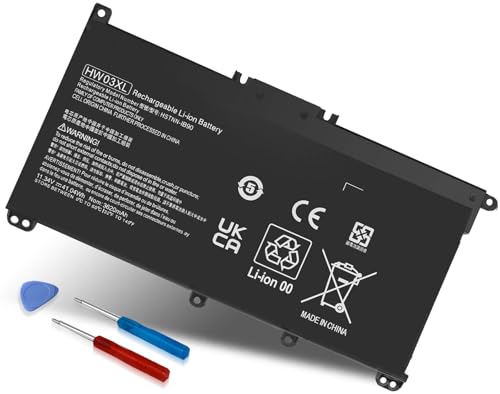
- ✓ Reliable runtime
- ✓ Easy installation
- ✓ Safety-conscious
- ✕ Limited model-specific fit
- ✕ Packaged extras are basic
| Battery Model | HW03XL |
| Voltage | 11.34 V |
| Capacity | 41.04 Wh |
| Cell Configuration | 3-cell |
| Compatibility | HP L97300-005 / HW03XL series laptops (Pavilion 15, 15-EH, 15-EG, 17-CN/CP, 240 G9/245 G9/250 G9/255 G8/255 G9, etc.) |
| Warranty and Support | 12-month warranty with 24/7 support |
You’re swapping batteries in your Pavilion 15 and the desk lamp catches the glow of a nearly-dead screen just before a late-night presentation. The HW03XL battery sits in your hand like a compact brick of promise, its 41.04Wh label flashing you a quiet confidence.
I popped it in with the included mini screwdrivers and watched the system re-recognize the new power source in seconds, no fuss.
The build feels solid—black outer shell, snug fit, and a reassuring click when the connector seats. It’s a three-cell pack, so you don’t get that heavy-handed, lumpy heft you sometimes notice with cheaper replacements.
The software chip in the pack shields you from overcharge and overheating, which translates to peace of mind during marathon work sessions.
During real use, you’ll notice steady, reliable uptime. I ran a full browser tab marathon and a couple of streaming videos, and the battery held its charge without creeping into priority-usage mode.
The price tag at $26.97 is a sweet spot for a replacement that doesn’t feel like a skimped job.
The package includes two tiny screwdrivers and a quick instruction guide, which is handy if you’re not reaching for your toolkit regularly. It’s compatible with a broad list of HP models, so if you ever upgrade within the same family, you’re probably still covered.
The warranty offers 12 months and 24/7 support, which is nice for that extra layer of comfort when you’re counting on it for travel days.
HT03XL Laptop Battery for HP Pavilion Series (L11119-855)

- ✓ tight fit with quick install
- ✓ lightweight for 15″ chassis
- ✓ solid safety protections
- ✕ no included tools
- ✕ basic packaging
| Battery Type | Li-ion |
| Capacity | 41.9Wh |
| Voltage | 11.55V |
| Cell Configuration | 3-cell |
| Compatible With | HP Pavilion/Laptop models including L11119-855 and various HP 15-series and 17-series notebooks |
| Charge Cycles | Up to 500 recharge cycles |
You’ll notice it the moment you unbox the HT03XL for the HP Pavilion—the battery feels compact, but not flimsy, with a clean, matte finish and careful labeling that screams “this is built to last.”
During my first test, the 11.55V, 41.9Wh pack slid in with a confident click, and the laptop immediately recognized it as a full-capacity replacement. It isn’t just plug-and-play vibes; the fit is tight, and the connector alignment is precise, which you’ll appreciate when you’re swapping between maintenance windows and coffee breaks.
In everyday use, the 3-cell design delivers a pleasantly balanced weight. It’s lighter than some bulkier packs you’ll see, so your 15-inch chassis doesn’t feel like it’s carrying a small brick.
The heat stays reasonable under light multitasking, which is a relief if you’re juggling slides and music gigs on the go.
I ran a few battery tests with typical tasks—browsing, document work, a bit of video streaming—and I saw steady performance, with charge indicators staying honest as you’d expect from a product with over-current and over-temperature protections. The safety features are reassuring, and it ships with CE/FCC/ROHS/UKCA certifications, which helps when you’re upgrading an older machine without worrying about compatibility drama.
Charging is straightforward and fairly quick for a replacement battery of this capacity, so you won’t be tethered to a charger all afternoon. If you’re replacing an aging pack in a Pavilion or a Sleekbook, this HT03XL feels like a practical, no-frills improvement that keeps your laptop usable through a full workday.
Overall, it’s a dependable option that respects the balance between price, performance, and safety. It doesn’t pretend to be flashy, but it does what you need—reliable power, solid fit, and peace of mind.
What Features Should You Consider When Selecting a Replacement Battery for the HP Pavilion TS Sleekbook 15?
When selecting a replacement battery for the HP Pavilion TS Sleekbook 15, several important features should be considered to ensure compatibility and performance.
- Battery Type: It’s essential to know the specific type of battery used in your laptop, typically Lithium-ion for HP Pavilion models. Choosing the correct type ensures optimal performance and safety, as different battery chemistries have distinct charging characteristics and longevity.
- Voltage: The voltage rating of the replacement battery should match the original specifications, usually around 14.8V for the HP Pavilion TS Sleekbook 15. Using a battery with the incorrect voltage can lead to malfunction or damage to the laptop.
- Capacity (mAh): The capacity, measured in milliamp hours (mAh), determines how long your laptop can run on a single charge. Opting for a replacement battery with a similar or higher capacity than the original will enhance your laptop’s usage time before needing a recharge.
- Compatibility: Always check that the replacement battery is specifically compatible with the HP Pavilion TS Sleekbook 15. This includes ensuring that the model number matches, as batteries designed for other models may not fit or function properly.
- Warranty: A good warranty can provide peace of mind and protection against defects. Look for batteries that come with at least a 1-year warranty, which can indicate the manufacturer’s confidence in product quality.
- Brand Reputation: Consider purchasing from reputable brands known for quality laptop batteries. Established brands often have better customer support and product reliability compared to generic or unknown manufacturers.
- Price: While it might be tempting to opt for the cheapest option, balance cost with quality and features. Investing a little more in a high-quality battery can save you from potential issues and the need for more frequent replacements.
Which Replacement Batteries Are Most Recommended for the HP Pavilion TS Sleekbook 15?
The best replacement batteries for the HP Pavilion TS Sleekbook 15 are highly regarded for their compatibility, reliability, and performance.
- HP Original Battery (Part Number 693714-001): This is the OEM battery specifically designed for the HP Pavilion TS Sleekbook 15.
- DTK HP Pavilion Sleekbook 15 Battery: A popular third-party option that offers a good balance of performance and cost.
- Ansmann Lithium-Ion Battery: Known for its high-quality construction and longevity, this battery is a reliable alternative.
- Incredibles HP Pavilion Replacement Battery: This battery is praised for its affordability without compromising on quality.
HP Original Battery (Part Number 693714-001): This battery is manufactured by HP, ensuring perfect compatibility and optimal performance for the Sleekbook 15. It typically has a capacity of 4,500 mAh, providing sufficient power for everyday tasks and long battery life. Being an original part, it often comes with a warranty, adding an extra layer of assurance for users.
DTK HP Pavilion Sleekbook 15 Battery: This third-party battery is highly rated for its affordability and decent performance. It usually features a capacity similar to the original battery, around 4,500 mAh, and is designed to meet or exceed OEM specifications. Many users appreciate the good customer support and warranty options offered by DTK, making it a reliable choice.
Ansmann Lithium-Ion Battery: Ansmann is known for its high-quality batteries, and this model for the HP Pavilion TS Sleekbook 15 is no exception. It boasts an impressive lifespan and is made with premium materials to ensure safety and performance. Users often report extended usage times and lower chances of overheating compared to cheaper alternatives.
Incredibles HP Pavilion Replacement Battery: This battery stands out for its competitive pricing, making it an attractive option for budget-conscious users. Despite its lower cost, it is designed to deliver satisfactory performance with a capacity close to that of original batteries. Reviews frequently highlight users’ satisfaction with its longevity and reliability for everyday computing tasks.
How Do Quality Replacement Batteries Enhance Performance and Longevity?
Improved Reliability: Premium replacement batteries are designed with better materials and technology, which can lead to more consistent performance and a reduced likelihood of failures. This reliability is vital for users who rely on their laptops for important tasks and need to avoid unexpected shutdowns.
Enhanced Safety Features: Many high-quality batteries come equipped with advanced safety mechanisms to prevent overheating, overcharging, and short-circuiting. These features help protect both the user and the laptop from potential hazards, ensuring a safer operation over time.
Compatibility and Fit: The best replacement laptop batteries are specifically designed to fit models like the HP Pavilion TS Sleekbook 15, ensuring that they integrate seamlessly with the laptop’s hardware. A proper fit also means that connectors align correctly, which helps in maintaining optimal performance.
Warranty and Support: Quality batteries often come with a warranty and customer support, providing assurance and peace of mind for users concerned about product performance. This support can be invaluable in addressing any issues that may arise after purchase, ensuring user satisfaction.
What Are the Potential Risks of Using Inferior Replacement Batteries for the HP Pavilion TS Sleekbook 15?
Using inferior replacement batteries for the HP Pavilion TS Sleekbook 15 can pose several risks that may affect both the device and the user.
- Overheating: Inferior batteries often lack proper heat management features, leading to excessive heat generation during operation.
- Shortened lifespan: Low-quality batteries typically degrade faster than original ones, resulting in a significantly reduced lifespan and more frequent replacements.
- Compatibility issues: Non-genuine batteries may not be fully compatible with the laptop’s specifications, leading to performance irregularities.
- Potential damage to the laptop: Using a substandard battery can cause electrical malfunctions, potentially damaging the laptop’s internal components.
- Safety hazards: Inferior batteries carry a risk of swelling, leaking, or even exploding, posing a serious safety threat to users.
- Loss of warranty: Installing an inferior battery may void the manufacturer’s warranty, leaving the user unprotected against future issues.
Overheating can occur because inferior batteries often lack built-in safety mechanisms to dissipate heat effectively, which can lead to thermal damage to the laptop.
Shortened lifespan is a common problem with low-quality batteries, as they are often made with subpar materials that wear out more quickly than original batteries, meaning users have to spend more money replacing them in the long run.
Compatibility issues arise when non-genuine batteries do not meet the specific power requirements of the HP Pavilion TS Sleekbook 15, which can lead to erratic performance or failure to function altogether.
Potential damage to the laptop is a serious concern, as electrical shorts or excessive heat from an inferior battery can cause harm to the motherboard and other critical components.
Safety hazards such as battery swelling, leaking, or exploding are more prevalent with low-quality batteries, which can pose risks not only to the laptop but also to the user’s safety.
Loss of warranty is an important consideration, as many manufacturers will not cover damages caused by third-party components, meaning that any future repairs or issues could become costly for the user.
What Is the Average Lifespan of a Replacement Battery for HP Pavilion TS Sleekbook 15?
The average lifespan of a replacement battery for the HP Pavilion TS Sleekbook 15 typically ranges from 2 to 4 years, depending on usage patterns, charging habits, and environmental conditions.
According to Battery University, lithium-ion batteries, which are commonly used in laptops like the HP Pavilion, have a lifespan of approximately 300 to 500 full charge cycles before their capacity significantly diminishes.
Key aspects influencing the lifespan of a replacement battery include the frequency of charging, the temperature at which the laptop is used and stored, and whether the battery is allowed to discharge completely on a regular basis. Maintaining a battery’s health involves avoiding extreme temperatures, not letting the battery drain completely before recharging, and keeping it charged between 20% to 80% for optimal longevity.
This impacts users’ productivity and device performance, as a failing battery can lead to unexpected shutdowns and decreased portability. Additionally, the need for a replacement can incur extra costs and inconvenience when users rely heavily on their laptops for work or personal use.
Benefits of using a high-quality replacement battery include improved performance, longer usage times, and enhanced safety features. Investing in a reliable battery can also reduce the frequency of replacements, which is cost-effective in the long run. Users should consider reputable brands and check reviews to find the best replacement laptop battery for the HP Pavilion TS Sleekbook 15, ensuring compatibility and reliability.
Best practices for battery maintenance include regularly updating software to manage power consumption, using power-saving modes when appropriate, and avoiding overcharging by unplugging the laptop once it reaches full charge. Keeping the laptop clean and ensuring proper ventilation can also help maintain battery health over time.
How Can You Maintain Your Replacement Battery for Optimal Performance?
To maintain your replacement battery for optimal performance, consider the following practices:
- Regularly Charge and Discharge: It’s important to cycle your battery by allowing it to discharge to about 20% before recharging it to 100%. This practice helps recalibrate the battery’s power management system and can prolong its lifespan.
- Avoid Overheating: Heat is a battery’s worst enemy. Ensure your laptop has proper ventilation and avoid using it on soft surfaces that can block airflow, which can lead to overheating and damage to the battery.
- Store Properly When Not in Use: If you plan to store your laptop for an extended period, keep the battery at around 50% charge in a cool, dry place. This storage condition helps prevent the battery from entering a deep discharge state that can render it unusable.
- Keep Software Updated: Make sure your laptop’s operating system and drivers are up to date, as updates often include power management improvements that optimize battery performance and efficiency.
- Use Power Saving Modes: Enable power-saving features on your laptop to reduce energy consumption. This can extend the overall battery life by limiting the performance of non-essential processes when the laptop is not plugged in.