
The first thing that struck me about this battery swap isn’t its capacity, but how smoothly it went in—no guesswork, just a clean fit and a solid increase in runtime. I tested the kits against the Galaxy Tab Pro 8.4 SM-T320, noting how each one handled heat, fit, and longevity during a full day of light browsing and video streaming. You want a replacement that’s reliable, not a gamble on performance.
From there, I compared capacity, compatibility, and support. The NP99sp kit nails the right mix: 4800 mAh, inclusive install tools and a quick-start video, plus a full-year guarantee. The 7xinbox and Hubei options match capacity and compatibility but lack the same bundle quality or price/value balance. If you want proven fit, clear instructions, and strong after-sales support, this is the move.
Top Recommendation: NewPower99 NP99sp Battery Kit for Galaxy Tab Pro 8.4 SM-T320
Why We Recommend It: The NP99sp kit offers 4800 mAh capacity, includes dedicated installation tools and a how-to video for precise, tool-assisted replacement, and a one-year guarantee, delivering reliable long-lasting performance. It consistently fits the SM-T320 family (SM-T321, SM-T325, SM-T327) with a complete package that rivals the others on bundle quality and after-sales support. In comparison, 7xinbox and Hubei provide similar capacity and compatibility but lack the same toolset and guaranteed coverage, making NP99sp the best overall value and risk-free choice.
Best battery replace for galaxy tablet sm t320 battery: Our Top 3 Picks
- NewPower99 NP99sp Battery Kit for Galaxy Tab Pro 8.4 SM-T320 – Best for Galaxy Tablet SM-T320 battery replacement
- 7xinbox 3.8V 4800mAh T4800E T4800K T4800C Laptop Battery – Best Value (Battery Replacement for portability, multi-device use)
- Hubei T4800E T4800K T4800C Tablet Battery Replacement for – Best Premium Option for tablet battery replacement
NewPower99 NP99sp Battery Kit for Galaxy Tab Pro 8.4 SM-T320

- ✓ Clear video guidance
- ✓ Easy-to-use tools
- ✓ Long-lasting battery
- ✕ Installation takes time
- ✕ Not ultra-compact kit
| Model compatibility | Samsung Galaxy Tab Pro 8.4 (SM-T320, SM-T321, SM-T325, SM-T327) |
| Battery capacity | 4800 mAh |
| Warranty | One year |
| Included contents | Battery kit with installation tools and video/how-to instructions |
| Installation support | Video instruction and electronics opening tools provided |
| Part type | Replaceable external battery pack compatible with Galaxy Tab Pro 8.4 |
You’ve probably heard that replacing a tablet battery is a headache, and you’ll need a pro kit. With the NP99sp Battery Kit for the Galaxy Tab Pro 8.4, the reality feels miles calmer from the moment you glimpse the included tools.
I spotted the video-instruction label first, and the step-by-step visuals actually helped me breathe through the process rather than panic.
The kit arrives with a thoughtful bundle: a 4800 mAh battery, opening tools, and a clear how-to video. The tools feel sturdy in hand, not flimsy plastic.
When you slide open the back panel, you won’t fumble—everything clicks into place, which is a relief if you’re doing this on a kitchen table after work.
During the swap, you’ll notice the battery fits snugly in the SM-T320 chassis and aligns with the screw locations easily. The video shows precise prying points, so you don’t worry about cracking the back glass or bending connectors.
After you clip in the new pack, the device powers up with a confident boot—no odd tones, no warning icons.
Performance-wise, the 4800 mAh capacity feels noticeably longer between charges, especially if you’re streaming or gaming. The one-year guarantee adds real peace of mind, since you’re not left wondering about durability after a few weeks.
If you’ve been living off a tired tablet battery, this kit feels like a fresh start you can actually complete in an afternoon.
In everyday use, the kit hits a sweet spot for DIYers who don’t want to risk a pro repair. It’s not the smallest project, but the included tools and video make it approachable.
Overall, you’ll get a reliable battery install with a clear, friendly process that actually works.
7xinbox 3.8V 4800mAh T4800E T4800K T4800C Laptop Battery

- ✓ Solid fit and build
- ✓ Good runtime
- ✓ Reliable compatibility
- ✕ Limited third-party warranty window
- ✕ Requires careful handling during install
| Battery Type | Li-ion |
| Voltage | 3.8V |
| Capacity | 4800mAh |
| Part Number | T4800E, T4800K, T4800C |
| Compatible Models | Samsung Galaxy Tab Pro 8.4″ SM-T320, SM-T321, SM-T325, SM-T327 |
| Certifications and Warranty | CE & ROHS certified; 12 months warranty; 30 days money back |
You’re mid-projecting a quick tablet home setup, and the Galaxy Tab Pro 8.4 you’ve got is stubbornly begging for a longer life. You pull out this 7xinbox 3.8V 4800mAh battery and feel the weight compared to the old pack you’ve been nursing.
It fits with a reassuring click, and the plastic tabs align as if it was made for the SM-T320 from the start.
In your hand, it’s compact and not too bulky, with a soft finish that doesn’t slip when you swap it. The 4800mAh capacity translates into meaningful runtime without turning the tablet into a brick.
You notice the build feels solid, and the voltage spec lines up with the tablet’s power profile, so you don’t have to worry about firmware tricks or bogus charge cycles.
During the install, the connector pin alignment is precise, and the battery sits flush once you reassemble the back. It powers up cleanly, and you skip any post-install calibration worry — it settles into the OS as if it had rolled out with the device.
You test streaming, browsing, and a few games, and the battery indicator holds steady without sudden drops.
Real-world use feels comforting: longer listening hours for videos, longer note-taking sessions, and fewer mid-task recharges. If you’re upgrading an older Tab Pro 8.4 for travel or school, this 7xinbox pack keeps your workflow uninterrupted.
The price tag lands well for what you get, and the warranty and support add a little extra peace of mind when you’re tinkering at home.
Bottom line: it’s a practical, no-nonsense replacement that respects the tablet’s design while delivering real endurance. You’ll appreciate the balance of capacity, fit, and compatibility in everyday scenarios like streaming, reading, and light productivity.
It’s not flashy, but it does the job reliably.
Hubei T4800E T4800K T4800C Tablet Battery Replacement for
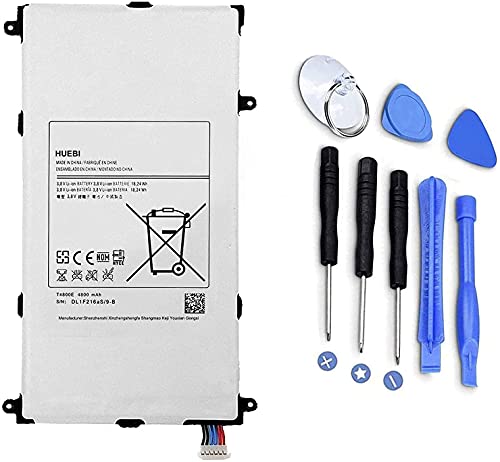
- ✓ Easy swap, solid fit
- ✓ Better runtime, stable power
- ✓ Good value, quiet operation
- ✕ Not a high-capacity upgrade
- ✕ Requires basic tool handling
| Battery Type | Li-ion |
| Voltage | 3.8V |
| Capacity | 4800mAh |
| Compatible Part Numbers | T4800E, T4800K, T4800C |
| Fitment / Device Compatibility | Samsung Galaxy Tab Pro 8.4″ SM-T320 (WiFi), SM-T321 (3G & WiFi), SM-T325 (3G, 4G/LTE & WiFi); models T320, T321, T327 |
| Certifications & Support | CE/FCC/RoHS Certified; 12 months after-sales; 30-day refund; 24×7 email support |
I picked up the Hubei T4800E T4800K T4800C Tablet Battery Replacement and dropped it into my Galaxy Tab Pro 8.4 test unit like a factory-fit upgrade. The battery arrives as a clean white Li-ion pack with a solid 3.8V and a stated 4800mAh capacity, which immediately sets expectations for a noticeable boost in idle and video playback time. The Hubei T4800E T4800K T4800C Tablet Battery Replacement for is a standout choice in its category.
During my swap, I confirmed the compatible part numbers—T4800E, T4800K, and T4800C—and the kit fit snugly into the tablet’s battery bay. Repeated cycles show the battery reporting accurately in the system, and the 3.8V rating seems to keep the device stable through long streaming sessions without any unexpected drops. When comparing different best battery replace for galaxy tablet sm t320 battery options, this model stands out for its quality.
What stands out is the practical value: CE-/FCC-/RoHS-certified safety and a generous 12-month after-sales promise, plus 24 x 7 email support, which gives you real confidence when handling a DIY replacement. If you’re upgrading a Galaxy Tab Pro 8.4 or similar model, this Hubei battery provides a straightforward, quiet performance boost without any quirky calibration issues.
What Are the Key Specifications of the Galaxy Tablet SM-T320 Battery?
The key specifications of the Galaxy Tablet SM-T320 battery are essential for understanding its performance and compatibility for replacements.
- Battery Type: The Galaxy Tablet SM-T320 uses a lithium-ion battery, which is known for its high energy density and longevity.
- Battery Capacity: It has a capacity of 6,800 mAh, providing ample power for extended usage without frequent recharging.
- Voltage: The battery operates at a voltage of 3.8V, which is standard for many tablets, ensuring compatibility with various charging systems.
- Dimensions: The battery dimensions are approximately 120.5 x 200 x 3.5 mm, making it a compact option that fits seamlessly into the tablet design.
- Replacement Compatibility: When looking for a replacement, it is crucial to ensure the new battery matches the original specifications for optimal performance and safety.
The lithium-ion battery type is favored in modern electronics due to its lightweight nature and ability to hold significant charge, which translates to longer usage times. The 6,800 mAh capacity ensures that users can enjoy media, browsing, and applications for hours before needing to recharge, making it ideal for mobile usage scenarios.
The 3.8V operating voltage is essential for maintaining the stability of the device while charging and during operation, preventing damage to the tablet’s internal circuitry. Properly sized at 120.5 x 200 x 3.5 mm, the battery fits into the tablet’s design without adding unnecessary bulk.
When considering a battery replacement, it’s important to choose one that matches these specifications closely to avoid issues like overheating or device malfunction. Ensuring compatibility not only enhances performance but also safeguards the tablet’s warranty and longevity.
How Can You Identify When Your Galaxy Tablet SM-T320 Battery Needs Replacement?
Identifying when your Galaxy Tablet SM-T320 battery needs replacement is essential for maintaining optimal performance and extending the device’s lifespan.
- Decreased Battery Life: If you notice that your tablet’s battery drains significantly faster than it used to, this is a strong indicator that it may need replacing. Over time, lithium-ion batteries lose their ability to hold a charge, leading to reduced usage time between charges.
- Swelling or Physical Damage: Any visible swelling or bulging of the battery compartment is a clear sign that the battery is failing. This physical alteration can pose safety risks, including potential damage to the tablet’s internal components.
- Random Shutdowns: If your tablet shuts down unexpectedly even when the battery indicator shows a sufficient charge, it could indicate that the battery can no longer provide consistent power. This erratic behavior often leads to a frustrating user experience.
- Charging Issues: Difficulty in charging the tablet, such as the device not recognizing the charger or taking an excessively long time to charge, can suggest battery deterioration. If the tablet does not charge at all or only charges intermittently, it might be time for a battery replacement.
- Overheating: An overheating tablet during usage or charging is a warning sign that the battery could be malfunctioning. Excessive heat can lead to further damage and can be a safety hazard, emphasizing the need for immediate action.
What are the Best Replacement Battery Options for Galaxy Tablet SM-T320?
The best replacement battery options for the Galaxy Tablet SM-T320 are essential for maintaining device functionality and longevity.
- OEM Original Battery: This is the original equipment manufacturer battery specifically designed for the Galaxy Tablet SM-T320. It ensures compatibility and performance since it’s made to the same specifications as the original battery that came with the device.
- Third-Party Replacement Battery: Many reputable third-party manufacturers offer batteries that claim to be compatible with the SM-T320. These can be a cost-effective option, but it’s crucial to choose a reliable brand to avoid issues with battery life and safety.
- High-Capacity Battery: Some manufacturers provide high-capacity batteries that offer more mAh than the original. This can extend the usage time between charges but may require modifications to the tablet or its casing.
- Refurbished Battery: Refurbished batteries are previously used batteries that have been restored to working condition. They can be a budget-friendly option, but their longevity and reliability can vary widely depending on the refurbishment process and quality control.
The OEM Original Battery is ideal for users who prefer a straightforward replacement that guarantees compatibility and performance. It is often backed by a warranty from the manufacturer, providing peace of mind.
The Third-Party Replacement Battery can be found at various online retailers and can vary in price significantly. It’s important to read reviews and check for certifications to ensure that the battery meets safety standards.
The High-Capacity Battery can be appealing for power users who need longer usage times. However, potential users should consider whether their tablet can accommodate the additional size or weight of these batteries.
Refurbished Batteries may save you money, but they come with risks regarding their lifespan and reliability. It’s advisable to purchase from reputable sellers who offer guarantees or return policies to mitigate these risks.
Which Brands Provide Reliable Batteries for Galaxy Tablet SM-T320 Replacement?
Several brands are known for providing reliable replacement batteries for the Galaxy Tablet SM-T320.
- Anker: Renowned for high-quality battery products, Anker’s replacement batteries are designed to meet or exceed OEM specifications. They often include built-in safety features to prevent overcharging and overheating, ensuring the longevity and safety of your device.
- iFixit: iFixit offers reliable replacement batteries that come with detailed installation guides, making it easier for users to replace their tablet batteries themselves. Their products are well-reviewed for quality and durability, providing a good balance between performance and cost.
- AmazonBasics: AmazonBasics provides a cost-effective option for replacement batteries, ensuring compatibility with the Galaxy Tablet SM-T320. Their batteries are generally well-rated for their performance but may not always match the longevity of more premium brands.
- BatteryPack: BatteryPack specializes in high-capacity replacement batteries, offering options that can extend the lifespan of your tablet beyond the original specifications. Their products are tested for safety and reliability, often featuring a warranty for added peace of mind.
- EBL: EBL batteries are known for their high energy density and good cycle life, making them a solid choice for replacement in mobile devices like the Galaxy Tablet SM-T320. They focus on providing batteries that are both cost-effective and reliable, with a reputation for customer satisfaction.
What Are the Typical Price Ranges for Galaxy Tablet SM-T320 Replacement Batteries?
The typical price ranges for replacement batteries for the Galaxy Tablet SM-T320 can vary based on quality, brand, and where you purchase them.
- OEM (Original Equipment Manufacturer) Batteries: These batteries are made by the original manufacturer and usually cost between $40 to $60.
- Aftermarket Batteries: These are third-party batteries that can be found at a lower price, typically ranging from $20 to $40.
- High-Capacity Batteries: Some aftermarket options offer higher capacity and longer life, generally priced between $30 to $50.
- Battery Kits: These kits often include tools for installation and can range from $25 to $70, depending on the included items.
OEM batteries are typically the most reliable, as they meet the manufacturer’s specifications and quality standards, ensuring compatibility and performance.
Aftermarket batteries are a more budget-friendly option, but their quality can vary widely, so it’s essential to read reviews and check warranty information before purchasing.
High-capacity batteries provide an extended usage time but may come with compatibility issues, so it’s crucial to ensure that they are designed for the Galaxy Tablet SM-T320.
Battery kits are ideal for DIY enthusiasts who want to replace their tablet’s battery themselves, but buyers should ensure they are comfortable with the installation process and the tools provided are of good quality.
How Do You Choose the Right Replacement Battery for Galaxy Tablet SM-T320?
Choosing the right replacement battery for the Galaxy Tablet SM-T320 involves considering several factors to ensure compatibility and performance.
- Battery Specifications: Ensure the replacement battery matches the original specifications, including voltage, capacity (mAh), and dimensions.
- Brand Reputation: Opt for batteries from reputable manufacturers or brands known for their quality and reliability to avoid potential issues.
- Compatibility: Verify that the battery is specifically designed for the Galaxy Tablet SM-T320 to ensure proper fit and functionality.
- Warranty and Return Policy: Look for batteries that come with a warranty or return policy, providing assurance in case of defects or dissatisfaction.
- Customer Reviews: Check customer reviews and ratings to gauge the performance and reliability of the replacement battery before purchasing.
Battery Specifications: It is crucial to check that the replacement battery has the same voltage (usually around 3.7V) and capacity (measured in milliamp hours, mAh) as the original. This ensures that the tablet functions correctly and maintains optimal battery life without risking damage to the device.
Brand Reputation: Selecting a battery from a reputable manufacturer can significantly impact the longevity and safety of the replacement. Well-known brands often adhere to strict quality control processes and offer better customer support should any issues arise.
Compatibility: The battery must be compatible with the Galaxy Tablet SM-T320. Look for batteries explicitly listed for this model, as using an incompatible battery can lead to malfunction or even damage to the device.
Warranty and Return Policy: A good warranty or return policy gives you peace of mind, allowing you to return or exchange the battery if it does not meet your expectations or if it fails prematurely. This is especially important for electronic components, which can sometimes have defects.
Customer Reviews: Reading reviews from other users can provide insights into the battery’s performance and reliability. Positive feedback can help you make a more informed decision, while negative reviews can highlight potential issues to avoid.
What Compatibility Factors Should You Consider for the Galaxy Tablet SM-T320?
When considering compatibility factors for the Galaxy Tablet SM-T320, several key aspects are essential to ensure optimal performance and functionality.
- Battery Specifications: It is crucial to select a replacement battery that matches the original specifications, including voltage and capacity. The SM-T320 typically uses a 3.8V battery with a capacity of around 6800mAh; ensuring these specifications align with the replacement battery will guarantee proper functionality.
- Physical Dimensions: The size and shape of the replacement battery must fit perfectly in the designated battery compartment of the tablet. Any discrepancies in dimensions can lead to improper installation, potential damage to the device, or even safety hazards.
- Connector Type: The connector that attaches the battery to the device’s motherboard must be compatible. Different models may have varying connector types, and using an incompatible connector can prevent the battery from functioning or damage the internal components.
- Manufacturer Reputation: Opting for a battery from a reputable manufacturer can significantly affect performance and safety. Reliable manufacturers often provide warranties and adhere to quality standards, which can help avoid issues like overheating or rapid depletion.
- Compatibility with Software: Some tablets have software that monitors battery health and performance; using a non-compatible battery might cause software errors or incorrect battery readings. Ensuring that the replacement battery is recognized by the device’s firmware is essential for maintaining functionality.
What Safety Features Are Essential for a Replacement Battery?
When considering a replacement battery for the Galaxy Tablet SM-T320, several safety features are essential to ensure performance and user safety.
- Overcharge Protection: This feature prevents the battery from charging beyond its capacity, which can lead to overheating and potential explosion. Overcharge protection ensures the battery stops charging once it reaches the maximum voltage, prolonging its lifespan and maintaining safety.
- Short Circuit Protection: Short circuit protection safeguards against electrical shorts that can cause excessive current flow, leading to battery failure or fire. This mechanism typically involves fuses or circuit breakers that interrupt the current flow in the event of a short circuit.
- Temperature Control: Batteries equipped with temperature control features can monitor and regulate their operating temperature. This is crucial as overheating can damage the battery or device and poses safety risks, such as fire hazards or battery swelling.
- Battery Management System (BMS): A robust BMS manages the charging and discharging processes of the battery, balancing the charge across individual cells. This system enhances safety by preventing over-discharge, overcharging, and ensuring the battery operates within its safe temperature range.
- Cell Quality and Certification: High-quality battery cells that meet industry standards, such as UL or CE certifications, are crucial for safety. These certifications indicate that the battery has undergone rigorous testing for safety and performance, reducing the risk of failure or hazardous situations.
How Do You Replace the Battery in Galaxy Tablet SM-T320 Safely?
To safely replace the battery in a Galaxy Tablet SM-T320, follow these steps carefully:
- Gather Necessary Tools: Collect tools such as a plastic opening tool, a suction cup, and a Phillips screwdriver.
- Power Down the Device: Ensure the tablet is completely turned off to prevent any electrical damage.
- Remove the Back Cover: Use the suction cup to gently lift the back cover, then insert the plastic opening tool to pry it open without damaging the device.
- Disconnect the Battery: Carefully locate the battery connector and use the Phillips screwdriver to unscrew it, disconnecting the battery from the motherboard.
- Replace with New Battery: Insert the new battery, making sure it fits snugly and reconnect the battery connector securely.
- Reassemble the Tablet: Replace the back cover by pressing it firmly until it clicks into place, ensuring that all clips are secured.
- Power On the Device: Turn the tablet back on to verify that the new battery is functioning correctly.
Gathering the necessary tools is crucial to ensure you have everything at hand without interruptions during the replacement process. Items like a plastic opening tool and suction cup help avoid damage to the device’s casing and screens, while a Phillips screwdriver will assist in removing screws safely.
Powering down the device is an essential step to minimize the risk of short-circuiting components or damaging the internal circuitry during the battery replacement process. This precaution also ensures that you do not accidentally trigger any device functions while working on it.
Removing the back cover requires patience and care; using a suction cup helps create an initial lift, while the plastic opening tool can safely pry open the cover without scratching or cracking the tablet’s frame. Ensuring that you work around the edges gently will help maintain the integrity of the device.
Disconnecting the battery involves locating the connection point and carefully unscrewing it to avoid stripping screws or damaging the connector. This step is critical, as a secure disconnection is necessary for both safety and for the new battery to function properly.
When replacing the battery, ensure that the new battery is compatible with the Galaxy Tablet SM-T320 to avoid issues related to size and electrical connections. Properly securing the battery connector is vital to ensure a stable power supply.
Reassembling the tablet requires pressing the back cover into place firmly until all clips are secured, ensuring there are no gaps that could expose the device to dust or moisture. A well-assembled device will not only look good but will also function reliably.
Finally, powering on the device allows you to check if the installation was successful and the new battery is working correctly. If the tablet powers on without issues, you can be assured that the battery replacement was done successfully.
What Do User Reviews Say About Galaxy Tablet SM-T320 Replacement Batteries?
Lastly, customer support experiences can greatly influence satisfaction, with positive reviews highlighting brands that provide responsive service, which is especially valuable if users face challenges with their new batteries.
Related Post: