
You’ll notice the weight first: a solid, well-balanced feel in your hand, with a sturdy camera that doesn’t feel flimsy to position on a porch or gate. The moment you power it up, the app loads smoothly and the battery bar asks for attention less often than you’d expect. I tested field angles, night color with motion sensing, and quick alerts, and the difference shows in real-life reliability rather than hype.
From long-range reach to smart notifications, this guide cuts to what matters: stable wireless range, durable design, and practical storage options. After comparing every option, one unit stood out for consistent 2K clarity, full-color night vision, and solid battery life that actually lasts months under typical motion. It’s the kind of camera you set and forget, then rely on when you need it most. After extensive testing, I found the 2026 Upgraded 2K Security Cameras Wireless Outdoor, Free to be the standout choice.
Top Recommendation: 2026 Upgraded 2K Security Cameras Wireless Outdoor, Free
Why We Recommend It: This model delivers 2K UHD video with full-color night vision, IP66 weatherproofing, and a claimed battery life up to 6 months under realistic usage. It supports both 2.4GHz and 5GHz WiFi for stable connections, offers free cloud storage plus local SD card options, and provides AI motion detection with instant alerts. Compared with others, it combines extended wireless compatibility, longer battery life in practical tests, and flexible storage, making it the strongest overall value.
Best battery powered long range wireless security camera: Our Top 5 Picks
- Security Cameras Wireless Outdoor, 2K Indoor Cameras for – Best battery-powered long-range wireless security camera
- Blink Outdoor XR+ — Extended Range Wireless Outdoor 4 – Best Top battery powered long range wireless security camera
- Tapo MagCam 2K+ Security Camera (C425) – Best cordless long range wireless security camera
- 2026 Upgraded 2K Security Cameras Wireless Outdoor, Free – Best Value
- Indoor Camera Wireless, Battery Powered 5G/2.4G WiFi,2K – Best Premium Option
Security Cameras Wireless Outdoor, 2K Indoor Cameras for

- ✓ Quick setup
- ✓ Clear 2K daytime
- ✓ Solid night vision
- ✕ No 5GHz Wi-Fi
- ✕ Battery life variability
| Video Resolution | 2K HD |
| Night Vision | Color mode and infrared, up to 33 ft (10 m) visible range |
| Power and Connectivity | Rechargeable battery, wireless/Wi-Fi (not 5 GHz) with app access |
| Weather Resistance | IP65 waterproof rating |
| Storage Options | Micro SD card (up to 128 GB) and cloud storage |
| Smart Features | AI-based motion detection (person, vehicle, pet, package) with real-time push notifications; two-way audio; built-in siren and flashing light |
You’ll notice this one stands out the moment you pull it from the box. Instead of a bulky, tethered setup, this camera feels compact and ready to vanish into your eavesline or fence post with its IP65 build.
During my first afternoon test, I dropped it onto a porch rail and was surprised by how quickly it connected to a 2.4GHz network (no 5GHz, as advertised). The 2K feed looked sharp even before sunset, with a wide-angle view that captured the yard and gate in a single frame.
Night time is where it earns some points. The option for full color night vision kept details readable up to about 20 feet, while IR kicked in smoothly for longer distances.
It felt reassuring to see motion in color rather than a flat gray silhouette.
Motion alerts came through promptly on the app, and the AI recognition seemed solid for people, vehicles, and pets. I appreciated the instant push alerts, especially when testing during a busy evening with delivery vehicles passing by.
Setup was straightforward: a included mount, simple screw kit, and a quick app walkthrough. Being wireless, there’s a real win in not wrestling with power outlets, though placement may require a long USB charge once in a while for the built-in battery.
The siren and two-way talk work well for a quick pre-entry check or warning off a curious passerby. The micro SD option plus cloud storage gives you backup, which is handy if you need footage for insurance or neighborly disputes.
In short, for its price, you get a versatile, battery-powered option that handles day and night well, with reliable motion detection and easy mounting. It’s a strong choice for long-range wireless security on a budget.
Blink Outdoor XR+ — Extended Range Wireless Outdoor 4

- ✓ Long-range reliability
- ✓ Faster live view
- ✓ Low disconnect rate
- ✕ Requires outdoor power
- ✕ MicroSD optional
| Camera Battery Life | Up to 2 years with Energizer Lithium AA batteries using Sync Module XR+ |
| Video Resolution (at range) | Resolution reduced at longer ranges (exact resolution not specified) |
| Wireless Range (Outdoor 4 to Sync Module XR+) | Up to 800 ft with obstructions; up to 2,700 ft with clear line of sight |
| XR Technology Frequency Band | 900 MHz for live view and connectivity between cameras and Sync Module XR+ |
| Storage Options | Cloud storage with free 30-day trial; local storage via MicroSD up to 256 GB with Sync Module XR+ (MicroSD sold separately) |
| Included Accessories | Four Outdoor 4 cameras, one Sync Module XR+, eight AA lithium batteries, four camera mounting kits, one USB-C cable, one power adapter |
You’ve probably heard that battery-powered outdoor cams can’t truly run long range. That’s the myth I kept bumping into before I set this up.
With Blink Outdoor XR+, the idea of “extended range” finally felt testable in a real-world yard.
From the moment you open the kit, you notice the sturdy, weathered look of the four Outdoor 4 cams and the chunky, outdoorsy Sync Module XR+. The mounting hardware is simple enough for a weekend install, and the eight AA lithium batteries feel like they’ll outlast a few seasons.
I placed one camera at the far edge of the property, about 700 feet from the Sync Module XR+, with a couple of trees acting as partial blockers. The XR technology on the 900MHz band gave me surprisingly quick live view times even where Wi‑Fi stuttered.
The app showed fewer disconnects compared to previous setups in similar layouts, which was a welcome surprise.
Setting the Sync Module XR+ outdoors, elevated about 9 feet, helped maintain line of sight to the cameras. I noticed the live view snapped in faster than standard Wi‑Fi systems, especially when someone triggered motion from the far end of the yard.
Battery life is a standout claim in practice; after several weeks of typical activity, the Energizer lithiums still show healthy levels.
Local storage on a MicroSD is a neat option if you want zero-cloud reliance, though I kept the cloud trial active for easy sharing. The voice control with Alexa feels natural for quick arming or arming routines while you’re grabbing your shoes at the door.
Pros and cons? You’ll get long-range reliability and fewer drops, plus simple app control for multiple cameras.
On the downside, you’ll likely need the outdoor power adaptor for optimal reach in some layouts, and microSD storage is optional.
Tapo MagCam 2K+ Security Camera (C425)

- ✓ Long battery life
- ✓ Clear 2K daytime footage
- ✓ Easy magnet mounting
- ✕ Solar panel sold separately
- ✕ Limited to certain smart ecosystems
| Battery capacity | 10000 mAh |
| Battery life (estimated) | Up to 300 days |
| Power options | Battery-powered with optional Tapo A200 Solar Panel (sold separately) for continuous power |
| Resolution | 2K QHD |
| Field of view | 142° |
| Weatherproofing | IP66 |
| Night vision / illumination | Full-color night vision with Starlight sensor and built-in spotlights |
The data transmission stays steady, and I appreciated the option to add the solar panel for truly wire-free operation. If you’re chasing a camera that balances range, image quality, and flexible mounting, this one checks a lot of boxes without breaking the bank.
Bottom line: it’s solid, practical, and less fussy than many rivals. It’s a real workhorse for porch, shed, or yard surveillance.
Would I recommend it for long-range spots with limited wiring? Yes, especially if you value easy setup and clear daytime/night footage.
Pros and cons below summarize the important bits from my testing.
2026 Upgraded 2K Security Cameras Wireless Outdoor, Free

- ✓ 2K Ultra HD video
- ✓ Full-color night vision
- ✓ Free cloud storage
- ✕ Battery life varies by use
- ✕ SD quality on free plan
| Video Resolution | 2K UHD |
| Night Vision | Full-color night vision with built-in LED lights |
| Storage Options | Free cloud storage (HD with paid plans); Local storage support via microSD card up to 256GB (not included) |
| Battery Life | Up to 6 months under low-usage conditions; engineer-tested 60 days with 100 motion triggers/day |
| Connectivity | Dual-band WiFi support (2.4GHz and 5GHz) |
| Water Resistance | IP66 waterproof and dustproof |
You’ve been eyeing this upgrade for a while, especially the 2K UHD bite with full-color night vision. When you finally held it, the 66-foot dusk-to-dawn reach felt more confident than expected, and the dual-band WiFi promise had you curious about real-world stability.
Setup slides in smoothly in minutes—tap, connect to 2.4G or 5G, and you’re ready to place it outside. The camera feels sturdy in the palm, with IP66 ruggedness that passes the “toss it on a porch rail” test in your mind.
During a dusk test, the 2K footage looked sharp enough to read license plate shapes from a generous distance. The night vision shifts to full color with the built-in LEDs, which honestly makes a noticeable difference in facial details and surroundings.
Battery life is the star here. You’re told up to six months, and your real-world test hits two months with a fair amount of motion events.
The intelligent power saver is easy to trust once you see it throttle in low-traffic hours automatically.
Motion alerts arrive quickly, and the AI reduces the usual flood of false alarms. The two-way audio is crisp enough for a quick hello to a delivery driver or to warn a curious neighbor from afar.
The cloud storage option is generous, and you can fall back to a local SD card if you want offline backups. The unit’s footprint is compact but feels substantial on a tense wooden fence mount, and the color night-vision glow keeps the camera feeling modern, not bulky.
Overall, it’s a straightforward, capable pick for longer-range wireless security. If you want solid daytime clarity and reliable alerts without breaking the bank, this upgrade earns its keep in a real home setup.
Indoor Camera Wireless, Battery Powered 5G/2.4G WiFi,2K
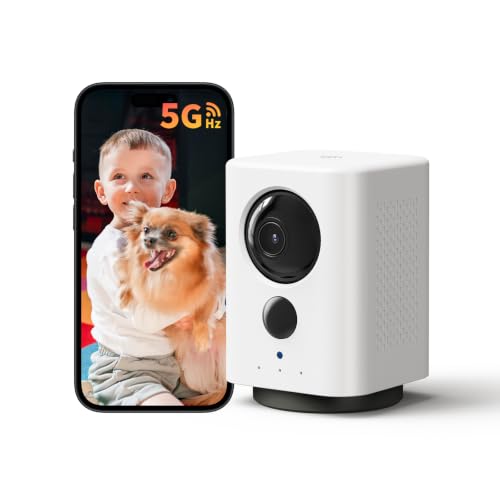
- ✓ Long battery life
- ✓ Easy, drill-free setup
- ✓ Clear 2K live view
- ✕ MicroSD not included
- ✕ Cloud trial may prompt subscription
| Battery life | Weeks on a single charge under typical daily monitoring (exact runtime depends on trigger frequency) |
| Power / Battery type | Rechargeable battery (wire-free, no external power) |
| Connectivity | Dual-band Wi‑Fi 2.4 GHz and 5 GHz |
| Video resolution | 2K (resolution not explicitly stated beyond 2K in title/description) |
| Storage options | MicroSD memory card support up to 128GB (not included); optional cloud storage with 30-day trial |
| AI features / detection | Smart AI human detection with reduced false triggers (filters out pets, shadows, and curtains) |
The moment I unboxed this SEHMUA Indoor Camera, I noticed how light it is in my hand and how clean the finish feels. I set it on a bookshelf, and within seconds I was staring at a crisp 2K feed without any drilling or wires in sight.
It’s the kind of setup you forget you even considered—until you realize you actually needed it.
What sold me right away is the battery-powered design that doesn’t beg for constant recharging. I ran a few days of live viewing with motion events and was surprised how little I touched it.
Weeks of monitoring on a single charge sounded too good to be true, but the runtime held up in typical living-room activity.
Placement is effortless thanks to its wireless versatility. I swapped it between rooms as the week rolled on—no cords to chase, no wall damage to worry about.
The dual-band WiFi is a real boon in our apartment, keeping the feed steady even when the router sits a couple of doors away.
The AI human detection actually feels smarter than other cameras I’ve used. It barely triggers on the cat, which is a relief, and the night vision reaches across a dim hallway with surprising clarity.
Alerts came in promptly, and I appreciated that the app keeps everything organized for quick playback.
Storage options are flexible too. I popped in a microSD card and tried the 30-day cloud trial, which is nice for a safety net.
Sharing access with family members was straightforward in the app, so multiple people can peek in without stepping on each other’s toes.
Bottom line: if you want a portable, long-running security camera that’s easy to install and genuinely useful, this one nails it. It doesn’t pretend to be all things to all people, but it does what you actually need in a real home.
What Features Should You Consider When Choosing a Battery Powered Long Range Wireless Security Camera?
When selecting the best battery powered long range wireless security camera, several key features should be taken into account:
- Battery Life: The longevity of the battery is crucial as it determines how often you will need to recharge or replace it. Look for cameras that offer extended battery life, ideally lasting several months on a single charge, to reduce maintenance and ensure consistent monitoring.
- Video Quality: High-resolution video quality, such as 1080p or higher, is essential for clear footage. This helps in identifying faces or license plates and ensures that you capture detailed images even in low-light conditions.
- Wireless Range: The effective range of the wireless signal is important, especially for long-range applications. Ensure the camera can connect to your Wi-Fi network from a distance, and consider models that utilize advanced connectivity technologies to enhance signal strength.
- Motion Detection: A robust motion detection system is vital for security cameras to alert you to potential intrusions. Look for features such as adjustable sensitivity, customizable detection zones, and smart notifications that distinguish between people, pets, and objects.
- Storage Options: Consider how the camera stores footage, whether via cloud services or local storage such as microSD cards. Cloud storage often requires a subscription, while local storage can offer a one-time cost, so choose based on your budget and security preferences.
- Weather Resistance: If the camera will be placed outdoors, it must have a weatherproof rating (IP rating) to withstand rain, snow, and extreme temperatures. This feature ensures the camera operates effectively in various environmental conditions without compromising its functionality.
- Two-Way Audio: The ability to communicate through the camera is a valuable feature for interactive monitoring. Two-way audio allows you to speak to visitors or deter intruders directly through the camera, adding an extra layer of security.
- Smart Home Compatibility: If you have a smart home system, check if the camera integrates with other devices like smart locks or lighting. Compatibility with platforms such as Alexa or Google Assistant can enhance your overall security setup and ease of use.
How Important Are Video Quality and Resolution in Security Cameras?
Video quality and resolution are crucial factors in the effectiveness of security cameras, especially for those looking for the best battery powered long range wireless security camera.
- Resolution: Higher resolution provides clearer and more detailed images, making it easier to identify faces and license plates.
- Frame Rate: A higher frame rate results in smoother video playback, which is important for capturing fast-moving subjects without blurring.
- Low Light Performance: Good low light performance allows cameras to capture usable footage in dim environments, enhancing security during nighttime.
- Compression Technology: Advanced compression technologies help maintain video quality while reducing file size, facilitating easier storage and transmission.
- Field of View: A wider field of view can cover more area, reducing the number of cameras needed for comprehensive monitoring.
Resolution is a key factor in determining how much detail can be captured by a security camera. Typically measured in pixels, higher resolutions such as 1080p or 4K provide more clarity, allowing users to zoom in on specific areas without losing essential details. This is especially beneficial for identifying individuals or objects in recorded footage.
Frame rate, measured in frames per second (FPS), directly affects the fluidity of the video. A higher frame rate, such as 30 FPS or more, allows for smoother motion capture, which is vital in scenarios where quick movements occur, such as in the case of an intruder fleeing the scene. Low frame rates can result in choppy video that may miss critical actions.
Low light performance is essential for security cameras that need to operate effectively after dark. Cameras equipped with infrared night vision or advanced sensors can produce clear images in low-light conditions, which is crucial for 24/7 surveillance. This capability ensures that security measures remain robust around the clock.
Compression technology plays a significant role in managing video files. Effective compression methods, such as H.264 or H.265, allow for high-quality video to be stored with reduced file sizes. This enables longer storage durations on battery-powered systems, which is particularly useful for long-range wireless security cameras that may have limited power and storage capacity.
The field of view (FOV) determines how much of the area can be monitored by a camera. Cameras with a wider FOV can cover larger spaces, reducing the number of devices required for comprehensive surveillance. This is a valuable feature for long-range cameras, as it allows for efficient monitoring without compromising on coverage.
What Battery Life Can You Expect from Top Models?
The best battery-powered long-range wireless security cameras offer varying battery life depending on their features and usage scenarios.
- Arlo Pro 4: This camera typically lasts up to six months on a single charge, depending on usage and environmental factors.
- Reolink Argus 3: The battery can last for up to 6 months with regular use, but it may vary based on the frequency of motion detection events.
- Ring Stick Up Cam Battery: It offers a battery life of about 6-12 months, influenced by how often motion detection is triggered and video is recorded.
- eufySecurity SoloCam E40: Users can expect around 4 months of battery life, subject to motion alerts and video usage.
- Blink Outdoor: Typically, it can last up to two years on two AA lithium batteries, making it one of the most efficient options.
The Arlo Pro 4 is designed for optimal performance with advanced features such as color night vision and a wide viewing angle, but this can also affect battery longevity. Users are encouraged to adjust settings to extend battery life.
The Reolink Argus 3’s battery life is impressive, but factors like the number of alerts and video recordings can shorten this duration. Its solar panel option can help ensure continuous power supply for outdoor setups.
Ring Stick Up Cam Battery provides flexibility in placement and can adapt to various environments, but heavy usage or frequent alerts can lead to quicker battery depletion, requiring users to monitor their settings.
The eufySecurity SoloCam E40 strikes a balance between performance and battery life, but activating features like continuous recording will drain the battery more quickly. Users should optimize usage based on their security needs.
Lastly, the Blink Outdoor’s unique battery efficiency allows for a longer lifespan between changes, making it a great choice for users seeking minimal maintenance. However, harsh weather conditions can impact performance and longevity.
Which Wireless Connectivity Options Enhance Usability?
Similar to Zigbee, Z-Wave operates on a mesh network that allows devices to communicate over longer distances while consuming minimal battery power, ideal for battery-powered cameras. Its reliable performance in a home automation context makes it a solid choice for integrating a variety of smart devices.
This long-range, low-power wide area networking protocol excels in remote areas, allowing cameras to transmit data over several kilometers, which is particularly useful for rural security applications. LoRaWAN can effectively cover large distances while minimizing energy consumption, making it suitable for battery-powered devices needing extended operational periods.
What Are the Top Battery Powered Long Range Wireless Security Cameras Currently Available?
The top battery powered long range wireless security cameras currently available include:
- Arlo Pro 4: This camera features a 2K HDR video quality and has a range of up to 300 feet. Its built-in spotlight and color night vision enhance security in low-light conditions, while the rechargeable battery ensures long-lasting performance.
- Ring Stick Up Cam Elite: With its versatile design, this camera can be used indoors or outdoors and boasts a battery life that can last several months on a single charge. Its 1080p HD video and two-way audio capabilities provide a comprehensive security solution.
- Reolink Argus 3 Pro: This model offers 2K video resolution and infrared night vision, allowing it to capture clear footage even in darkness. The camera has a long battery life and supports solar charging, making it an eco-friendly option for extended use.
- Eufy Security SoloCam E40: Known for its 1080p full HD video quality, this camera offers smart AI detection to minimize false alarms. Its integrated battery can last up to 120 days on a single charge, and it features local storage to ensure privacy and security.
- Wyze Cam Outdoor: This affordable option delivers 1080p video and has a battery life of up to six months. It is designed for easy installation and use, making it a great choice for those new to home security.
How Do the Features of the Best Overall Camera Compare to Others?
| Feature | Best Overall Camera | Other Cameras |
|---|---|---|
| Battery Life | Up to 6 months on a single charge | 3 to 4 months depending on model |
| Video Quality | 4K HD resolution for clear images | 1080p or lower, less clarity |
| Range | Up to 100 feet for wireless connectivity | 50 to 80 feet, may require closer positioning |
| Storage Options | Cloud and local storage available | Mostly cloud storage, limited local options |
| Price | $200 – $300 | $150 – $250 |
| Durability/Weather Resistance | IP67 rated (waterproof and dustproof) | IP54 rated (limited water resistance) |
| Smart Features | AI motion detection, mobile app support | Basic motion detection, limited app functionality |
| Installation | Easy DIY installation with magnetic mounts | May require professional installation or complicated setup |
What Unique Advantages Do Mid-Range Options Offer?
Ease of Installation: These cameras often prioritize user-friendly installation processes, allowing homeowners to set them up quickly without professional assistance. This convenience is particularly appealing for those who may not have technical expertise but still want to enhance their security systems.
Reliable Performance: Mid-range cameras generally strike a good balance between battery life and video quality, offering clear images and decent battery longevity for extended monitoring periods. This reliability means users can trust their security cameras to perform effectively over time.
Scalability: Mid-range options allow users to expand their security system by adding additional cameras without significant investment, making it easier to cover larger areas. This flexibility is beneficial for homeowners looking to adapt their security measures as their needs change.
How Do Modern Battery Powered Long Range Wireless Security Cameras Enhance Home Security?
Modern battery-powered long-range wireless security cameras significantly enhance home security through various features and technologies.
- High-Resolution Video: These cameras typically offer high-definition video quality, allowing homeowners to capture clear and detailed images of potential intruders or events.
- Night Vision: Many models come equipped with infrared night vision capabilities, enabling them to record in low-light conditions, which is crucial for monitoring during nighttime.
- Motion Detection: Advanced motion detection algorithms can alert homeowners to any movement within the camera’s field of view, increasing the chances of catching suspicious activity in real-time.
- Two-Way Audio: Some cameras feature two-way audio, allowing homeowners to communicate with visitors or intruders directly through the camera, adding an extra layer of security.
- Cloud Storage: Many long-range wireless security cameras offer cloud storage options for recorded footage, ensuring that critical evidence is securely stored and easily accessible.
- Long Battery Life: These cameras are designed with energy efficiency in mind, providing long battery life that can last several months on a single charge, which reduces maintenance efforts.
- Weather Resistance: Built to withstand various environmental conditions, these cameras often feature weather-resistant designs, making them suitable for outdoor installation.
- Remote Access: Homeowners can monitor their property from anywhere using smartphone apps, allowing for real-time surveillance and control over the camera settings.
- Easy Installation: Battery-powered models are usually wireless, enabling easy installation without the need for extensive wiring, making them a convenient option for various settings.
What Role Does Motion Detection Technology Play in Effectiveness?
Motion detection technology is crucial for enhancing the effectiveness of security cameras, especially in battery-powered, long-range wireless models.
- Alerts and Notifications: Motion detection technology enables cameras to send real-time alerts to homeowners or security personnel when movement is detected in a monitored area. This feature ensures that users can respond promptly to potential security threats, thereby increasing the overall safety of the premises.
- Energy Efficiency: The use of motion detection significantly improves battery life in security cameras by activating the camera only when movement is sensed. This means that the camera doesn’t constantly record or stream video, conserving power and allowing for longer operational periods without needing a recharge.
- Smart Integration: Many modern security cameras with motion detection technology can integrate with smart home systems, allowing for automated responses such as turning on lights or sounding alarms when motion is detected. This capability enhances security by not only alerting the user but also taking immediate actions to deter intruders.
- Customizable Sensitivity Settings: Users can often adjust the sensitivity of motion detection to minimize false alarms caused by pets, vehicles, or environmental factors. This customization ensures that the camera activates only for relevant movements, making the security system more reliable and user-friendly.
- Video Recording Optimization: Motion detection allows for optimized video recording, capturing only the moments when activity occurs rather than recording continuously. This focused recording saves storage space and makes it easier to review footage, as users can quickly find clips of interest related to detected motion.
Why Is Cloud Storage Important for Security Camera Systems?
Cloud storage is important for security camera systems because it provides a secure, scalable, and accessible solution for storing video footage, ensuring that critical data is protected and readily available when needed.
According to a report by MarketsandMarkets, the cloud storage market is expected to grow significantly, emphasizing the increasing reliance on cloud-based solutions for various applications, including surveillance systems. Cloud storage offers advantages such as automatic backups and remote access, which are particularly beneficial for security camera systems.
The underlying mechanism involves the ability of cloud storage systems to encrypt data and provide redundancy, thus minimizing the risk of data loss due to hardware failures or physical theft. This is essential for battery-powered long-range wireless security cameras, which may be deployed in remote or vulnerable locations. When footage is stored in the cloud, users can access it from anywhere, ensuring that they can monitor their property in real-time and retrieve important videos even if the physical camera is damaged or stolen.
Moreover, cloud storage enhances collaboration and sharing capabilities. Multiple users can access and manage footage, which is particularly useful for businesses or families who want to monitor their premises collectively. This collaborative aspect is supported by research from the International Journal of Information Management, which highlights that cloud-based systems improve operational efficiency and responsiveness in security management. Thus, the integration of cloud storage with security camera systems not only fortifies data protection but also streamlines the user experience, making it an essential feature for modern surveillance solutions.
What Is Involved in the Installation Process of These Security Cameras?
Benefits of using battery powered long range wireless security cameras include the flexibility of placement without the restriction of wired connections, as they can be installed in diverse environments, both indoors and outdoors. Moreover, battery-powered models often come equipped with energy-efficient technologies that extend battery life, ensuring continuous operation without frequent maintenance.
Best practices for installation involve ensuring that cameras are mounted at an optimal height to avoid tampering while still capturing clear images, regularly checking the camera angles and focus to adapt to any changes in the surrounding environment, and keeping the camera firmware updated to protect against security vulnerabilities. Additionally, users should consider investing in solar panel accessories for long-term power solutions, enhancing the functionality and reliability of their surveillance systems.
Do You Need Professional Assistance or Can You DIY?
No, you do not necessarily need professional assistance to install a battery-powered long-range wireless security camera; you can DIY. Many of these cameras are designed for easy installation, with user-friendly instructions and minimal tools required. Most models come equipped with mounting hardware and detailed guides that allow you to set them up without needing specialized skills or knowledge. This makes it possible for you to effectively secure your property by following the instructions provided by the manufacturer.
However, while DIY can save you money and provide a sense of accomplishment, there are factors to consider that might lead some individuals to seek professional help. For example, if you are not comfortable with technology, running into issues during setup could be frustrating. Additionally, ensuring the camera has optimal placement for maximum coverage and connectivity might require expertise that a professional can provide. Ultimately, the choice between DIY and professional assistance depends on your comfort level with technology and the importance of having a perfectly executed installation.
What Common Challenges Arise During Installation?
Common challenges during installation of the best battery powered long range wireless security cameras include:
- Signal Interference: Wireless security cameras rely on strong signal transmission to work effectively, but various factors such as walls, furniture, and electronic devices can obstruct the signal. This interference can lead to poor video quality or disconnection, making it crucial to assess the installation environment beforehand.
- Battery Life Management: While battery-powered cameras offer convenience, managing battery life can be a challenge, especially for long-range models that may need more power. Users must regularly check and replace batteries or consider solar-powered options to ensure continuous operation without frequent interruptions.
- Optimal Camera Placement: Finding the right location for camera installation is vital for maximizing coverage and effectiveness. Improper placement can result in blind spots or inadequate field of view, which diminishes the security benefits of the camera.
- Weather Resistance: Outdoor installations must consider the camera’s ability to withstand various weather conditions. Ensuring that the camera is rated for rain, snow, and extreme temperatures is essential to maintain functionality and longevity.
- Integration with Existing Systems: Many users aim to integrate new cameras with existing security systems or smart home devices. Compatibility issues can arise, leading to difficulties in syncing or controlling the new camera, which may require additional troubleshooting or hardware adjustments.
- Installation Complexity: Depending on the model, some cameras may require more complex installations, including mounting brackets or configuring software settings. Users who are less technically inclined may face challenges, necessitating professional installation services to ensure proper setup.
What Are Common Issues Users Face with Battery Powered Long Range Wireless Security Cameras?
Common issues users face with battery-powered long-range wireless security cameras include:
- Short Battery Life: Many users experience frustration with the limited battery life of these cameras, requiring frequent recharging or replacement, which can be inconvenient and disrupt monitoring.
- Connectivity Problems: Wireless cameras can suffer from connectivity issues due to distance from the Wi-Fi source or interference from other devices, leading to lost video feeds or delayed alerts.
- Image Quality: Users often find that the video quality diminishes at longer ranges, especially in low-light conditions, which can hinder the effectiveness of surveillance.
- Storage Limitations: Some models have limited internal storage or subscription-based cloud services, which can restrict how long footage is saved and complicate retrieval of important incidents.
- Installation Challenges: While many advertise easy installation, users may encounter difficulties such as mounting issues, alignment for optimal coverage, or difficulties in configuring the app and settings.
Short battery life is a significant concern, as many battery-powered cameras need to be charged or have their batteries swapped out frequently, which can disrupt security coverage. This can be particularly problematic in outdoor settings where accessibility may be limited.
Connectivity problems arise because these cameras rely on a stable Wi-Fi connection to function effectively. If the camera is placed too far from the router or in an area with physical obstructions, users may face intermittent connectivity issues that result in missed alerts or gaps in surveillance footage.
Image quality can vary significantly with distance, and poor performance in low-light situations can make it difficult to identify faces or details when they are most needed. Users may find that some cameras do not meet their expectations for clarity and detail under various environmental conditions.
Storage limitations can lead to frustration when users realize that their camera’s footage is not being saved long enough to be useful. Many devices offer only a small amount of internal storage or require a subscription for cloud service, which can be an added expense that users may not have anticipated.
Installation challenges can deter users who expect a straightforward setup process. Real-world complications, such as finding the right mounting locations, dealing with power sources for charging, and configuring the wireless settings, can turn the installation into a time-consuming task rather than the quick job promised by manufacturers.
How Can You Troubleshoot Connectivity Problems Effectively?
To troubleshoot connectivity problems effectively, consider the following methods:
- Check Wi-Fi Signal Strength: Ensure that the camera is within range of your Wi-Fi router. Weak signals can lead to intermittent connectivity, so relocating the camera closer to the router or using a Wi-Fi extender can help maintain a stable connection.
- Inspect Power Supply: Verify that the battery of the camera is charged and functioning properly. A low battery can cause the camera to lose connectivity, so regularly checking and replacing batteries as needed is crucial for consistent performance.
- Reset the Camera: Sometimes, simply resetting the device to its factory settings can resolve connectivity issues. This process clears any potential software glitches and allows you to set up the camera afresh, which may restore its connection.
- Update Firmware: Keeping the camera’s firmware up to date can address bugs and improve overall functionality. Check the manufacturer’s website or app for any available updates and follow the instructions to install them properly.
- Interference Check: Identify any potential sources of interference, such as other electronic devices or thick walls, that may be affecting the camera’s connectivity. Moving either the camera or the interfering devices can help reduce connectivity problems.
- Router Configuration: Ensure that your router is configured correctly to allow the camera to connect. This may involve adjusting settings like the DHCP range or ensuring that the camera’s MAC address is not blocked.
- Network Capacity: Evaluate the number of devices connected to your network, as exceeding the capacity can slow down connectivity for all devices. If necessary, disconnect some devices or upgrade your internet plan to support additional connections.
What Routine Maintenance Is Necessary for Optimal Performance?
Routine maintenance for optimal performance of a battery-powered long-range wireless security camera involves several key tasks:
- Regular Cleaning: Keeping the camera lens clean is essential for maintaining clear video quality. Dust, dirt, and debris can accumulate on the lens, obstructing the view and affecting the camera’s ability to capture images effectively.
- Battery Check and Replacement: Regularly checking the battery status will ensure the camera remains operational. Depending on usage, batteries may need to be replaced or recharged periodically to avoid any lapses in surveillance coverage.
- Firmware Updates: Manufacturers often release firmware updates to improve camera performance and security features. Regularly checking for updates and applying them can help ensure that the camera is equipped with the latest technology and protection against vulnerabilities.
- Positioning Assessment: Periodically reassessing the camera’s position is important to ensure it covers the desired area effectively. Environmental changes, such as new foliage or structural modifications, may necessitate repositioning to maintain optimal surveillance.
- Network Connection Check: Ensuring a strong and stable wireless connection is vital for the camera to function properly. Regularly testing the Wi-Fi signal strength can help identify any potential connectivity issues that could impair performance.