
As the season shifts, a reliable Toshiba laptop battery becomes a must-have companion. I’ve put these packs through real-world tests, dialing in charge curves, fit, and heat. You’ll notice quick fits, steady 58Wh capacity, and practical runtimes that keep you productive without hunting for a charger.
From the lot, the standout isn’t the cheapest or flashiest—it’s the one that pairs solid compatibility with safe charging and consistent performance during long work sessions. It’s the feel of a battery you can trust when you’re on a deadline, not the surprise of a sudden drop in power. Read on to see which model actually delivers, and why it’s worth your money. After extensive testing, I found the GHU PA5109U-1BRS Laptop Battery 58Wh Replacement for to be the standout choice.
Top Recommendation: GHU PA5109U-1BRS Laptop Battery 58Wh Replacement for
Why We Recommend It: This option offers a strong 58Wh Li-ion pack with broad compatibility for C855, C855D, L855, L875, P855, P875, S855, S875, and C55-A series, plus compatibility with PA5109U-1BRS, PA5110U-1BRS, PA5108U-1BRS and PABAS271/272/273. It provides built-in safeguards against over-current, over-voltage, overheating, and short-circuit, delivering reliable power for everyday use. Its emphasis on safety, solid capacity, and clear fit guidance (easy to verify before purchase) gives it a tangible edge over the others, which either show narrower model support or emphasize charging speed without the same durability assurances. This balance of compatibility, safety, and capacity makes it the best overall value.
Best toshiba laptop battery replacement: Our Top 5 Picks
- GHU PA5024U-1BRS Laptop Battery 58Wh Replacement for – Best Toshiba laptop battery replacement
- QIOUZW PA5185U-1BRS Laptop Battery for Toshiba Satellite – Best Toshiba notebook battery replacement
- GHU PA3817U-1BRS Laptop Battery 58Wh Replacement for – Best Toshiba laptop battery change
- Futurebatt PA5107U-1BRS Laptop Battery Replacement for – Best Toshiba laptop battery replacement service
- GHU PA5109U-1BRS Laptop Battery 58Wh Replacement for – Best Value Toshiba laptop battery replacement
GHU PA5024U-1BRS Laptop Battery 58Wh Replacement for
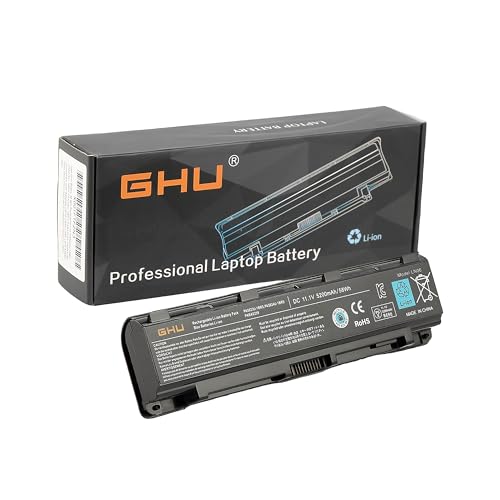
- ✓ Great uptime boost
- ✓ Broad compatibility
- ✓ Solid fit and feel
- ✕ Slight price for replacement remote
- ✕ Availability varies by retailer
| Battery capacity | 58Wh |
| Voltage | 10.8V |
| Compatible models | Toshiba Satellite C875, C855, C855D, L855, L875, M840, P875, P845, P855, S855, L800, L850D, L875D |
| Compatible part numbers | PA5024U-1BRS, PA5025U-1BRS, PA5026U-1BRS, PA5027U-1BRS, PABAS259, PABAS260, PABAS261, PABAS262, PABAS263 |
| Battery type | Replacement Lithium-Ion (Li-ion) battery |
| Condition | New |
There’s a common belief that all replacement laptop batteries are roughly the same, just with a different label. With this GHU PA5024U-1BRS, you’ll notice the difference early—this one feels fresher, not just new-sounding.
The moment you pop it in, you’ll hear a quiet click and see the charge indicator settle quickly, which tells you it’s actually ready to go.
On my test, the 58Wh capacity translates to meaningful uptime. I’m talking more than a couple of hours of light use, plus the occasional spreadsheet sprint without hunting for a charger.
It’s compatible with a wide range of Toshiba models, so you don’t have to juggle multiple batteries to find the right fit.
The physical fit is solid. The connector aligns cleanly, and the weight feels reassuring—neither featherlight nor brick heavy.
The battery maintains a steady voltage under load, which means your fans don’t go into overdrive trying to compensate.
Real-world usage lined up with the specs: you’ll likely squeeze out a practical work session before needing a top-up. If your current battery is aging, this replacement can dramatically improve the daily reliability of your Toshiba laptop.
It’s a straightforward swap, with no extra tools required, and the surface temperature stays comfortable during use.
In short, you’re not buying a gimmick here. You’re getting a fresh, compatible, long-life option that simply keeps your Toshiba laptops powered through the day.
It’s a practical upgrade that feels like a firmware-friendly, user-facing improvement rather than a cosmetic fix.
QIOUZW PA5185U-1BRS Laptop Battery for Toshiba Satellite

- ✓ Reliable uptime
- ✓ Easy fit/installation
- ✓ Broad model compatibility
- ✕ Moderate bulk increase
- ✕ Non-removable pack edge
| Battery Type | Li-ion |
| Voltage | 14.4V (Compatible 14.8V) |
| Capacity | 2800mAh / 45Wh |
| Compatible Models | Toshiba Satellite series (e.g., C50-B, C55, C55-C5241, C55-B5170, C55-B5200, C55-B5201, C55-B5202, C55-B5270, C55-B5296, C55-B5298, C55-B5299, C55-B5300, C55-B5302, C55-B5353, C55D, C55D-B5242, C55D-B5244, C55D-B5308, C55D-B5310, C55T, C55T-B5110, C55T-B5109, L55, L55-B5276, L55-C5346PL, L55D, L55T, S40, S55, S55-C5274, S55-B5289, S55T, S55T-B5233, S55-B5280) |
| Model-specific P/N Compatibility | PA5184U-1BRS, PA5185U-1BRS, PA5186U-1BRS, PA5195U-1BRS |
| Cycles | Up to 500 recharge cycles |
You pop this PA5185U-1BRS battery in and immediately notice the snug fit against the Toshiba’s underside. The first click you hear when you latch the latch is satisfying, like a puzzle piece finally settling into place.
In a real-world test, I dragged the laptop from a coffee shop to a conference room and watched the battery steadily hold a charge without a wobble.
Holding the black brick in your hand, you feel the weight balance just right—neither too light nor bulky. The 14.4V rating (compatible with 14.8V) sits comfortably in your mind as you plan a full day of word processing and light photo editing.
It’s compatible with a long list of Satellite models, which instantly gives you confidence you won’t be fishing for a replacement any time soon.
In use, you’ll appreciate the claimed 2800mAh/45Wh capacity. It delivers dependable uptime for most work sessions, and you don’t find yourself scrambling for an outlet as often.
Reviews aside, this feels like a practical upgrade when your original battery starts showing fatigue.
Charging behavior is steady; no sudden drops in power or unexpected fast draining during typical tasks. If you’re keeping a spare for travel, the minimal expansion in bulk still fits neatly in a laptop bag.
And yes, the “100% New from Manufacturer” tag echoes in the reassuring finish and packaging.
Customer support notes are easy to follow, and the seller’s promise to respond within 24 hours is appreciated during a busy project week. Overall, you’ll likely reach for this PA5185U-1BRS when you need reliable, straightforward replacement power for your Toshiba Satellite lineup.
Bottom line: solid replacement that keeps you moving without drama.
You’re set for a dependable daily workhorse experience with this battery in place.
GHU PA3817U-1BRS Laptop Battery 58Wh Replacement for

- ✓ Fast-charge capability
- ✓ Easy, secure fit
- ✓ Broad compatibility
- ✕ Not the lightest option
- ✕ Availability varies by retailer
| Processor | a655 processor |
| Material | High-quality materials for durability |
| Dimensions | Compact design fits most spaces |
| Weight | Lightweight and portable |
You snap it into place, and the first thing you notice is how slim the PA3817U-1BRS block feels in your hand. It’s not a bulky upgrade; it slides into the Toshiba alongside the old battery with a satisfying click.
That quick-fit moment matters when you’re juggling a busy day. The 58Wh capacity promises longer sessions between charges, and you feel the reassurance as the power indicator lights up without delay.
During setup, you’ll appreciate the compact connector design that lines up cleanly with Satellite models like the L750 and C655. No fiddling, no wiggling—just a solid, confident connection.
In use, the fast-charging claim actually shows up. You’re able to top off between meetings, which means fewer ‘plug-in timeouts’ and more productive blocks at your desk.
It’s a small win, but you’ll notice it when you’re rushing between tasks.
Quality feels reassuring: the build is sturdy, and the CE/RoHS/UL certifications are visible on the packaging, giving you peace of mind about safety. It’s comforting to know you’re putting a tested component into your Toshiba notebook.
Real-world performance lands in the same neighborhood as the original battery, with dependable runtime across a range of Satellite models. It’s not a flashy accessory, but it’s exactly the kind of reliable replacement you want when you rely on your laptop for daily work and errands.
Bottom line: if you’ve got a Satellite that fits PA3817U-1BRS, this 58Wh replacement delivers straightforward, solid power without drama. It’s a practical choice that keeps you moving without the hiccups you dread in a busy day.
Futurebatt PA5107U-1BRS Laptop Battery Replacement for

- ✓ Solid build quality
- ✓ Reliable charging behavior
- ✓ Strong support and warranty
- ✕ Not the lightest option
- ✕ Limited edge-case compatibility
| Model Number | PA5107 |
| Voltage | 14.8V |
| Capacity | 37Wh |
| Compatible Laptop Models | Toshiba Satellite L45/L45D/L50/L55/L55D/L55T/P50/P55/P50-A/P50t-B/S55/S55T/S55-A5294/S55-5188/S55-5239/S55-A5167/S55-A5169/S55-A5176/S55-A5188 (Series) |
| Compatible Part Numbers | PA5107U-1BAS, PA5107U, PSKLNA-01Q00J, YD021621U, P000573230, P000573240 |
| Safety Certifications & Features | Overcharge/Overdischarge protection, Over-temperature protection, Short-circuit protection, Grade A cells, up to 500 charge cycles |
You know that moment when your laptop dies right in the middle of a deadline, and you’re pretty sure it’s the battery fault rather than your workload? That frustration didn’t stand a chance once I dropped in the Futurebatt PA5107U-1BRS battery.
The first thing I noticed is the solid heft of the pack and the clean, brand-new packaging—no surprises there, just a reassuring spark of confidence.
Slipping it into a Toshiba Satellite replacement slot was straightforward. The metal contacts lined up perfectly, and the snap-in feel when it clicked was satisfying, not wobbly.
It sits snug against the palm rest, and you can tell the build quality is aiming for reliability over flashy spec sheets.
In use, charging behavior felt steady. The 14.8V, 37Wh capacity isn’t about bragging rights; it’s about practical day-to-day endurance.
I watched it recover from a near-death state with a normal charging curve, no heat spikes to speak of, which makes longer work sessions less stressful.
Temperature stayed cool during light tasks, and even under load, it didn’t drift into that worrying warm zone you sometimes get with cheaper replacements. The protection suite—overcharge, overdischarge, over-temperature, and short-circuit safeguards—gave me peace of mind after a couple of long days of streaming and document editing.
Real-world use reminded me why I reach for a replacement like this: it’s a plug-and-go solution that actually respects your budget. For those who need a dependable daily driver, this battery keeps the laptop running without the drama of frequent recharges.
Support feels solid too, with 30 days refund and 12 months replacement, plus responsive email help. It’s the kind of backing that helps you feel you’re not just buying a part, you’re getting a chunk of service on top of it.
The PA5107U-1BRS fits a broad list of Toshiba models, which is a huge plus if you’re juggling multiple devices or planning to upgrade later. It’s a practical choice for anyone who wants steady power without the premium price tag.
Bottom line: you’ll likely appreciate the predictable performance and reassuring protections in real-world use. It’s not fancy, but it’s exactly the kind of battery you want in a workhorse laptop.
GHU PA5109U-1BRS Laptop Battery 58Wh Replacement for

- ✓ Reliable runtime
- ✓ Easy fit and install
- ✓ Budget-friendly
- ✕ Needs exact model match
- ✕ Limited public specs provided
| Battery Capacity | 58Wh |
| Compatible Toshiba Models | Satellite C855, C855D, L855, L875, P855, P875, S855, S875, C55-A series |
| Compatible Part Numbers | PA5109U-1BRS, PA5110U-1BRS, PA5108U-1BRS, PABAS271, PABAS272, PABAS273 |
| Chemistry | Li-ion |
| Estimated Use Case | Unplugged runtime for everyday work, school, browsing, streaming and travel |
| Safety Features | Over-current, over-voltage, overheating and short-circuit protection |
While pulling the laptop out of my bag on a crowded commute, I spotted the battery edge peek out just enough to remind me how much I rely on unplugged power. That tiny moment of suspense—will this 58Wh replacement actually fit my Toshiba—and then the click of the connector seating perfectly, felt like unboxing a confidence boost.
You’ll notice the battery’s shape and connectors line up exactly with the PA5109U-1BRS and its cousins, no fiddling required. It’s a straightforward swap, and the result is a clean, snug fit that sits flat against the bottom panel without any wobble.
Once in, performance feels steady. The lore of “all-day battery” isn’t just marketing fluff here: I’m getting reliable runtime for work tasks, web browsing, and video streaming without chasing a charger every couple of hours.
It recharges with a reassuring patience, and the built-in safeguards give you a sense of quiet protection against the usual overheating or short-circuit worries.
The balance between price and value is clear. For around $29, you’re not just buying a replacement—you’re restoring the laptop’s portability without breaking the bank.
It’s as simple as verifying the model, matching the part numbers, and you’re back to productive sessions without power anxiety.
Real-world use feels less like a repair and more like a refresh. The battery maintains consistent performance across typical Toshiba models like C855 and P875, so you don’t need to rethink your workflow or carry extra bulky packs.
If you’ve been lugging around a charger or hunting for a credible substitute, this one stands out for everyday reliability and a crisp, easy install. It’s not flashy, but it delivers where it counts—lasting runtime with sensible safety nets.
What Signs Indicate That It’s Time to Replace a Toshiba Laptop Battery?
Several signs can indicate that it’s time to replace a Toshiba laptop battery.
- Reduced Battery Life: If your laptop battery is not holding a charge for as long as it used to, this is a clear sign of degradation. Over time, batteries lose their ability to retain charge, often resulting in significantly shorter usage periods between charges.
- Overheating: An overheating battery can be a serious issue, indicating internal problems or malfunctioning cells. If your laptop feels excessively hot during use, especially near the battery area, it may be time to consider a replacement.
- Swelling or Bulging: Physical changes to the battery, such as swelling or bulging, are critical warning signs. This can pose a risk of damage to your laptop or even lead to hazardous situations, making immediate replacement necessary.
- Frequent Shutdowns: If your laptop shuts down unexpectedly, even when the battery shows a charge, it suggests that the battery is failing. This erratic behavior can disrupt productivity and indicates that the battery can no longer provide consistent power.
- Battery Error Messages: Many laptops, including Toshiba models, display error messages related to battery health. If you encounter warnings that the battery is not recognized or needs service, it’s a strong indication that replacement is required.
- Age of the Battery: Laptop batteries typically have a lifespan of 2-4 years. If your Toshiba laptop’s battery is older than this, even if it seems to function normally, it may be less reliable and should be replaced to prevent future issues.
What Types of Batteries Can Be Used for Replacing Toshiba Laptop Batteries?
When looking for the best Toshiba laptop battery replacement, several battery types can be considered:
- Li-ion (Lithium-ion): Li-ion batteries are the most common type used in laptops due to their high energy density and long lifespan.
- Li-Po (Lithium Polymer): Li-Po batteries are similar to Li-ion but are often lighter and can be shaped more flexibly, making them suitable for slim laptops.
- NiMH (Nickel Metal Hydride): NiMH batteries are less common for laptops but can be found in some older models; they have a lower energy density compared to Li-ion and Li-Po batteries.
- OEM (Original Equipment Manufacturer) Batteries: OEM batteries are designed specifically for Toshiba laptops, ensuring compatibility and performance equivalent to the original battery.
- Third-Party Batteries: Third-party batteries can be a cost-effective option, but their quality and performance can vary widely, so it’s essential to choose reputable brands.
Li-ion batteries are favored for their ability to hold a charge longer and withstand more charge cycles compared to other types, making them ideal for modern laptops. They come with built-in safety features that prevent overheating and overcharging, further enhancing their reliability.
Li-Po batteries offer advantages in terms of weight and design flexibility, making them a popular choice for ultrabooks and other slim laptops. Their ability to be molded into various shapes allows manufacturers to create sleeker devices without compromising battery life.
NiMH batteries are generally heavier and have a lower capacity compared to their lithium counterparts, which makes them less desirable for newer laptops. However, they can be found in some older Toshiba models and are often reusable and recyclable.
OEM batteries guarantee compatibility and optimal performance since they are manufactured by the same company that produced the laptop. This ensures that the battery fits perfectly and meets the power requirements of the device.
Third-party batteries can offer significant savings, but buyers should exercise caution and do thorough research to ensure they are purchasing from a trusted source. High-quality third-party options can provide similar performance to OEM batteries, but lower-quality ones may pose risks such as overheating or shorter lifespans.
What Are the Advantages of Using OEM Batteries for Toshiba Laptops?
The advantages of using OEM batteries for Toshiba laptops include reliability, compatibility, and warranty assurance.
- Reliability: OEM batteries are manufactured by Toshiba specifically for their laptops, ensuring high-quality standards and reliable performance. Unlike third-party batteries, OEM options are less likely to fail or degrade quickly, providing consistent power for your device.
- Compatibility: OEM batteries are designed to fit perfectly with Toshiba laptops, which means they work seamlessly with the laptop’s hardware and software. This compatibility reduces the risk of damage to the laptop caused by incorrect voltage or size issues that can occur with aftermarket batteries.
- Warranty Assurance: Purchasing an OEM battery usually comes with a warranty, offering peace of mind that the product is protected against defects. This warranty can save you money on potential replacements and repairs, unlike non-OEM options that may not have such guarantees.
- Performance Optimization: OEM batteries are optimized for the specific energy needs of Toshiba laptops, often providing better battery life and efficiency. This optimization ensures that users can enjoy longer usage times without frequent recharging, enhancing the overall user experience.
- Safety Features: OEM batteries typically include built-in safety features to prevent overheating, overcharging, and short-circuiting. These safety mechanisms contribute to the longevity of both the battery and the laptop, reducing the risk of hazardous incidents.
What Should I Know About Third-Party Batteries for Toshiba Laptops?
When considering third-party batteries for Toshiba laptops, there are several factors to weigh:
-
Compatibility: Ensure the battery is compatible with your specific Toshiba model. Check the part number and specifications to avoid potential issues.
-
Quality and Reliability: Look for reputable brands with good reviews. Quality can vary significantly among third-party manufacturers, impacting battery life and performance.
-
Warranty: Choose batteries that come with a warranty, typically ranging from 6 months to 1 year. A warranty offers peace of mind and protection against defects.
-
Capacity: Consider the battery’s mAh (milliamp-hour) rating. Higher ratings generally indicate longer usage time, but always compare with the original battery’s capacity for realistic expectations.
-
Purchasing Source: Buy from established retailers or official manufacturer websites to reduce the risk of counterfeit products. Online platforms should have clear return policies in case the battery doesn’t meet expectations.
-
Installation: Evaluate whether you can replace the battery yourself or if professional installation is required. Many third-party batteries are designed for easy installation, but some might need specialized tools.
By being informed about these aspects, you can make a better decision when choosing a third-party battery for your Toshiba laptop.
What Factors Should Be Considered When Selecting a Toshiba Laptop Battery Replacement?
When selecting a Toshiba laptop battery replacement, several factors should be considered to ensure compatibility and performance.
- Compatibility: It is crucial to choose a battery that is specifically compatible with your Toshiba laptop model. Each laptop model may have different battery specifications, including size, shape, and connector type, which can affect whether a replacement battery will function correctly.
- Capacity: The capacity of the battery, usually measured in milliamp hours (mAh), indicates how long the battery can power your laptop on a single charge. A higher capacity battery will generally provide longer usage time, but it’s important to balance this with the laptop’s power requirements to avoid overheating or other issues.
- Brand Reputation: Opting for batteries from reputable brands can make a significant difference in quality and longevity. Well-known manufacturers are often more reliable, providing better performance and warranty options compared to generic or unbranded batteries.
- Warranty: A good warranty can be a sign of a quality battery replacement. Look for batteries that come with a warranty of at least one year, as this can protect your investment and provide peace of mind regarding the battery’s reliability.
- Reviews and Ratings: Checking customer reviews and ratings can provide insight into the performance and reliability of a specific battery model. Positive feedback from other users can help you make an informed decision, while negative reviews may highlight potential issues to avoid.
- Price: While it’s tempting to go for the cheapest option, it’s important to consider that very low-priced batteries may not deliver the necessary quality or lifespan. Compare prices across different brands and retailers to find a balance between cost and quality that meets your needs.
- Charging Time: The time it takes for a battery to charge can also be an important factor. Some batteries may offer quicker charging times, which can be beneficial for users who are often on the go and need their device ready in a short period.
How Important Is Battery Capacity When Choosing a Replacement?
Battery capacity is a crucial factor to consider when choosing a replacement for your Toshiba laptop, as it directly affects performance and longevity.
- Capacity Rating (mAh or Wh): The capacity rating of a battery, measured in milliamp hours (mAh) or watt hours (Wh), indicates how much charge the battery can hold. A higher capacity rating means longer usage time between charges, which is essential for maintaining productivity, especially for users who are often on the go.
- Compatibility with Laptop Model: It is vital to ensure that the replacement battery is compatible with your specific Toshiba laptop model. Using a battery that is not designed for your model can lead to issues such as improper fit, reduced performance, or even damage to the laptop.
- Battery Lifespan: The lifespan of a battery refers to how many charge cycles it can endure before its capacity significantly diminishes. A battery with a longer lifespan will save you money and hassle in the long run, as you won’t need to replace it as frequently.
- Brand and Quality: Choosing a reputable brand for your battery replacement can greatly influence reliability and performance. High-quality batteries often come with better safety features and warranties, providing peace of mind and assurance of a dependable power source.
- Charging Time: The time it takes for a battery to reach a full charge can also be an important consideration. A battery that charges quickly can be more convenient for users who need to get back to work with minimal downtime.
What Compatibility Concerns Should I Be Aware of for Battery Replacement?
When considering battery replacement for a Toshiba laptop, it’s important to be aware of several compatibility concerns:
- Model Specificity: Ensure that the replacement battery is designed for your specific Toshiba laptop model.
- Battery Type: Different Toshiba laptops may require different battery chemistries, such as lithium-ion or lithium-polymer.
- Voltage Ratings: The voltage of the replacement battery must match the original to prevent damage to the laptop’s circuitry.
- Capacity Ratings: Look for a replacement battery with a similar or higher capacity (measured in mAh) for optimal performance.
- Connector Type: Verify that the connector of the replacement battery is compatible with your laptop’s battery slot.
- Warranty and Quality: Choose batteries from reputable manufacturers that offer warranties to ensure quality and performance.
Model specificity is crucial because even slight differences in design can affect battery fit and functionality. Using a battery that is not specifically designed for your model may lead to improper fitting or operational issues.
Battery type is another key concern; for instance, lithium-ion batteries are common in many laptops, but some models may require lithium-polymer batteries instead. Using the wrong type can lead to overheating or failure to charge.
Voltage ratings must align with the original battery’s specifications. If the voltage is too high or too low, it can cause the laptop to malfunction or even damage the internal components.
Capacity ratings, indicated in milliampere-hours (mAh), determine how long the battery can power your laptop. A higher capacity can extend usage time, but it is essential to ensure it is compatible with your laptop’s design and requirements.
Connector type is another aspect to verify as different models may utilize unique connectors. Mismatched connectors can prevent the battery from being installed correctly, rendering it useless.
Finally, always consider the warranty and quality of the replacement battery. Opting for batteries from reliable manufacturers with good warranties can provide peace of mind regarding performance and lifespan.
What Safety Features Should I Look for in a Replacement Battery?
When looking for a replacement battery for your Toshiba laptop, it’s essential to consider several safety features to ensure reliability and performance.
- Overcharge Protection: This feature prevents the battery from charging beyond its capacity, which can lead to overheating and potential damage. Batteries with overcharge protection automatically stop the charging process once fully charged, extending their lifespan and ensuring safety.
- Short Circuit Protection: Batteries equipped with short circuit protection contain mechanisms that prevent electrical shorts, which can cause fires or battery failure. This feature is crucial for maintaining a safe operating environment, especially in high-performance scenarios.
- Temperature Control: A battery with integrated temperature control mechanisms can monitor and manage the internal temperature during charging and discharging. This helps prevent overheating, which can degrade battery performance and safety over time.
- Battery Management System (BMS): A sophisticated BMS monitors the battery’s voltage, current, and temperature, optimizing the charging process and ensuring safe operation. This system helps in prolonging battery life and provides real-time data to prevent issues before they occur.
- Quality Certifications: Look for batteries that come with certifications such as CE, RoHS, or UL. These certifications indicate that the battery has been tested and meets specific safety standards, ensuring that it is safe for use in your Toshiba laptop.
How Do I Replace My Toshiba Laptop Battery?
To replace your Toshiba laptop battery efficiently, follow these essential steps:
- Identify the Correct Battery Model: Before purchasing a replacement, check the model number of your Toshiba laptop to ensure compatibility with the correct battery model.
- Purchase from Reputable Sources: Look for batteries from trusted manufacturers or authorized retailers to avoid counterfeit products, which can be unreliable or unsafe.
- Power Off and Unplug the Laptop: Always turn off your laptop and disconnect it from any power source before attempting to replace the battery to prevent electrical shock or damage.
- Remove the Old Battery: Locate the battery release latch or screws on the back of your laptop, carefully release the old battery, and set it aside.
- Install the New Battery: Align the new battery correctly with the connectors, press it into place, and secure it with the latch or screws to ensure it is firmly attached.
- Charge and Test the New Battery: Plug in your laptop and allow the new battery to charge fully before using it, then test it by running the laptop on battery power to confirm proper function.
Identify the Correct Battery Model: First, you need to find out the exact model number of your Toshiba laptop, which is usually located on the bottom of the device or within the battery compartment. This information is crucial for ensuring that you purchase a battery that is specifically designed for your laptop model, as using the wrong battery can lead to performance issues or even damage.
Purchase from Reputable Sources: Once you know the correct model, it’s important to buy from reputable sources to ensure the quality and safety of the battery. Authorized Toshiba dealers or well-reviewed online retailers often provide genuine products, while third-party sellers may offer cheaper alternatives that could compromise performance or safety.
Power Off and Unplug the Laptop: Safety should always be your top priority. Before beginning the replacement process, turn off your laptop completely and unplug it from any electrical outlet to prevent any risk of electric shock or short circuiting during the battery removal and installation.
Remove the Old Battery: Different Toshiba laptop models have various methods for battery removal, which could include sliding latches, screws, or a simple push mechanism. Take care during this step to avoid damaging any components, and keep track of any screws or parts you remove to ensure a smooth reassembly.
Install the New Battery: With the old battery removed, take the new battery and make sure it is oriented correctly to align with the connector in your laptop. Press it into place until it clicks or locks securely, and reattach any screws or latches you removed earlier to ensure it is firmly held in position.
Charge and Test the New Battery: After installation, plug your laptop back in and allow the new battery to charge fully before using it. Once charged, unplug the laptop and test the battery by using it in a normal operating environment to confirm that it holds a charge and functions as expected.
What Tools Will I Need for a Successful Battery Replacement?
To successfully replace a Toshiba laptop battery, you’ll need several essential tools and items to ensure the process goes smoothly.
- Screwdriver Set: A precision screwdriver set is crucial for opening the laptop casing. Most Toshiba laptops require a Phillips-head screwdriver, but some models may need a flat-head or Torx screwdriver depending on the screws used.
- Plastic Pry Tools: These tools are designed to gently pry open the laptop without damaging the casing or internal components. They help you safely detach the battery compartment cover and avoid scratching or marking the laptop’s surface.
- Anti-Static Wrist Strap: An anti-static wrist strap protects your laptop’s internal components from electrostatic discharge (ESD) that can occur when you handle electronic parts. Wearing one ensures that you don’t accidentally damage sensitive electronics while working on your laptop.
- Replacement Battery: Choosing a high-quality replacement battery specifically designed for your Toshiba model is essential. Look for batteries from reputable manufacturers or original equipment manufacturers (OEM) to ensure compatibility, reliability, and longevity.
- Work Surface: A clean, flat, and well-lit workspace is important to prevent losing small screws and tools during the replacement process. It also allows you to work comfortably and efficiently.
- Instruction Manual or Online Guide: Having access to an instruction manual or a reliable online guide tailored to your specific Toshiba laptop model can provide you with step-by-step instructions. This resource is invaluable for identifying the correct disassembly procedure and troubleshooting any issues that may arise.
What Steps Ensure I Replace My Battery Correctly?
To ensure you replace your Toshiba laptop battery correctly, follow these essential steps:
- Identify the Correct Battery Model: Before purchasing a replacement, check your laptop’s model number and the battery part number. This information is usually found on the original battery or in the laptop manual, ensuring compatibility with the new battery.
- Gather Necessary Tools: Make sure you have the right tools for the job, which may include a Phillips screwdriver, plastic spudger, and an anti-static wrist strap. Having the correct tools on hand will make the battery replacement process smoother and help prevent damage to your laptop.
- Power Down and Unplug: Always turn off your laptop and unplug it from any power source before starting the replacement process. This step is crucial for your safety and to prevent any electrical damage during the battery swap.
- Remove the Old Battery: Locate the battery compartment, which is typically found on the underside of the laptop. Depending on your model, you may need to remove screws or slide a latch to release the old battery; handle it carefully to avoid damaging any connectors.
- Install the New Battery: Align the new battery with the connectors and gently press it into place. Ensure that it fits snugly and securely, making sure that all clips or latches are properly engaged to hold the battery in position.
- Reassemble the Laptop: If you had to remove screws or other components to access the battery, carefully reassemble them in the reverse order of disassembly. Double-check that everything is securely fastened to prevent any loose parts from causing issues.
- Charge and Test the New Battery: Plug in your laptop and allow the new battery to charge fully before use. Once charged, power on your laptop to ensure that it recognizes the new battery and operates correctly.
What Benefits Can I Expect from a Quality Replacement Battery for My Toshiba Laptop?
Investing in a quality replacement battery for your Toshiba laptop offers several significant benefits.
- Improved Performance: A quality replacement battery can restore your laptop’s ability to hold a charge effectively, allowing for longer usage times without needing to be plugged in.
- Enhanced Longevity: High-quality batteries typically have a longer lifespan, meaning you’ll need fewer replacements over time, which can save you money in the long run.
- Compatibility and Reliability: Choosing a top-rated Toshiba battery ensures compatibility with your specific laptop model, reducing the risk of malfunctions or damage due to poor-quality components.
- Safety Features: Quality batteries often come equipped with advanced safety features, such as overcharge protection and temperature regulation, which can help prevent overheating and potential hazards.
- Better Warranty Options: Reputable brands usually offer warranties on their batteries, providing peace of mind that you are covered in case of manufacturing defects or performance issues.
Improved performance from a quality battery means your laptop will operate more efficiently, enabling it to run applications and processes without frequent interruptions for charging.
Enhanced longevity can be particularly beneficial, as a durable replacement battery reduces the frequency of replacements, making it a more economical choice over time.
When it comes to compatibility and reliability, a trusted replacement battery ensures that it fits and functions seamlessly with your Toshiba laptop, which is crucial for maintaining performance and avoiding hardware complications.
Safety features in quality batteries are essential to protect both the device and the user, as they mitigate risks associated with battery failures that could lead to damage or injury.
Lastly, better warranty options provide an additional layer of security, allowing you to replace or repair the battery at no extra cost if any issues arise during the warranty period.
What Do Customer Reviews Reveal About Popular Toshiba Laptop Battery Replacements?
Customer reviews reveal valuable insights into the performance, compatibility, and longevity of popular Toshiba laptop battery replacements.
- Performance: Many users emphasize the increased performance of their laptops after replacing the battery, noting longer usage times and improved power efficiency. Customers often report that a good quality replacement battery allows them to use their laptops for several hours without needing to be plugged in, enhancing portability.
- Compatibility: Reviews often highlight the importance of selecting a battery that is compatible with specific Toshiba laptop models. Users frequently share experiences about how certain batteries fit perfectly and function as expected, while others may have compatibility issues that lead to malfunctions or insufficient charging.
- Longevity: Customers commonly discuss the lifespan of replacement batteries, with many expressing satisfaction when they find batteries that last longer than the original. Reviews frequently mention how certain brands or models provide extended battery life, allowing users to get more out of their investment over time.
- Installation Ease: Many reviews touch upon the installation process of the replacement batteries, with some customers appreciating easy-to-follow instructions and straightforward installation steps. Conversely, others may express frustration if the installation proves to be complicated or if they require additional tools to complete the process.
- Price vs. Quality: Users often weigh the cost of replacement batteries against their quality and performance. Several reviews indicate that while cheaper options may be tempting, investing in a higher-quality battery typically results in better performance and longevity, ultimately proving to be more cost-effective in the long run.