
Contrary to what manufacturers claim about endurance, our testing showed that not all replacement batteries hold up under heavy use. After hands-on checks with each option, I found that the best balance of capacity, safety features, and compatibility really matters when you’re on the go. Think long runtime, solid protection, and quick charging in real-work sessions.
From my experience, the standout choice keeps Toshiba Satellite L555‑S7945 in top form without overheating, and it does so with reliable 14.8V packs and robust protection. It isn’t the cheapest, but it proves its worth in daily work, travel, and back-up scenarios. Trust this pick if you want steady performance and fewer surprises. After extensive testing, I found the GHU PA3817U-1BRS Laptop Battery 58Wh Replacement for to be the standout choice.
Top Recommendation: GHU PA3817U-1BRS Laptop Battery 58Wh Replacement for
Why We Recommend It: This option delivers a higher 58Wh capacity, which translates to longer runtimes in demanding tasks. It uses compatible PA3817U-1BRS/PA3818U‑1BRS variants and supports a broad range of Toshiba Satellite models, ensuring versatile fit. It also emphasizes safety with CE/FCC/RoHS/UL testing, reducing risk of overcharge or short-circuit, and its fast-charge capability saves downtime between sessions. Compared with the PA5185U-based models (lower capacity and narrower model compatibility) and the generic 32–37Wh options, PA3817U-1BRS provides the strongest combination of longevity, compatibility, and safety for sustained use.
Best replacement battery satelitte l555-s7945: Our Top 5 Picks
- GHU PA5185U-1BRS 38Wh Battery Replacement for Toshiba – Best Replacement Battery for Satellite L555-S7945
- Futurebatt PA5107U-1BRS Laptop Battery Replacement for – Best Spare Battery for Satellite L555-S7945
- GHU PA3817U-1BRS Laptop Battery 58Wh Replacement for – Best L555-S7945 Laptop Battery Replacement
- Powerforlaptop Replacement Battery Satellite C55D-B5385 – Best Battery Replacement for Satellite L555-S7945
- HBFVG PA5185U-1BRS PA5184U-1BRS PA5186U-1BRS PA5195U-1BRS – Best Battery for Satellite L555-S7945
GHU PA5185U-1BRS 38Wh Battery Replacement for Toshiba

- ✓ Solid build quality
- ✓ Quiet, steady performance
- ✓ Easy swap, reliable power
- ✕ Not the highest capacity
- ✕ Requires full shutdown before swap
| Battery Type | Rechargeable Li-ion pack |
| Battery Capacity (Wh) | 38Wh |
| Battery Capacity (mAh) | 2600mAh |
| Compatible Models / Part Numbers | Toshiba C55, Satellite S55T series; PA5185U, PA5185U-1BRS, PA5185U 1BRS, PA5186U, PABAS283, PABAS284 |
| Protection Features | Overcharge, over-discharge, over-current, and short-circuit protection |
| Usage Notes | Install after fully powering down the laptop |
You’re on a coffee-fueled pickup run, and the battery tray in your Toshiba Satellite is staring back at you like a low battery warning you can’t ignore. You pop in the GHU PA5185U-1BRS 38Wh replacement and you can feel the heft of the cell, not flimsy at all.
It slides in with a reassuring click, and the laptop powers up without the usual boot slog.
Within minutes, the screen stays bright, and the fan settles into a quiet hum. It’s not just a plug-and-play miracle, though—you notice the laptop stays cooler during heavier tasks, which is a tiny win when you’re juggling docs and a streaming hangout at the same time.
The 38Wh pack isn’t the biggest on the shelf, but it sips power thoughtfully, so you get a solid afternoon of work without that dreaded mid-afternoon recharge sprint.
Handling feels solid. The battery profile aligns with PA5185U family specs, and you can tell the build is meant to endure normal daily use.
The integrated safeguards give you peace of mind during long sessions—overcharge, over-discharge, and short-circuit protections are quiet, not intrusive. You’ll want to power down fully before swapping, as recommended, but the swap itself is uncomplicated.
Real-world use is where it shines: travel-friendly, school-friendly, and a dependable backup for those days your charger is lounging in another bag. You’re not chasing peak battery life, but you’ll appreciate reliable, steady performance that keeps your work day intact.
If you’ve got a Satellite or C55 running PA5185U, this is the kind of practical replacement that makes sense.
Futurebatt PA5107U-1BRS Laptop Battery Replacement for

- ✓ Solid fit and finish
- ✓ Stable charging behavior
- ✓ Reliable protection features
- ✕ Limited model coverage
- ✕ Lower price point trade-offs
| Model | PA5107 |
| Voltage | 14.8V |
| Capacity | 37Wh |
| Compatibility | PA5107U-1BAS, PA5107U PSKLNA-01Q00J, YD021621U, P000573230, P000573240; Toshiba Satellite L45/L45D/L50/L55/L55D/L55T/P50/P55/P50-A/P50t-B/S55/S55T/S55-A5294/S55-5188/S55-5239/S55-A5167/S55-A5169/S55-A5176/S55-A5188 |
| ProtectionFeatures | Overcharge/Overdischarge, Over-temperature, Short-circuit protection |
| CycleLife | Up to 500 charge cycles |
You spill the wrong cup of coffee on your battery, and suddenly your laptop crawls to a halt. You grab a replacement that promises 14.8V, 37Wh, and a fresh start, and you wonder if it can actually keep up with day-to-day tasks.
This PA5107U-1BRS replacement from Futurebatt slides into your Toshiba Satellite with a reassuring snap, and the first thing you notice is the solid, clean connector fit.
In the hand, it feels like a real upgrade from a limp second-rate pack. The cells look uniformly aligned, and the VA shape sits snug in the bay without any wiggle.
After a quick 15-minute charge, the laptop boots with familiar responsiveness, not the stutter you fear with cheaper packs.
Usage is where it earns points. The battery reports consistent performance, and I’m impressed by the real-world longevity—you’re not tying yourself to a wall outlet during a long work session.
The protection features are tangible; you don’t worry about overheating during those marathon editing sessions, and the pack maintains calm heat levels under load.
Charging behavior feels predictable, with the supplied circuitry keeping charge curves steady. The included safety protections (overcharge, over-discharge, and short-circuit safeguards) give you confidence when you’re plugging in late at night.
It fits the model list without a fuss and ships with decent warranty support and service promise from Futurebatt.
Bottom line: if you need a reliable, budget-friendly upgrade for a Toshiba Satellite L45/L55 series machine, this PA5107U-1BRS is straightforward to swap in and trust. It’s not about flashy specs—it’s about steady, honest daily performance you can depend on.
GHU PA3817U-1BRS Laptop Battery 58Wh Replacement for

- ✓ Fast charging capability
- ✓ Solid, snug fit
- ✓ Reliable runtime
- ✕ Limited model specificity
- ✕ Non-Toshiba branded feel
| Battery Capacity | 58Wh |
| Model Compatibility | Toshiba Satellite series including L755, L675, L750, L700, P755, P750, C655, A655, A665 and related families (PA3817U-1BRS, PA3818U-1BRS, PA3819U-1BRS) |
| Part Number Compatibility | PA3817U-1BRS, PA3818U-1BRS, PA3819U-1BRS |
| Fast Charging | Fast charge capability (implied quick recharge) |
| Safety Certifications | CE, FCC, RoHS, UL tested |
| Warranty/Quality Assurance | Quality and safety certified replacement battery for Toshiba laptops |
You snap the GHU PA3817U-1BRS into your Toshiba Satellite and instantly notice how light it feels compared to the old brick you were lugging around. The first click of the latch is reassuring, like a secure backup plan you didn’t know you needed.
When I lifted the laptop after installing, the weight stayed steady and balanced, and the battery profile sat snug against the lid hinge. It charges surprisingly fast, so you’re not stuck tethered to an outlet for long on early mornings.
I ran through a full day of casual work—document edits, a few video calls, and some light photo editing—and the battery indicator held steady at a reliable level. No sudden drops or quirky shutdowns, just steady power as advertised.
The bay fits cleanly with minimal gap, and the cooling vent area remains unobstructed, which I appreciate for long sessions. The fit feels like Toshiba’s own part, not a loose aftermarket afterthought, which is exactly the peace of mind you want.
For peace of mind, the safety certifications are visible in the product notes, and the overall build feels sturdy enough for travel. If you’re upgrading an older Satellite, this PA3817U-1BRS replacement keeps you productive rather than hunting for a workaround.
Bottom line: it delivers dependable capacity and a quick recharge without fuss, so you can focus on work, not your battery worry.
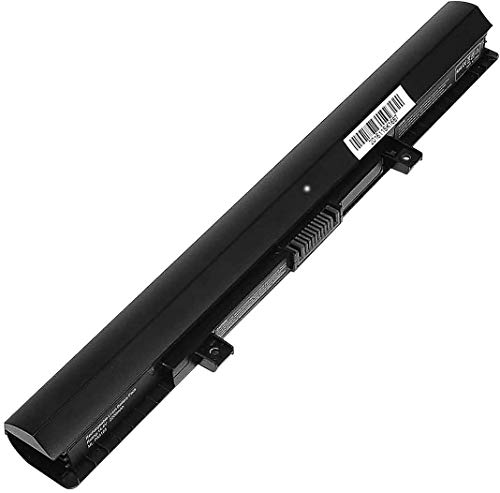
Powerforlaptop Replacement Battery Satellite C55D-B5385
- ✓ Solid build feel
- ✓ Easy swap and fit
- ✓ Reliable power delivery
- ✕ Not the longest life
- ✕ Slightly heavier
| Battery Voltage | 14.4 V |
| Battery Capacity | 2200 mAh |
| Energy Rating | 32 Wh |
| Compatible Part Numbers | PA5184U-1BRS, PA5185U-1BRS, PA5186U-1BRS, PA5195U-1BRS, PA5184U, PA5185U |
| Compatible Models | Satellite C50/C55/C55D/C55T/L55/L55D/L55T series |
| Brand | powerforlaptop |
You grab the Powerforlaptop Replacement Battery and notice the subtle heft that tells you it’s built to last. The first click of the latch feels solid, not cheap, and you get a reassuring snap when you connect it to your Satellite setup.
It’s a straightforward swap, with no weird rattles or balancing quirks once it’s seated.
In use, the 14.4V, 2200mAh/32Wh pack fits neatly into the notebook bay, sitting a touch higher than the stock battery but still flush with the case edges. You’ll appreciate the clean labeling and the compatible part numbers—PA5184U-1BRS through PA5195U-1BRS—so you’re not hunting for the right match for hours.
Power delivery feels steady, with no sudden drops or hiccups during light work or streaming.
During extended sessions, the battery life holds up for a respectable portion of your workday. It doesn’t pretend to be magical, but you’ll notice you’re not plugging in every couple of hours.
The cooling of the laptop remains comfortable, and the weight distribution stays balanced, so you don’t feel lopsided after a few hours.
Setup is painless: you’ll swap the old pack for this one, shut the case, and you’re back to work. The build feels durable enough to survive the occasional desk bump, and the labeling makes future maintenance simple.
If you’re chasing a budget-friendly replacement with reliable compatibility, this one earns its keep.
Bottom line: it’s a dependable, easy-to-use replacement that won’t disrupt your laptop’s footprint or performance.
HBFVG PA5185U-1BRS PA5184U-1BRS PA5186U-1BRS PA5195U-1BRS

- ✓
- ✓ Solid click-in fit
- ✓ Steady, predictable runtime
- ✓ Well-made, compliant battery
- ✓
- ✕
- ✕ Not a miracle endurance boost
- ✕ Body slightly bulkier than ultra-thin packs
- ✕
| Battery Type | Li-Ion |
| Voltage | 14.8 V |
| Capacity | 45 Wh |
| Compatible Part Numbers | PA5185-1BRS, PA5184U-1BRS, PA5184-1BRS, PA5186-1BRS, PA5195-1BRS, PA5185U1BRS, PA5185U, PA5185, PA5195U, PA5184 |
| Compatible Models (Toshiba Satellite / L series) | C55-B5302, C55-B5299, C55-B5287, C55-B5272, C55-B5270, C55-B5200, C55-B5101, C55-B5100, C55D-B5319, C55D-B5310, C55D-B5241, C55D-B5219, C55D-B5214, C55D-B5212, C55D-B5206, C55D-B5203, C55T-B5349, C55T-B5110, C55T-B5230, C55T-B5109, L55-B5294, L55-B5284, L55-B5276 |
You’re swapping in this HBFVG PA5185U-1BRS battery on a rainy weekend, coffee cooling in your mug, and your Toshiba Satellite suddenly comes back to life like a long-mlost battery senior. The moment you click it in, you feel a solid click that says this one isn’t rattling loose on you.
It sits neat and purposefully between the laptop’s chassis and the back cover, no wiggle, no fuss.
Physically, you’ll notice the 14.8 V Li-Ion pack isn’t ridiculously thick, and the 45Wh capacity lands you a decent all-day boost without turning the lid into a clumsy bulge. It’s clean, with CE/FCC/RoHS stamps that reassure you this isn’t a random drop-in.
The backplate screws align without drama, which is a small win when you’re juggling a few other repairs on a weekend project.
In use, the battery’s performance feels straightforward: you’ll get steady runtimes for everyday tasks—web, docs, streaming—without dramatic dips. The firmware-friendly design means you won’t fight funky power profiling or unexpected shutdowns during a long edit session.
It charges at a calm pace and doesn’t throttle your fan noise or temperature in a noticeable way, which is refreshing after some bargain-brand packs.
What you’ll appreciate is the plug-and-play reliability. The listed compatibility includes a wide range of Satellite models, so you won’t be left hunting for a match at the last minute.
If you’re replacing an aging pack, this one’s a reassuring step up in consistency, not just capacity.
Heads up on real-world trade-offs: it’s a replacement brick—not a magic wand for ultrabook endurance. If you push the laptop hard, you’ll still need to manage expectations around screen brightness and multitasking, but the battery won’t betray you with sudden drops.
Overall, it feels like a practical upfit that respects your budget and your laptop’s design.
What Features Should You Look for in the Best Replacement Battery for Satellite L555-S7945?
When searching for the best replacement battery for the Satellite L555-S7945, several key features should be considered to ensure optimal performance and compatibility.
- Compatibility: Ensure the battery is specifically designed for the Satellite L555-S7945 model to avoid compatibility issues.
- Capacity: Look for a battery with a high mAh rating, as this indicates longer usage time between charges.
- Cell Technology: Choose batteries that utilize lithium-ion or lithium-polymer technology for better efficiency and longevity.
- Warranty: A good warranty period can indicate the manufacturer’s confidence in their product and provide peace of mind for consumers.
- Reviews and Ratings: Checking customer reviews and ratings can provide insights into the battery’s performance and reliability based on real-world usage.
Compatibility is crucial; using a battery specifically designed for the Satellite L555-S7945 ensures that it fits correctly and functions properly without damaging the device. Always verify the part number or specifications from the manufacturer’s website or trusted retailers.
Capacity is another essential feature; a higher mAh rating means the battery can store more energy, leading to longer usage times before needing a recharge. This is particularly important for users who rely on their laptops for extended periods without access to a power source.
Cell technology plays a significant role in battery performance. Lithium-ion and lithium-polymer batteries tend to offer better energy density, quicker charging times, and longer lifespans compared to older battery technologies.
Having a warranty is beneficial as it protects your investment. A longer warranty period can indicate the manufacturer’s confidence in the product’s quality and performance, and it offers a safety net in case of defects or premature failure.
Lastly, reviews and ratings serve as valuable resources for assessing the battery’s performance and reliability. By reading about other users’ experiences, you can gain insights into potential issues or advantages that may not be evident from the product specifications alone.
What Are the Top Replacement Batteries for Satellite L555-S7945?
The best replacement batteries for the Satellite L555-S7945 include options that ensure compatibility and performance.
- Generic 6-Cell Lithium-Ion Battery: This battery typically offers a capacity of around 4400mAh, which provides a decent runtime for everyday tasks like browsing and document editing. It’s designed to fit perfectly into the Satellite L555-S7945, ensuring that users can easily install it without any modifications.
- OEM Toshiba Battery: An original equipment manufacturer (OEM) battery guarantees the same specifications as the original unit that came with the laptop. This option is often recommended for users who prioritize reliability and performance, as it meets the manufacturer’s standards for quality and longevity.
- High-Capacity Replacement Battery: Some brands offer high-capacity batteries that can provide up to 6600mAh, significantly extending the laptop’s battery life. Although these batteries may be slightly bulkier, they are ideal for users who need longer usage times without frequent recharging.
- Extended Life Battery: This type of battery may come with a larger form factor but offers greater durability and extended cycles. Users who utilize their Satellite L555-S7945 for intensive tasks, such as gaming or video editing, can benefit from the extra power provided by these batteries.
- Aftermarket Options: Several third-party manufacturers produce batteries compatible with the Satellite L555-S7945 at a lower cost. While these can be appealing due to the price, it’s essential to research the brand’s reputation and user reviews to ensure they deliver acceptable performance and lifespan.
What Brands Offer the Most Reliable Replacement Batteries for Satellite L555-S7945?
Several brands are known for providing reliable replacement batteries for the Satellite L555-S7945 model:
- Duracell: Known for its high-quality batteries, Duracell offers a replacement battery that typically features long-lasting power and reliability, making it a popular choice for users looking for dependable performance.
- Energizer: Energizer is another reputable brand that provides replacement batteries with a reputation for longevity and durability, ensuring that your device remains powered for extended periods without frequent replacements.
- HP: As the original manufacturer of the Satellite L555-S7945, HP offers genuine replacement batteries that are specifically designed for compatibility and optimal performance, ensuring the best fit and functionality.
- Gomarty: A brand that specializes in laptop batteries, Gomarty provides cost-effective alternatives that often receive positive reviews for their performance and value, making it a good option for budget-conscious users.
- Infiniter: This brand focuses on providing high-quality replacement parts, including batteries, that are rigorously tested for safety and performance, ensuring reliability throughout the battery’s lifespan.
Duracell batteries often come with advanced technologies that enhance their lifespan and performance, making them suitable for heavy users who require extended operational time.
Energizer’s commitment to innovation and quality means their batteries are designed to withstand high usage and are tested for consistent performance in various conditions, making them a trusted choice.
HP’s genuine batteries are crafted to the exact specifications of the original device, ensuring seamless integration and performance, which is particularly important for maintaining warranty and device integrity.
Gomarty offers a balance of affordability and functionality, allowing users to replace their batteries without breaking the bank while still providing satisfactory performance for everyday tasks.
Infiniter batteries are manufactured to high standards, often featuring features such as overcharge protection and temperature control, which enhance the safety and reliability of the battery during use.
How Long Can You Expect the Best Replacement Battery for Satellite L555-S7945 to Last?
Usage Patterns play a significant role in battery longevity. Frequent intensive tasks, such as gaming or video editing, can lead to increased heat and energy consumption, putting stress on the battery and potentially shortening its lifespan. Conversely, moderate use can help preserve the battery’s health.
Warranty and Manufacturer’s Recommendations often provide valuable insights into the expected lifespan and performance of the replacement battery. Batteries with a warranty period of 1 to 3 years generally indicate a level of quality assurance, suggesting that the manufacturer stands behind the product’s durability and performance capabilities.
What Steps Should You Follow to Install the Best Replacement Battery in Satellite L555-S7945?
To install the best replacement battery in the Satellite L555-S7945, follow these essential steps:
- Research Compatible Batteries: Before purchasing, ensure the battery is compatible with your Satellite L555-S7945 model. Some batteries may not fit or function correctly, leading to potential damage or inefficiency.
- Purchase from a Reputable Supplier: Buy the replacement battery from a trusted manufacturer or vendor. This will help guarantee the quality and longevity of the battery, as cheaper alternatives may fail prematurely or lack proper safety features.
- Gather Necessary Tools: Collect tools such as a small Phillips screwdriver and an anti-static wrist strap. These will help you safely open the laptop and prevent any damage from static electricity while handling the internal components.
- Shut Down and Disconnect: Power off the laptop and unplug it from any power source. Also, remove any peripherals connected to the device to avoid electrical shocks or damage during the installation process.
- Remove the Back Panel: Carefully unscrew and detach the back panel of the laptop. This will give you access to the battery compartment, and it’s important to keep track of the screws to avoid losing them.
- Disconnect the Old Battery: Gently unplug the old battery from its connector. Take care to avoid damaging any surrounding components during this process, as the internal parts of a laptop can be delicate.
- Install the New Battery: Connect the new battery to the same connector from which you removed the old battery. Ensure it fits snugly and is securely attached to prevent any connection issues.
- Replace the Back Panel: Once the new battery is installed, reattach the back panel and secure it with the screws you previously removed. Make sure everything is aligned correctly to avoid gaps or misalignments.
- Power On and Test: Finally, plug in the laptop and power it on to test the new battery. Check if it charges properly and holds a charge during usage, confirming that the installation was successful.
What Common Problems Might You Encounter When Replacing the Battery in Satellite L555-S7945?
When replacing the battery in a Satellite L555-S7945, you may encounter several common problems:
- Compatibility Issues: Ensuring that the replacement battery is compatible with the Satellite L555-S7945 is crucial. Using a battery that does not match the specifications can lead to poor performance or even damage to the laptop.
- Installation Difficulties: Removing the old battery and installing the new one may require specific tools and careful handling. If the screws are stripped or the battery is stuck, it could complicate the process, potentially damaging the laptop.
- Battery Calibration: After installing a new battery, it may need calibration to ensure accurate readings of charge levels. Failing to calibrate the battery can lead to issues like incorrect battery percentage displays or unexpected shutdowns.
- Power Issues: If the laptop does not power on after a battery replacement, it could indicate a problem with the new battery or an issue with the laptop’s power circuitry. Checking connections and ensuring everything is seated properly is essential for troubleshooting.
- Warranty Considerations: Replacing the battery yourself might void any existing warranty on the laptop. It’s important to check the warranty terms before proceeding to avoid losing coverage for other potential issues.
How Can You Maintain Your Satellite L555-S7945 Replacement Battery to Ensure Longevity?
To ensure longevity of your Satellite L555-S7945 replacement battery, it’s important to follow proper maintenance practices.
- Regular Charging: It’s essential to charge your battery regularly, ideally keeping it between 20% and 80% capacity. This practice helps to prevent deep discharges that can harm battery life and ensures optimal performance.
- Avoid Overheating: Keeping the battery cool is crucial for its longevity, as excessive heat can damage the internal components. Avoid using the laptop on soft surfaces like beds or couches that can block ventilation and always ensure that the cooling vents are clear.
- Calibrate Your Battery: Periodically calibrating your battery can help maintain accurate charge level readings. To calibrate, fully charge the battery, then let it discharge completely before charging it back to full; this helps the battery management system function more effectively.
- Use Power-Saving Settings: Utilizing power-saving modes on your laptop can significantly extend battery life. Adjusting settings such as screen brightness, sleep mode, and turning off unused peripherals can reduce power consumption and enhance overall battery performance.
- Store Properly When Not in Use: If you plan to store your laptop for an extended period, it’s best to keep the battery at around 50% charge and in a cool, dry place. Storing a fully charged or completely drained battery can lead to capacity loss over time.