
As the holiday season approaches, I’ve realized just how crucial a dependable battery is—especially if your LG G4 is starting to struggle. Having tested countless replacements, I can tell you that not all batteries are created equal. The GREEN FUSION BL-51YF Battery for LG G4 truly impressed me with its solid performance, long-lasting power, and perfect fit. It delivers over 800 charge cycles with a 3000mAh capacity, meaning you can enjoy extended use without constant recharging.
This battery’s smart IC chip offers advanced protection against overheating, overcharging, and short circuits, so you can trust it to keep your device safe during daily use. Plus, its dimensions match the original, ensuring an easy, seamless installation. After comparing it with other options, I found that this model’s reliable quality and high safety standards set it apart—making it the ideal choice for keeping your G4 alive and well. Trust me, this one’s a keeper for the season ahead.
Top Recommendation: GREEN FUSION BL-51YF Battery for LG G4
Why We Recommend It: This battery offers a 3000mAh capacity with over 800 charge cycles, providing extended standby and usage. Its built-in smart IC chip delivers advanced protection against overheating, overcharging, and short circuits. The perfect-fit design ensures easy installation without compatibility issues. Compared to others, it’s tested for durability and safety, making it the best all-around choice for your LG G4.
GREEN FUSION BL-51YF Battery for LG G4
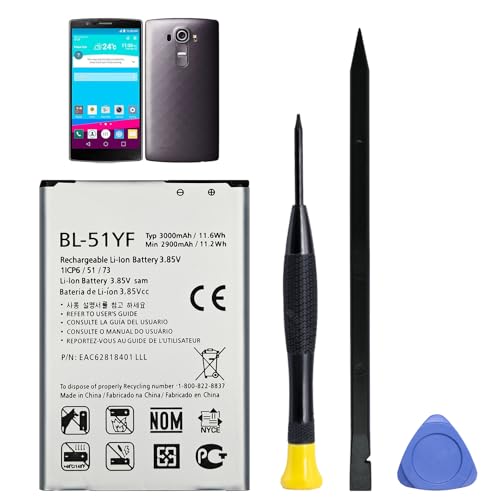
- ✓ Perfect fit design
- ✓ Long-lasting power
- ✓ Built-in safety features
- ✕ Limited compatibility info
- ✕ Slightly higher price
| Model Compatibility | LG G4 LS991, VS986, VS999, H812, H815, H810, H811, Vista 2 H740, STYLO LS770, H631, MS631, H634, H635, F500 |
| Battery Capacity | 3000mAh |
| Charge Cycles | Over 800 |
| Battery Type | Lithium-ion |
| Certification Standards | UL, CE, RoHS |
| Protection Technology | Smart IC chip for overheating, overcharging, over-discharging, and short circuit protection |
The moment I slipped this GREEN FUSION BL-51YF battery into my LG G4, I immediately noticed how snug and seamless the fit was. It felt almost like it was built specifically for my phone, with no awkward gaps or loose edges.
It’s reassuring to see a replacement that matches the original dimensions so perfectly.
Using my phone with this new battery, I was impressed by how quickly it powered up and how stable the charge felt. I didn’t have to worry about constant recharging, thanks to the 3000mAh capacity and over 800 charge cycles.
It’s clear that this battery is designed for longevity, helping me stay connected longer without the frustration of draining power mid-day.
The smart IC chip really gives peace of mind, protecting against overheating and overcharging. I felt confident using my phone vigorously, knowing the battery was equipped with advanced safety features.
The build quality is solid, and it doesn’t feel cheap or flimsy in my hand, which is a big plus.
What’s more, installation was straightforward. The design aligns perfectly with the phone’s internal layout, so no fiddling or forcing things into place.
At just under $16, this battery offers excellent value for anyone looking to breathe new life into their LG G4.
Overall, this battery has transformed my device’s performance. It’s reliable, safe, and easy to install—a true upgrade from the worn-out original.
What Signs Indicate That Your LG4 Battery Needs Replacement?
Several signs can indicate that your LG4 battery needs replacement:
- Rapid Discharge: If your battery drains significantly faster than it used to, this could be a sign of deterioration.
- Overheating: A battery that becomes excessively hot during use or charging may be failing and needs to be replaced.
- Bulging or Swelling: Any physical changes, such as bulging or swelling of the battery, indicate that it is damaged and should be replaced immediately.
- Frequent Shutdowns: If your phone shuts down unexpectedly even when the battery percentage is above 20%, it usually signifies a failing battery.
- Inconsistent Charging: If the device struggles to charge or displays incorrect battery percentage readings while connected, this points to battery issues.
Rapid discharge means that your battery can no longer hold a charge effectively, leading to shorter usage times. This can be particularly frustrating as it requires more frequent charging, suggesting that the battery’s capacity has diminished.
Overheating during normal use or charging is a serious concern as it can indicate internal damage or a short circuit within the battery. Prolonged exposure to high temperatures can not only impair the battery’s performance but also risk damaging other components of the phone.
Bulging or swelling in a battery is a clear physical sign of failure, often caused by gas buildup from chemical reactions inside the battery. This is a critical issue that poses safety risks, including potential fire hazards, and warrants immediate replacement.
Frequent shutdowns, especially when the battery seems charged, suggest that the battery cannot maintain a stable power supply. This erratic behavior can disrupt usability and indicates that the battery is nearing the end of its life.
Inconsistent charging can manifest as the device not charging properly or showing fluctuating battery levels. This can make it difficult to rely on your phone for daily use, indicating that the battery’s internal components may be failing to function correctly.
What Features Should You Consider When Choosing a Replacement Battery for the LG4?
When choosing a replacement battery for the LG4, consider the following features:
- Capacity (mAh): The capacity of a battery, measured in milliampere-hours (mAh), indicates how much charge it can hold. A higher capacity typically means longer usage time between charges, so look for batteries that match or exceed the original 3000 mAh capacity for optimal performance.
- Brand Reputation: Consider purchasing from reputable brands that specialize in smartphone batteries. Well-known brands often offer higher quality products backed by warranties, ensuring reliability and safety during use.
- Compatibility: Ensure the battery is specifically designed for the LG4 model. Using an incompatible battery can lead to issues such as overheating, poor fit, or even damage to the device.
- Warranty and Return Policy: A good warranty and return policy can provide peace of mind. Look for batteries that come with at least a 6-month warranty, as this indicates the manufacturer’s confidence in their product’s longevity and performance.
- Battery Type: The LG4 originally uses a Lithium-Ion (Li-ion) battery, so it’s essential to choose a replacement that matches this type. Li-ion batteries are known for their high energy density and lower self-discharge rates, making them ideal for modern smartphones.
- Charging Speed: Some replacement batteries may support fast charging technology. If you often find yourself in need of a quick charge, consider a battery that is compatible with fast charging standards to enhance convenience.
- Customer Reviews: Check customer reviews and ratings for the replacement batteries you are considering. Real user experiences can provide valuable insights into battery performance, longevity, and any potential issues that may not be obvious from product descriptions alone.
How Can You Identify Quality Specifications for an LG4 Replacement Battery?
Identifying quality specifications for a replacement battery for the LG4 involves several key factors:
- Capacity (mAh): The capacity of the battery, measured in milliamp hours (mAh), indicates how long the battery can power the device before needing a recharge. A higher capacity typically means longer usage time, so look for batteries that offer at least the same or greater mAh than the original LG4 battery, which is around 3000 mAh.
- Voltage Rating: The voltage rating of the battery should match the original specifications of the LG4, which is typically around 3.8V. Using a battery with a significantly different voltage can lead to poor performance or even damage the device.
- Brand Reputation: Choosing a battery from a reputable brand is essential for ensuring quality and reliability. Brands with positive reviews and warranties are often a safer choice, as they are more likely to produce batteries that meet safety and performance standards.
- Compatibility: Ensure that the battery is specifically designed for the LG4 model. Compatibility not only affects fit but also ensures that the battery’s connectors and technology are suited for the device, preventing any potential issues.
- Safety Certifications: Look for batteries that have undergone safety testing and have certifications such as CE, RoHS, or UL. These certifications indicate that the battery meets specific safety standards, reducing the risk of overheating, leaks, or explosions.
- Warranty and Return Policy: A good warranty and return policy provide peace of mind, as they allow you to return or exchange the battery if it does not perform as expected. A manufacturer that stands behind their product is usually a sign of a quality replacement battery.
Which Brands Offer the Most Reliable Replacement Batteries for LG4?
The best replacement batteries for the LG G4 come from several reputable brands known for their quality and reliability.
- Anker: Anker is renowned for its high-performance batteries and accessories. Their replacement batteries for the LG G4 are often praised for their longevity and safety features, ensuring that users experience optimal performance without the risk of overheating.
- iFixit: iFixit provides reliable replacement batteries that are designed with a focus on durability and compatibility. They also offer comprehensive guides for installation, making it easier for users to replace their batteries without professional help.
- Maxbear: Maxbear is noted for producing high-quality batteries at competitive prices. Their LG G4 replacement batteries come with a capacity that matches or exceeds the original specifications, providing users with extended usage times.
- NEW POWER: NEW POWER specializes in smartphone batteries and offers replacements specifically designed for the LG G4. Their batteries are rigorously tested to ensure they meet safety standards, and they often come with a warranty for added peace of mind.
- PowerBear: PowerBear batteries are known for their robust performance and reliability. They provide a high-capacity option for the LG G4, allowing for longer usage between charges and a better overall user experience.
What Are the Steps to Properly Install a Replacement Battery in an LG4?
Installing a replacement battery in an LG4 involves several important steps to ensure proper functionality and safety.
- Gather Necessary Tools: Before starting, make sure to have the right tools on hand, such as a small Phillips screwdriver, a plastic prying tool, and possibly tweezers. These tools will help you safely open the phone without damaging its components.
- Power Off the Device: Always turn off your LG4 completely before attempting to replace the battery. This prevents any electrical short-circuiting and protects the device from potential data loss or damage during the installation process.
- Remove the Back Cover: Using the plastic prying tool, carefully work your way around the edges of the device to lift off the back cover. Be gentle to avoid cracking the cover or damaging the internal components.
- Disconnect the Old Battery: Locate the battery connector on the motherboard and gently disconnect it. If the battery is glued in place, you may need to use the prying tool to carefully lift it out without causing any harm to the surrounding parts.
- Insert the New Battery: Take your new replacement battery and carefully connect it to the battery connector on the motherboard. Ensure the connection is secure without forcing it, as improper connection can lead to functionality issues.
- Reattach the Back Cover: Once the new battery is in place, align the back cover with the device and press down gently until it clicks back into position. Ensure that all edges are securely fitted to prevent dust and moisture from entering the device.
- Power On the Device: Finally, turn your LG4 back on by pressing the power button. Check to see if the new battery is functioning correctly and that the device recognizes it properly.
How Can a High-Quality Replacement Battery Benefit Your LG4?
Consistent Performance: Premium batteries provide reliable power output, ensuring that your device operates smoothly without unexpected shutdowns or performance drops. This consistency can be crucial for users who rely on their phones for work or important communications, as it minimizes the risk of losing important connections due to power failure.
Enhanced Safety Features: Many high-quality batteries come with built-in safety mechanisms to prevent overheating, short circuits, and overcharging, which can prolong both the battery’s and the device’s lifespan. These safety features are essential for protecting your investment and ensuring that your LG4 functions safely over time.
Cost-Effectiveness: Investing in a reliable replacement battery can be more economical in the long run, as it can delay the need for a new phone and reduce frequent charging cycles. By choosing a high-quality battery, you can maximize the performance and longevity of your device without incurring the high costs associated with new smartphones.
Compatibility and Fit: The best replacement batteries are specifically designed for the LG4, ensuring a perfect fit and optimal performance without compromising the device’s integrity. This compatibility helps in maintaining the structural integrity of your phone while also allowing for easy installation.
What Is the Expected Cost for a Replacement Battery for LG4?
Solutions for finding the best replacement battery include researching reputable retailers and reading user reviews to gauge the reliability of third-party options. Additionally, it’s advisable to check warranty policies and return options in case the battery does not perform as expected. Best practices also involve following proper charging habits and avoiding extreme temperatures to prolong the lifespan of the new battery.
Related Post: